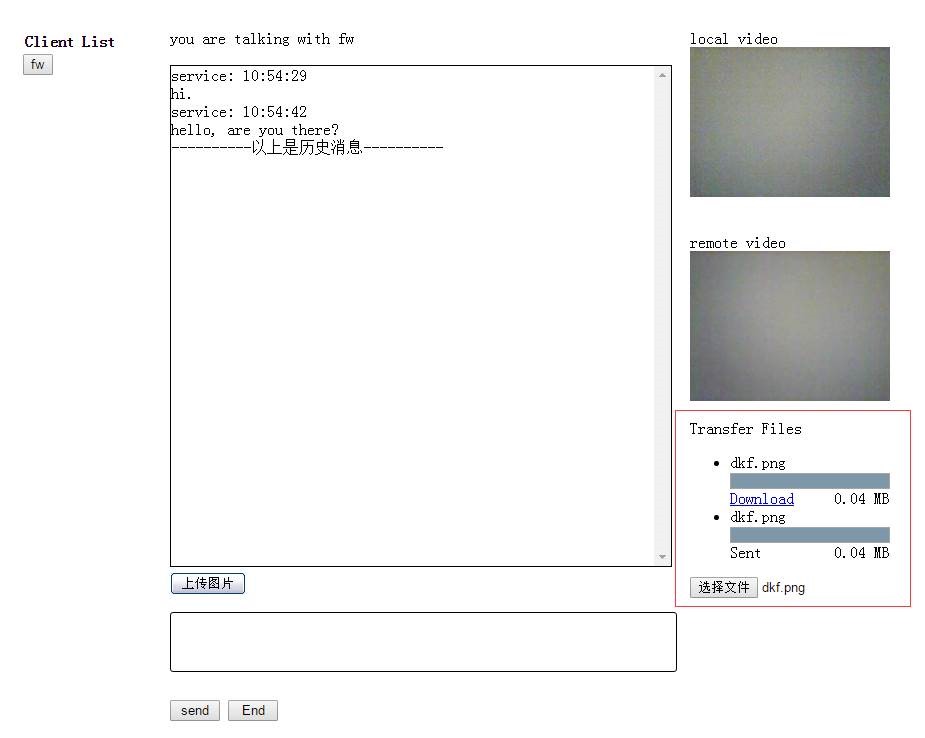
客服系统里,经常要发送图片文件,对方可以直接看到图片;如果发送文件,对方可以download下来。
先利用jquery uploadify来上传图片:
![]()
function () {
$("
#uploadify").uploadify({
'uploader': 'Images/uploadify.swf',
'script': 'Handler/UploadFile.ashx',
'cancelImg': 'Images/cancel.png',
'folder': 'UploadFiles/',
'queueID': 'fileQueue',
'buttonImg': 'Images/uploadify.jpg',
'auto':
true,
'multi':
true,
'fileExt': '*.jpg;*.jpeg;*.gif;*.png;',
'onComplete':
function (event, queueID, fileObj, response, data) {
SendImg(fileObj);
}
})
})
相关的三个images下的文件:
http://yunpan.cn/cHgDdAGNUeMcF 访问密码 7705
在后台把文件保存下来:
![]()
class UploadFile : IHttpHandler
{
public void ProcessRequest(HttpContext context)
{
context.Response.ContentType = "
text/plain";
context.Response.Charset = "
utf-8";
HttpPostedFile file = context.Request.Files["
Filedata"];
string uploadPath =
HttpContext.Current.Server.MapPath(@context.Request["
folder"]) + "
\\";
if (file !=
null)
{
if (!Directory.Exists(uploadPath))
{
Directory.CreateDirectory(uploadPath);
}
file.SaveAs(uploadPath + file.FileName);
//下面这句代码缺少的话,上传成功后上传队列的显示不会自动消失
context.Response.Write("
1");
}
else
{
context.Response.Write("
0");
}
}
public bool IsReusable
{
get
{
return false;
}
}
}
完成之后,首先在自己的聊天框显示图片,然后再发送给对方:
![]()
function SendImg(fileObj) {
var now = getCurrentTime();
var img = "";
img += "
<div>";
img += "
<img src='" + fileObj.filePath + "
' width='100' height='100'>";
img += "
</div>";
var msg = '<div> ' + webrtc.config.nick + ' : ' + now + ' </div> ' + img;
if (webrtc.config.nick === clientID) {
msg = msg.split("
<div>").join("
<div style='text-align:right'>");
}
setMessage(msg);
console.log(msg);
webrtc.sendToAll('chat', { message: img, nick: webrtc.config.nick });
}
这里是发送给所有人:
webrtc.sendToAll('chat', { message: img, nick: webrtc.config.nick });
2 发送文件
- 当有人进入聊天时,会有一个peer参数传进来,创建一个文件上传的按钮:
webrtc.on('createdPeer', function (peer) {
……
var fileinput = document.createElement('input');
fileinput.type = 'file';
- 为文件上传按钮添加change的事件,并用传进来的peer来发送文件:
fileinput.addEventListener('change', function () {
var file = fileinput.files[0];
var sender = peer.sendFile(file);
- 接收方用peer的fileTransfer事件来接收文件
// receiving an incoming filetransfer
peer.on('fileTransfer', function (metadata, receiver) {
- 发送方和接收方都可以用progress事件来实现进度条效果:
// hook up send progress
sender.on('progress', function (bytesSent) {
sendProgress.value = bytesSent;
});
// hook up receive progress
receiver.on('progress', function (bytesReceived) {
receiveProgress.value = bytesReceived;
});
最终效果图:

完整代码如下:
![]()
//// 3. transfer files
// called when a peer is created
webrtc.on('createdPeer',
function (peer) {
console.log('createdPeer', peer);
var transferFiles =
document.getElementById('transferFiles');
if (!transferFiles || peer.type =='screen')
return;
var container =
document.createElement('div');
container.className = 'peerContainer';
container.id = 'container_' + webrtc.getDomId(peer);
//// show the peer id
//var peername = document.createElement('div');
//peername.className = 'peerName';
//peername.appendChild(document.createTextNode('Peer: ' + peer.id));
//container.appendChild(peername);
// show a list of files received / sending
var filelist =
document.createElement('ul');
filelist.className = 'fileList';
container.appendChild(filelist);
// show a file select form
var fileinput =
document.createElement('input');
fileinput.type = 'file';
// send a file
fileinput.addEventListener('change',
function () {
fileinput.disabled =
true;
var file = fileinput.files[0];
var sender = peer.sendFile(file);
// create a file item
var item =
document.createElement('li');
item.className = 'sending';
// make a label
var span =
document.createElement('span');
span.className = 'filename';
span.appendChild(
document.createTextNode(file.
name));
item.appendChild(span);
// create a progress element
var sendProgress =
document.createElement('progress');
sendProgress.max = file.size;
item.appendChild(sendProgress);
span =
document.createElement('span');
span.style.cssText = '
float:right;';
span.appendChild(
document.createTextNode(' ' +
Math.round(file.size / 1024 / 1024 * 100) / 100 + ' MB'));
item.appendChild(span);
// hook up send progress
sender.on('progress',
function (bytesSent) {
sendProgress.value = bytesSent;
});
// sending done
sender.on('sentFile',
function () {
item.appendChild(
document.createTextNode('Sent'));
// we allow only one filetransfer at a time
fileinput.removeAttribute('disabled');
});
// receiver has actually received the file
sender.on('complete',
function () {
// safe to disconnect now
});
filelist.appendChild(item);
},
false);
fileinput.disabled = 'disabled';
container.appendChild(fileinput);
// show the ice connection state
if (peer && peer.pc) {
var connstate =
document.createElement('div');
connstate.className = 'connectionstate';
container.appendChild(connstate);
peer.pc.on('iceConnectionStateChange',
function (event) {
var state = peer.pc.iceConnectionState;
console.log('state', state);
container.className = 'peerContainer p2p' + state.substr(0, 1).toUpperCase()
+ state.substr(1);
switch (state) {
case 'connected':
case 'completed':
// on caller side
//connstate.innerText = 'Connection established.';
// enable file sending on connnect
console.log('connection established');
fileinput.removeAttribute('disabled');
$('#send').prop('disabled',
false);
//$('#send').prop('disabled', false);
break;
case 'checking':
//connstate.innerText = 'Connecting to peer...';
console.log('Connecting to peer...');
break;
case 'disconnected':
//connstate.innerText = 'Disconnected.';
console.log('disconnected');
//break;
case 'failed':
// not handled here
//break;
case '
closed':
//connstate.innerText = 'Connection closed.';
// disable file sending
fileinput.disabled = 'disabled';
fileinput.hidden = '
true';
$('#send').prop('disabled',
true);
//$('#end').prop('disabled', true);
// FIXME: remove container, but when?
break;
}
});
}
transferFiles.appendChild(container);
// receiving an incoming filetransfer
peer.on('fileTransfer',
function (metadata, receiver) {
console.log('incoming filetransfer', metadata);
var item =
document.createElement('li');
item.className = 'receiving';
// make a label
var span =
document.createElement('span');
span.className = 'filename';
span.appendChild(
document.createTextNode(metadata.
name));
item.appendChild(span);
// create a progress element
var receiveProgress =
document.createElement('progress');
receiveProgress.max = metadata.size;
item.appendChild(receiveProgress);
span =
document.createElement('span');
span.style.cssText = '
float:right;';
span.appendChild(
document.createTextNode(
Math.round(metadata.size / 1024 / 1024 * 100) / 100 + ' MB'));
item.appendChild(span);
// hook up receive progress
receiver.on('progress',
function (bytesReceived) {
receiveProgress.value = bytesReceived;
});
// get notified when file is done
receiver.on('receivedFile',
function (file, metadata) {
console.log('received file', metadata.
name, metadata.size);
var href =
document.createElement('a');
href.href = URL.createObjectURL(file);
href.download = metadata.
name;
href.appendChild(
document.createTextNode('Download'));
item.appendChild(href);
// close the channel
receiver.channel.
close();
});
filelist.appendChild(item);
});
});
如果不清楚webrtc为何物,请参考《3分钟实现网页版多人文本、视频聊天室 (含完整源码)》。
.