1.idea创建项目:很方便,在下面添加各自的jar包,注意点:hibernate和struts2都有一个javassiste的jar包,把低级的删掉即可,因为有两个的时候,会有转换异常
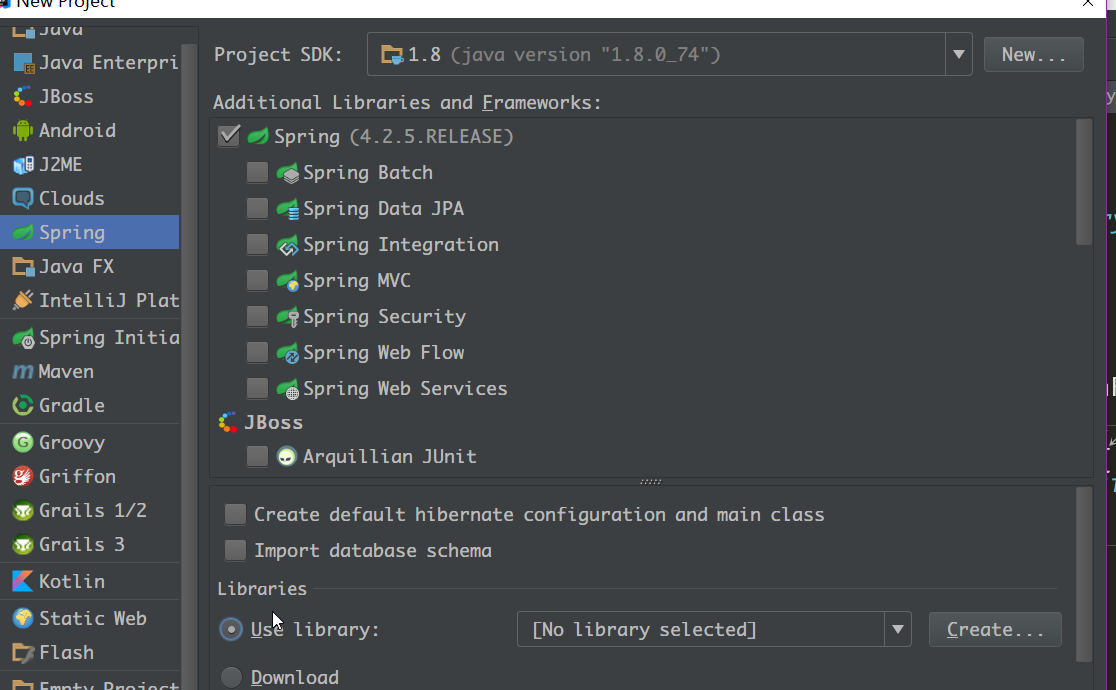
idea会帮你配置好基本的信息。
jar包一览:
2.首先,在大佬web.xml配置好加载各小弟的配置信息:idea帮忙生成的
<?xml version="1.0" encoding="UTF-8"?>
<web-app xmlns="http://xmlns.jcp.org/xml/ns/javaee"
xsi:schemaLocation="http://xmlns.jcp.org/xml/ns/javaee http://xmlns.jcp.org/xml/ns/javaee/web-app_3_1.xsd"
version="3.1">
<!--读取spring配置-->
<context-param>
<param-name>contextConfigLocation</param-name>
<param-value>classpath:applicationContext.xml,classpath:applicationContext-beans.xml</param-value>
</context-param>
<!--struts2配置-->
<filter>
<filter-name>struts2</filter-name>
<filter-class>org.apache.struts2.dispatcher.ng.filter.StrutsPrepareAndExecuteFilter</filter-class>
</filter>
<filter-mapping>
<filter-name>struts2</filter-name>
<url-pattern>/*</url-pattern>
</filter-mapping>
<!--listener-->
<listener>
<listener-class>org.springframework.web.context.ContextLoaderListener</listener-class>
</listener>
</web-app>3.把hibernate搞到spring的容器中去......(已经写过这一方面的内容,就不详细了,直接贴代码 )
applicationContext.xml这个文件是配置hibernate与spring的整合信息的
<?xml version="1.0" encoding="UTF-8"?>
<beans xmlns="http://www.springframework.org/schema/beans"
xsi:schemaLocation="http://www.springframework.org/schema/beans http://www.springframework.org/schema/beans/spring-beans.xsd http://www.springframework.org/schema/tx http://www.springframework.org/schema/tx/spring-tx-4.1.xsd http://www.springframework.org/schema/aop http://www.springframework.org/schema/aop/spring-aop-4.1.xsd http://www.springframework.org/schema/context http://www.springframework.org/schema/context/spring-context-4.1.xsd">
<context:property-placeholder location="classpath:db.properties"/>
<bean id="dataSource" class="com.mchange.v2.c3p0.ComboPooledDataSource">
<property name="user" value="${user}"/>
<property name="password" value="${password}"/>
<property name="driverClass" value="${driveClass}"/>
<property name="jdbcUrl" value="${url}"/>
</bean>
<bean id="sessionFactory" class="org.springframework.orm.hibernate5.LocalSessionFactoryBean">
<property name="dataSource" ref="dataSource"/>
<property name="mappingLocations" value="classpath:*.hbm.xml"/>
<property name="hibernateProperties">
<props>
<prop key="hibernate.format_sql">true</prop>
<prop key="hibernate.show_sql">true</prop>
<prop key="hibernate.hbm2ddl.auto">update</prop>
<prop key="hibernate.dialect">org.hibernate.dialect.MySQL5InnoDBDialect</prop>
</props>
</property>
</bean>
<bean id="transactionManager" class="org.springframework.orm.hibernate5.HibernateTransactionManager">
<property name="sessionFactory" ref="sessionFactory"/>
</bean>
<aop:config>
<aop:pointcut id="pointCut" expression="execution(* com.service.*.*(..))"/>
<aop:advisor advice-ref="txAdvice" pointcut-ref="pointCut"/>
</aop:config>
<tx:advice id="txAdvice" transaction-manager="transactionManager">
<tx:attributes>
<tx:method name="get*" read-only="true"/>
<tx:method name="*"/>
</tx:attributes>
</tx:advice>
</beans>db.properties
user=rootpassword=driveClass=com.mysql.jdbc.Driverurl=jdbc:mysql://localhost:3306/ssh?useUnicode=true&characterEncoding=UTF-8
为完善上面这个配置文件,需要生产bean类和mapping映射文件:
Department.java
Employee.java
Department.hbm.xml
Employee.hbm.xml
package com.entities;
import javax.persistence.Basic;
import javax.persistence.Column;
import javax.persistence.Entity;
import javax.persistence.Id;
@Entitypublic class Department {
private int id;
private String departmentname;
@Id
@Column(name = " ID", nullable = false)
public int getId() {
return id;
}
public void setId(int id) {
this.id = id;
}
@Basic
@Column(name = "DEPARTMENTNAME", nullable = true, length = 255)
public String getDepartmentname() {
return departmentname;
}
public void setDepartmentname(String departmentname) {
this.departmentname = departmentname;
}
}package com.entities;
import javax.persistence.*;
import java.util.Date;
@Entitypublic class Employee {
private int id;
private String lastname;
private String email;
private Date birth;
private Date createtime;
private Department department;
@Id
@Column(name = "ID", nullable = false)
public int getId() {
return id;
}
public void setId(int id) {
this.id = id;
}
@Basic
@Column(name = "LASTNAME", nullable = true, length = 255)
public String getLastname() {
return lastname;
}
public void setLastname(String lastname) {
this.lastname = lastname;
}
@Basic
@Column(name = "EMAIL", nullable = true, length = 255)
public String getEmail() {
return email;
}
public void setEmail(String email) {
this.email = email;
}
@Basic
@Column(name = "BIRTH", nullable = true)
public Date getBirth() {
return birth;
}
public void setBirth(Date birth) {
this.birth = birth;
}
@Basic
@Column(name = "CREATETIME", nullable = true)
public Date getCreatetime() {
return createtime;
}
public void setCreatetime(Date createtime) {
this.createtime = createtime;
}
@Basic
@Column(name = "DEPARTMENT_ID", nullable = true)
public Department getDepartment() {
return department;
}
public void setDepartment(Department department) {
this.department = department;
}
}<?xml version='1.0' encoding='utf-8'?>
<!DOCTYPE hibernate-mapping PUBLIC "-//Hibernate/Hibernate Mapping DTD 3.0//EN"
<hibernate-mapping> <class name="com.entities.Department" table="department" schema="ssh">
<id name="id">
<column name=" ID" sql-type="int(11)"/>
<generator class="native"/>
</id>
<property name="departmentname">
<column name="DEPARTMENTNAME" sql-type="varchar(255)" not-null="true"/>
</property>
</class>
</hibernate-mapping><?xml version='1.0' encoding='utf-8'?>
<!DOCTYPE hibernate-mapping PUBLIC "-//Hibernate/Hibernate Mapping DTD 3.0//EN"
<hibernate-mapping> <class name="com.entities.Employee" table="employee" schema="ssh">
<id name="id">
<column name="ID" sql-type="int(11)"/>
<generator class="native"/>
</id>
<property name="lastname">
<column name="LASTNAME" sql-type="varchar(255)" not-null="true"/>
</property>
<property name="email">
<column name="EMAIL" sql-type="varchar(255)" not-null="true"/>
</property>
<property name="birth">
<column name="BIRTH" sql-type="date" not-null="true"/>
</property>
<property name="createtime">
<column name="CREATETIME" sql-type="date" not-null="true"/>
</property>
<many-to-one name="department" class="com.entities.Department">
<column name="DEPARTMENT_ID"/>
</many-to-one>
</class>
</hibernate-mapping>
至此:打开Tomcat来运行,如果各方面配置没问题,就可以自动生成数据表了。
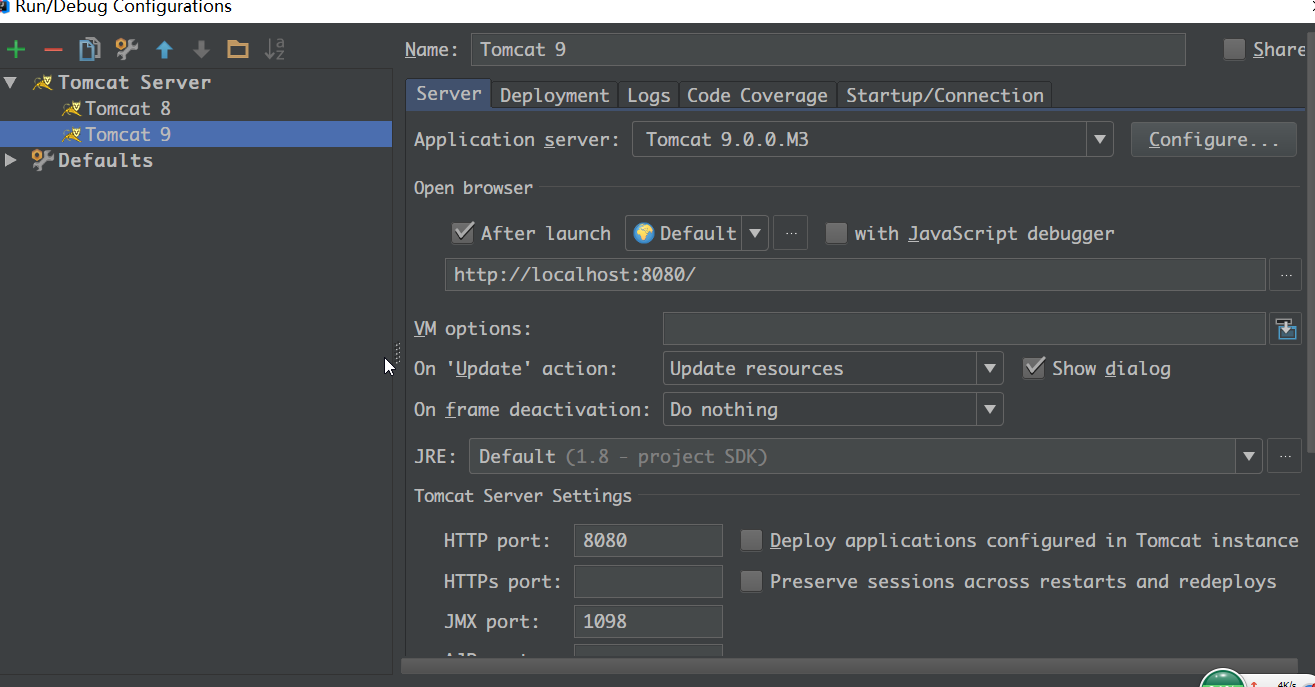
3.开始操作数据:写一个业务获取数据(数据由自己填充 )
EmployeeDao.java
这里的sessionfactory通过set的方法获取..... set方法把该类注入到bean管理器,获得sessionfactory
package com.service;
import com.entities.Employee;
import org.hibernate.Session;
import org.hibernate.SessionFactory;
import java.util.List;
public class EmployeeDao {
private SessionFactory sessionFactory;
public void setSessionFactory(SessionFactory sessionFactory) {
this.sessionFactory = sessionFactory;
}
public Session getSession() {
return sessionFactory.getCurrentSession();
}
public List<Employee> getAll() {
// 左向外联获取department信息,fetch获取单一信息,不用获取一大堆
String hql = "from Employee e left outer join fetch e.department";
return getSession().createQuery(hql).list();
}
}
再写一个service把上面的业务结果中转(自己形象地 理解 )
EmployeeService.java
package com.service;
import com.entities.Employee;
import java.util.List;
public class EmployeeService {
private EmployeeDao employeeDao;
public void setEmployeeDao(EmployeeDao employeeDao) {
this.employeeDao = employeeDao;
}
public List<Employee> getAll() {
return employeeDao.getAll();
}
}4.到了这里,就需要写struts2的东西了,首先 在web的开始页面写一个action超链接
<%@ page contentType="text/html;charset=UTF-8" language="java" %>
<html><head> <title>$Title$</title>
</head><body><a href="emp-list">List all Employees</a>
</body></html>实现这个效果,点击后就出现查询结果:
接着需要实现这个挑战的action,需要在struts.xml中注册这个action的信息,这里用通配符共用这个action
struts.xml
这里的employeeAction就是spring中已经注入的bean的id
<?xml version="1.0" encoding="UTF-8"?>
<!DOCTYPE struts PUBLIC "-//Apache Software Foundation//DTD Struts Configuration 2.3//EN"
<struts> <!--打开开发者模式,如有bug会显示之类,不过也消耗性能-->
<constant name="struts.devMode" value="true"/>
<!--关闭动态方法调用,这样就不能在浏览器通过调用类方法来调用action了-->
<constant name="struts.enable.DynamicMethodInvocation" value="false"/>
<!--引用默认配置-->
<package name="default" extends="struts-default">
<!--通配符表示多种类似的方法共用一个模块,这里就是数据交互出,自己的理解-->
<action name="emp-*" class="employeeAction" method="{1}">
<result name="list">/WEB-INF/pages/emp-list.jsp</result>
</action>
</package>
</struts>
再写一个关于处理与struts相关bean的spring容器文件,其实是一个样的
applicationContext-beans.xml
<?xml version="1.0" encoding="UTF-8"?>
<beans xmlns="http://www.springframework.org/schema/beans"
xsi:schemaLocation="http://www.springframework.org/schema/beans http://www.springframework.org/schema/beans/spring-beans.xsd">
<!--通过set方法把emplayDao注入到bean中,在EmployeeDao使用到sessionFactory-->
<bean id="employeeDao" class="com.service.EmployeeDao">
<property name="sessionFactory" ref="sessionFactory"/>
</bean>
<!--同上-->
<bean id="employeeService" class="com.service.EmployeeService">
<property name="employeeDao" ref="employeeDao"/>
</bean>
<!--配置action,这里在struts.xml的action会与此绑定,进行数据交互,scope="prototype"确保每个请求都是一个新的action,不能使用单例,那样的话,就会出现信息错乱-->
<bean id="employeeAction" class="com.actions.EmployeeAction" scope="prototype">
<property name="employeeService" ref="employeeService"/>
</bean>
</beans>最后,就需要写数据的交汇点,EmployeeAction.java了
这里就把EmployeeService.java查询得来的数据写入到值栈中,一边在jsp中读取并且显示..
package com.actions;
import com.opensymphony.xwork2.ActionSupport;
import com.service.EmployeeService;
import org.apache.struts2.interceptor.RequestAware;
import java.util.Map;
public class EmployeeAction extends ActionSupport implements RequestAware {
private EmployeeService employeeService;
public void setEmployeeService(EmployeeService employeeService) {
this.employeeService = employeeService;
}
public String list() {
request.put("employee", employeeService.getAll());
return "list";
}
private Map<String, Object> request;
@Override
public void setRequest(Map<String, Object> map) {
this.request = map;
}
}
最后完善显示结果的jsp文件:
<%@ page contentType="text/html;charset=UTF-8" language="java" %>
<%@taglib prefix="s" uri="/struts-tags" %>
<html><head> <title>Title</title>
</head><body><h4>Employee List Page</h4><s:if test="#request.employee==null||request.employee.size()==0">
没有任何员工信息
</s:if>
<s:else>
<table border="1" cellpadding="2" cellspacing="0">
<tr>
<td>ID</td>
<td>LAST_NAME</td>
<td>E_MAIL</td>
<td>BIRTH</td>
<td>CREATE_TIME</td>
<td>DEPARTMENT</td>
</tr>
<s:iterator value="#request.employee">
<tr>
<td>${id}</td>
<td>${lastname}</td>
<td>${email}</td>
<td>${birth}</td>
<td>${createtime}</td>
<td>${department.departmentname}</td>
</tr>
</s:iterator>
</table>
</s:else>
</body></html>
6.文件一览:
运行结果: