1)安装
在此之前要安装 好jdk和jre
下载绿色版
解压至:D:\Program Files (x86)\tomcat9
环境变更path添加两个值 :
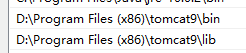
新建一个系统变量:CLASSPATH,其值新增一项

cmd里执行安装服务:
安装: D:\Program Files (x86)\tomcat9\bin>service.bat install
删除服务:D:\Program Files (x86)\tomcat9\bin>service.bat uninstall

把服务设置成自动启动
2)配置
1.更改默认端口
配置文件server.xml里找到

2.把项目放在不同目录,不是放在tomcat的webapps目录配置
在server.xml的host节点添加
<Context path="/crm" docBase="E:/study/java/crm/WebContent"/>,使用htpp://localhost:8080/crm就可以访问到
3.配置默认文档
web.xml里找到相关下面代码
<welcome-file-list>
<welcome-file>index.jsp</welcome-file>
<welcome-file>index.html</welcome-file>
<welcome-file>index.htm</welcome-file>
</welcome-file-list>