虚拟机更换VDI文件,启动时会出现 “UUID already exists”的错误,这是因为删除虚拟机时候没有选择“删除所有”,只是选择移除造成的。

方法一:利用VirtualBox自带的更改uuid号的命令,重新设置这个存储磁盘的 UUID
VBoxManage.exe internalcommands sethduuid +“你的虚拟硬盘”
C:\Users\xqzt>cd  C:\Software\Oracle\VirtualBox

C:\Software\Oracle\VirtualBox>VBoxManage.exe internalcommands sethduuid "E:\VirtualBox VMs\Oracle 11g-Standby\Centos 6.4.vdi"
UUID changed to: 750a847b-5034-49ce-b720-112f008ad8e0

C:\Software\Oracle\VirtualBox>
现在就可以正常添加了

方法二:在VirtualBox中的虚拟介质管理中把相同的那个uuid给删除掉
管理-》虚拟介质管理-》去掉带感叹号的 然后重新添加
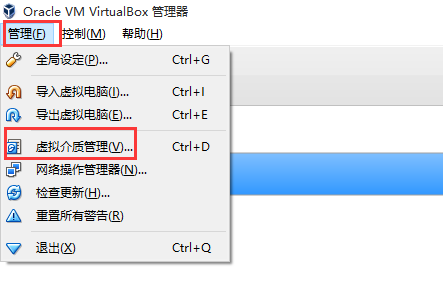
去掉UUID相同的
