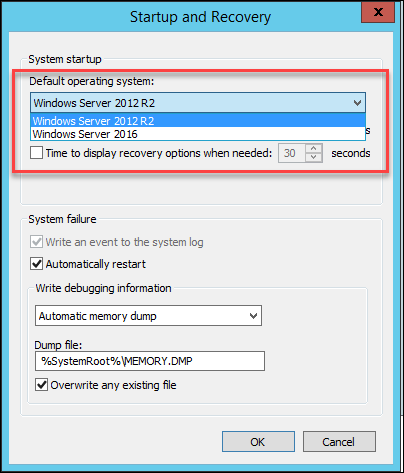
一台主机上,同时安装了Windows 2012R2还有Windows 2016, 但是如何能在任意一个系统重启到另一个呢?


下图中,在Win2012R2中,无法选择重启到2016中。

Windows server 2012 R2 与 Windows 2016 的双系统重启选项

解决方案

===========

运行下面的命令

bcdedit /copy {current} /d "Windows Server 2016"

bcdedit /set {ID from 上一步} device partition=E:(哪个盘符要根据你的Windows 2016装在那个盘里)
bcdedit /set {ID from 第一步} osdevice partition=E:


结果如下:
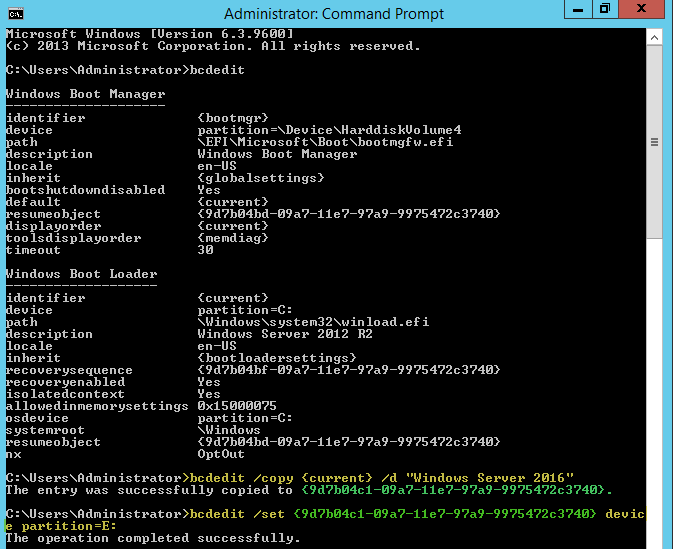
Windows server 2012 R2 与 Windows 2016 的双系统重启选项


Windows server 2012 R2 与 Windows 2016 的双系统重启选项

命令运行结束,效果就是这样。

Windows server 2012 R2 与 Windows 2016 的双系统重启选项


Thanks to Lieven about this technical point.

相关文章:

  • 2021-08-12
  • 2021-08-07
  • 2021-12-01
  • 2022-01-18
  • 2022-12-23
  • 2021-12-15
  • 2021-07-04
猜你喜欢
  • 2021-06-21
  • 2021-11-18
  • 2021-07-30
  • 2021-12-22
  • 2021-10-14
  • 2021-06-08
相关资源
相似解决方案