原文:https://www.yuque.com/yuejiangliu/dotnet/ac0xok
(137.6 MB)
并访问被保护资源。
简单说就是 MVC 做客户端,IdentityServer4 做身份认证和授权。
OAuth 2.0 vs OpenID Connect
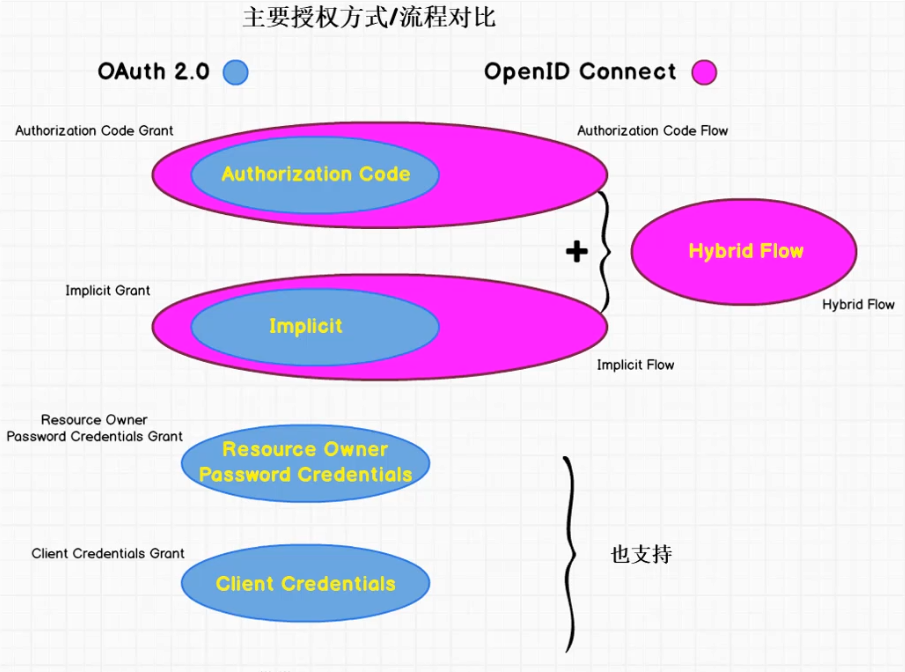
OAuth 2.0 - Authorization Code Grant
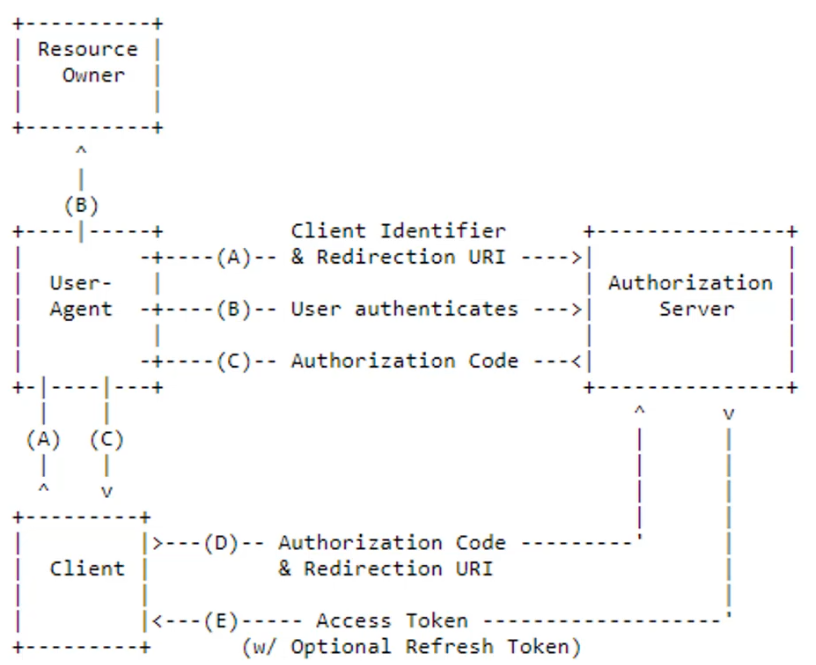
流程按字母先后顺序执行。
OpenlD Connect - Authorization Code Flow
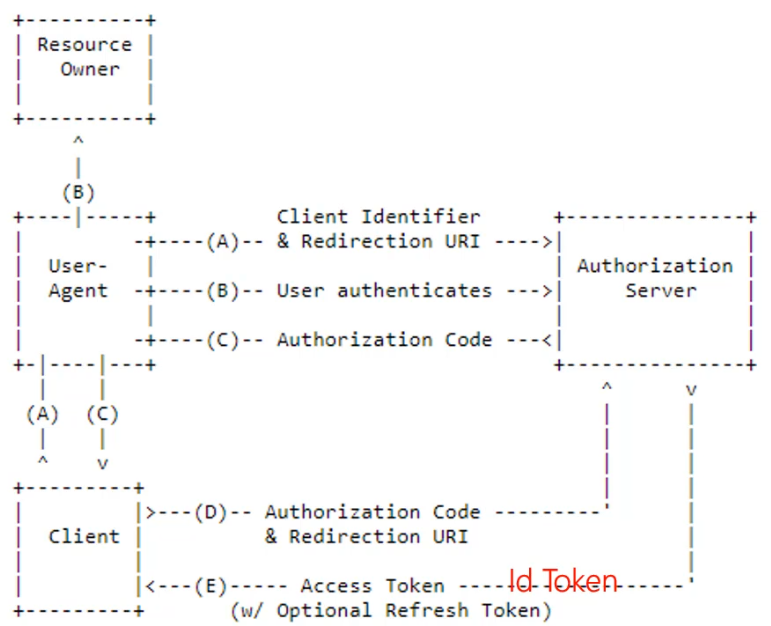
主要差别就是除了 Access Token,客户端还能从授权服务器获得 Id Token,进而通过它获得最终用户的相关信息。
- D 通过前端浏览器的重定向完成
- E 通过后端服务器间的通讯完成
Authorization Code
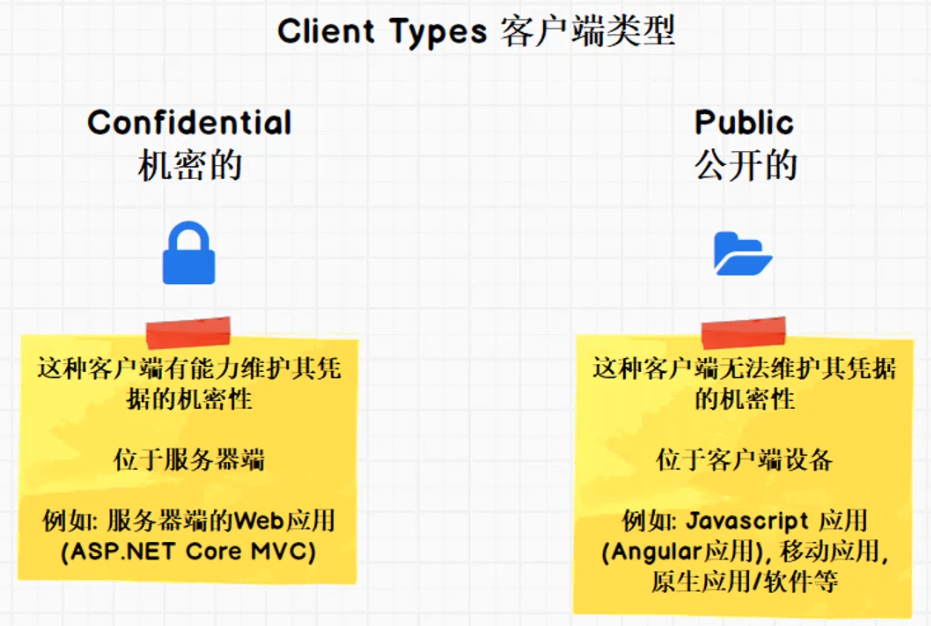
- 适用于机密客户端(Confidential Client)
- 服务器端的 Web 应用
- 对用户和客户端进行身份认证
客户端类型:
Authorization Code 实战
新建 MVC 项目
修改 launchSettings.json 把端口改为 5002:
{
  "profiles": {
    "MvcClient": {
      "commandName": "Project",
      "launchBrowser": true,
      "applicationUrl": "http://localhost:5002",
      "environmentVariables": {
        "ASPNETCORE_ENVIRONMENT": "Development"
      }
    }
  }
}
安装 IdentityModel NuGet 包。
在 Startup 里面注册并启用身份认证中间件:
public void ConfigureServices(IServiceCollection services)
{
    ...
    services.AddMvc().SetCompatibilityVersion(CompatibilityVersion.Version_2_2);

    // 关闭 JWT Claim 映射
    JwtSecurityTokenHandler.DefaultInboundClaimTypeMap.Clear();

    // 注册身份认证中间件
    services.AddAuthentication(options =>
        {
            // CookieAuthenticationDefaults.AuthenticationScheme == "Cookies"
            options.DefaultScheme = CookieAuthenticationDefaults.AuthenticationScheme;
            // OpenIdConnectDefaults.AuthenticationScheme == "OpenIdConnect"
            options.DefaultChallengeScheme = OpenIdConnectDefaults.AuthenticationScheme;
        })
        .AddCookie(CookieAuthenticationDefaults.AuthenticationScheme)
        .AddOpenIdConnect(OpenIdConnectDefaults.AuthenticationScheme, options =>
        {
            options.SignInScheme = CookieAuthenticationDefaults.AuthenticationScheme;
            options.Authority = "http://localhost:5000";
            options.RequireHttpsMetadata = false;
            options.ClientId = "mvc client";
            options.ClientSecret = "mvc secret";
            options.SaveTokens = true;
            options.ResponseType = "code";

            options.Scope.Clear();
            options.Scope.Add("api1");
            options.Scope.Add(OidcConstants.StandardScopes.OpenId);
            options.Scope.Add(OidcConstants.StandardScopes.Profile);
            options.Scope.Add(OidcConstants.StandardScopes.Email);
            options.Scope.Add(OidcConstants.StandardScopes.Phone);
            options.Scope.Add(OidcConstants.StandardScopes.Address);
            // 必须添加 OfflineAccess 才能获取到 Refresh Token
            options.Scope.Add(OidcConstants.StandardScopes.OfflineAccess);
        });
}

public void Configure(IApplicationBuilder app, IHostingEnvironment env)
{
    if (env.IsDevelopment())
    {
        app.UseDeveloperExceptionPage();
    }
    else
    {
        app.UseExceptionHandler("/Home/Error");
    }
    // 要在添加 MVC 中间件之前添加 Authentication 到管道
    app.UseAuthentication();

    app.UseStaticFiles();
    ...
}
Adding User Authentication with OpenID Connect 中的解释。
最后在 HomeController 上标注 [Authorize] 以保护 HomeController。
添加 MVC Client
// MVC client, authorization code
new Client
{
    ClientId = "mvc client",
    ClientName = "ASP.NET Core MVC Client",

    AllowedGrantTypes = GrantTypes.CodeAndClientCredentials,
    ClientSecrets = { new Secret("mvc secret".Sha256()) },

    RedirectUris = { "http://localhost:5002/signin-oidc" },

    FrontChannelLogoutUri = "http://localhost:5002/signout-oidc",
    PostLogoutRedirectUris = { "http://localhost:5002/signout-callback-oidc" },

    // 总是在 Id Token 里面包含所有 User Claims 信息
    AlwaysIncludeUserClaimsInIdToken = true,

    // 设为 True 即支持 Refresh Token
    AllowOfflineAccess = true, // offline_access

    AllowedScopes =
    {
        "api1",
        IdentityServerConstants.StandardScopes.OpenId,
        IdentityServerConstants.StandardScopes.Email,
        IdentityServerConstants.StandardScopes.Address,
        IdentityServerConstants.StandardScopes.Phone,
        IdentityServerConstants.StandardScopes.Profile
    }
},