
|
1
2
3
4
5
6
7
8
9
10
11
12
13
14
15
16
17
18
19
20
21
22
|
sw1#copy flassw1#copy flash: tftp:
Source filename []?sw1#show flash #1
Directory of flash:/1 -rw- 3058048 <no date> c2950-i6q4l2-mz.121-22.EA4.bin
64016384 bytes total (60958336 bytes free)
sw1#co
sw1#copy
sw1#copy fla
sw1#copy flash: t
sw1#copy flash: tftp: #2
Source filename []? c2950-i6q4l2-mz.121-22.EA4.bin #3
Address or name of remote host []? 192.168.56.10Destination filename [c2950-i6q4l2-mz.121-22.EA4.bin]? c2950-test.bin #4
Writing c2950-i6q4l2-mz.121-22.EA4.bin...!!!!!!!!!!!!!!!!!!!!!!!!!!!!!!!!!!!!!!!!!!!!!!!!!!!!!!!!!!!!![OK - 3058048 bytes]3058048 bytes copied in 0.052 secs (58808615 bytes/sec)
sw1#
|
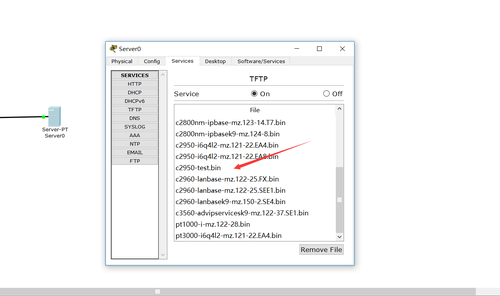
可以看出cisco的交换机的镜像备份成功
怎么还原呢??
|
1
2
3
4
5
6
7
8
9
10
11
12
13
14
15
16
17
18
19
20
21
22
23
24
|
sw1#copy tftp:sw1#copy tftp:
sw1#copy tftp: ?
flash: Copy to flash: file system
running-config Copy configuration from systemstartup-config Copy startup configuration from systemsw1#copy tftp: fl
sw1#copy tftp: flash:
Address or name of remote host []? 192.168.56.10Source filename []? c2950-test.bin
Destination filename [c2950-test.bin]?
Accessing tftp://192.168.56.10/c2950-test.bin...
Loading c2950-test.bin from 192.168.56.10: !!!!!!!!!!!!!!!!!!!!!!!!!!!!!!!!!!!!!!!!!!!!!!!!!!!!!!!!!!!!
[OK - 3058048 bytes]3058048 bytes copied in 0.054 secs (56630518 bytes/sec)
sw1#show flash
Directory of flash:/1 -rw- 3058048 <no date> c2950-i6q4l2-mz.121-22.EA4.bin
2 -rw- 3058048 <no date> c2950-test.bin
64016384 bytes total (57900288 bytes free)
sw1#
|
怎么从tftp服务器下载的
ISO启动呢
-
删除原有的文件
|
1
2
3
4
5
6
7
8
9
10
11
12
13
14
15
16
17
18
|
sw1#show flashDirectory of flash:/
1 -rw- 3058048 <no date> c2950-i6q4l2-mz.121-22.EA4.bin
2 -rw- 3058048 <no date> c2950-test.bin
64016384 bytes total (57900288 bytes free)
sw1#dele
sw1#delete c2950-i6q4l2-mz.121-22.EA4.bin
Delete filename [c2950-i6q4l2-mz.121-22.EA4.bin]?Delete flash:/c2950-i6q4l2-mz.121-22.EA4.bin? [confirm]
sw1#show flash
Directory of flash:/2 -rw- 3058048 <no date> c2950-test.bin
64016384 bytes total (60958336 bytes free)
sw1#
|
2.特权模式下
|
1
|
sw1(config)#boot system c2950-test.bin
|
3.都不要忘记保存
测试:
|
1
2
3
4
5
6
7
8
9
10
11
12
13
14
15
16
17
18
19
20
21
|
sw1#reloadProceed with reload? [confirm]
C2950 Boot Loader (C2950-HBOOT-M) Version 12.1(11r)EA1, RELEASE SOFTWARE (fc1)Compiled Mon 22-Jul-02 18:57 by miwangCisco WS-C2950-24 (RC32300) processor (revision C0) with 21039K bytes of memory.2950-24 starting...Base ethernet MAC Address: 0090.2187.E434Xmodem file system is available.
Initializing Flash...flashfs[0]: 2 files, 0 directoriesflashfs[0]: 0 orphaned files, 0 orphaned directoriesflashfs[0]: Total bytes: 64016384flashfs[0]: Bytes used: 3059209flashfs[0]: Bytes available: 60957175flashfs[0]: flashfs fsck took 1 seconds.
...done Initializing Flash.
Boot Sector Filesystem (bs:) installed, fsid: 3Parameter Block Filesystem (pb:) installed, fsid: 4Loading "flash:/c2950-test.bin"...
|
反思:交换机属于二层设备,需要配置管理地址
路由器属于三层设备 有端口启动就可以
路由器的备份和恢复和交换机的命令一样
本文转自 小小三郎1 51CTO博客,原文链接:http://blog.51cto.com/wsxxsl/1934693,如需转载请自行联系原作者