|
1
2
3
4
5
6
7
8
9
10
11
12
13
14
15
16
17
18
19
20
21
22
23
24
25
26
27
28
29
30
31
32
33
34
35
36
37
38
39
40
41
42
43
44
45
46
47
48
49
50
51
52
53
54
55
56
57
58
59
60
61
62
63
64
65
66
67
68
69
70
71
72
73
74
75
76
77
78
79
80
81
82
83
84
85
86
87
88
89
90
91
92
93
94
95
96
97
98
99
100
101
102
103
104
105
106
107
108
109
110
111
112
113
114
115
116
117
118
119
120
121
122
123
124
125
126
127
128
129
130
131
132
133
134
135
136
137
138
139
140
141
142
143
144
145
146
147
148
149
150
151
152
153
154
155
156
157
158
159
160
161
162
163
164
165
166
167
168
169
170
171
172
173
174
175
176
177
178
179
180
181
182
183
184
185
186
187
188
189
190
191
192
193
194
195
196
197
198
199
200
201
202
203
204
205
206
207
208
209
210
211
|
我的博客已迁移到xdoujiang.com请去那边和我交流一、基础环境1、cat /etc/debian_version 7.82、uname -r
3.2.0-4-amd643、ip(eth0)10.0.0.1094、nginx版本1.4.7二、安装nginx1、安装所需要的基础包apt-get -y install libpcre3-dev libpcre3 libssl-dev zlib1g-dev make
2、建立nginx用户1)groupadd nginx2)useradd nginx -g nginx -s /bin/false
3、下载nginxaxel -n 10 http://nginx.org/download/nginx-1.4.7.tar.gz
4、解压tar zxvf nginx-1.4.7.tar.gz && cd nginx-1.4.7
5、编译三部曲1)./configure --prefix=/opt/nginx --user=nginx --group=nginx --with-http_ssl_module
2)make && make install
6、参数说明--prefix=/opt/nginx 将安装路径指定在/opt/nginx http_ssl_module https协议模块http_gzip_module 压缩的HTTP服务器的响应模块http_rewrite_module 重写模块--user=nginx nginx用户 --group=nginx nginx组7、为了方便 弄个软链接ln -s /opt/nginx/sbin/nginx /usr/local/sbin/nginx
8、修改nginx配置文件以支持php-fpm1)先备份下cp /opt/nginx/conf/nginx.conf /opt/nginx/conf/nginx.conf.bak
2)修改以下内容2c2< user nginx;---> #user nobody;
36,39c36,38< listen 10.0.0.109:80;< server_name 10.0.0.109;< access_log /opt/nginx/logs/10.0.0.109.access.log;
< error_log /opt/nginx/logs/10.0.0.109.error.log;
---> listen 80;> server_name localhost;> 66,72c65,71< location ~ \.php$ {< root html;< fastcgi_pass unix:/run/shm/php5-fpm.sock;
< fastcgi_index index.php;< fastcgi_param SCRIPT_FILENAME $document_root$fastcgi_script_name;< include fastcgi_params;< }---> #location ~ \.php$ {
> # root html;
> # fastcgi_pass 127.0.0.1:9000;
> # fastcgi_index index.php;
> # fastcgi_param SCRIPT_FILENAME /scripts$fastcgi_script_name;
> # include fastcgi_params;
> #}
9、启动nginx服务nginx10、查看端口和进程1)netstat -tupnl|grep nginx
tcp 0 0 10.0.0.109:80 0.0.0.0:* LISTEN 13852/nginx: master
2)ps -ef |grep nginx
root 13852 1 0 22:51 ? 00:00:00 nginx: master process nginxnginx 13853 13852 0 22:51 ? 00:00:00 nginx: worker processnginx 13907 13906 0 22:52 ? 00:00:00 php-fpm: pool www nginx 13908 13906 0 22:52 ? 00:00:00 php-fpm: pool www PS:1、停止nginx服务nginx -s quit2、重新加载配置nginx -s reload三、安装php5-fpm1、安装php5-fpm及phpapt-get -y install php5-cli
apt-get -y install php5-fpm
2、修改php-fpm配置文件1)先备份下cp /etc/php5/fpm/pool.d/www.conf /etc/php5/fpm/pool.d/www.conf.bak
2)修改以下内容diff /etc/php5/fpm/pool.d/www.conf /etc/php5/fpm/pool.d/www.conf.bak
22,23c22,23< user = nginx< group = nginx---> user = www-data> group = www-data33c33< listen = /run/shm/php5-fpm.sock
---> listen = /var/run/php5-fpm.sock
44,46c44,46< listen.owner = nginx< listen.group = nginx< listen.mode = 0660---> listen.owner = www-data> listen.group = www-data> ;listen.mode = 06603、重启php-fpm服务/etc/init.d/php5-fpm restart
4、查看进程ps -ef |grep php
root 13906 1 0 22:52 ? 00:00:00 php-fpm: master process (/etc/php5/fpm/php-fpm.conf)
nginx 13907 13906 0 22:52 ? 00:00:00 php-fpm: pool www nginx 13908 13906 0 22:52 ? 00:00:00 php-fpm: pool www 四、写个php文件测试cat /opt/nginx/html/info.php
<?phpphpinfo();?>;五、nginx相关模块及参考文章1、nginx相关模块ngx_http_core_modulengx_http_access_modulengx_http_addition_modulengx_http_auth_basic_modulengx_http_auth_request_modulengx_http_autoindex_modulengx_http_browser_modulengx_http_charset_modulengx_http_dav_modulengx_http_empty_gif_modulengx_http_f4f_modulengx_http_fastcgi_modulengx_http_flv_modulengx_http_geo_modulengx_http_geoip_modulengx_http_gunzip_modulengx_http_gzip_modulengx_http_gzip_static_modulengx_http_headers_modulengx_http_hls_modulengx_http_image_filter_modulengx_http_index_modulengx_http_limit_conn_modulengx_http_limit_req_modulengx_http_log_modulengx_http_map_modulengx_http_memcached_modulengx_http_mp4_modulengx_http_perl_modulengx_http_proxy_modulengx_http_random_index_modulengx_http_realip_modulengx_http_referer_modulengx_http_rewrite_modulengx_http_scgi_modulengx_http_secure_link_modulengx_http_session_log_modulengx_http_spdy_modulengx_http_split_clients_modulengx_http_ssi_modulengx_http_ssl_modulengx_http_status_modulengx_http_stub_status_modulengx_http_sub_modulengx_http_upstream_modulengx_http_upstream_conf_modulengx_http_userid_modulengx_http_uwsgi_modulengx_http_xslt_modulengx_mail_core_modulengx_mail_auth_http_modulengx_mail_proxy_modulengx_mail_ssl_modulengx_mail_imap_modulengx_mail_pop3_modulengx_mail_smtp_modulengx_stream_core_modulengx_stream_access_modulengx_stream_limit_conn_modulengx_stream_proxy_modulengx_stream_ssl_modulengx_stream_upstream_module2、参考文章http://nginx.org/en/docs
http://tengine.taobao.org/nginx_docs/cn/docs/http/ngx_http_core_module.html
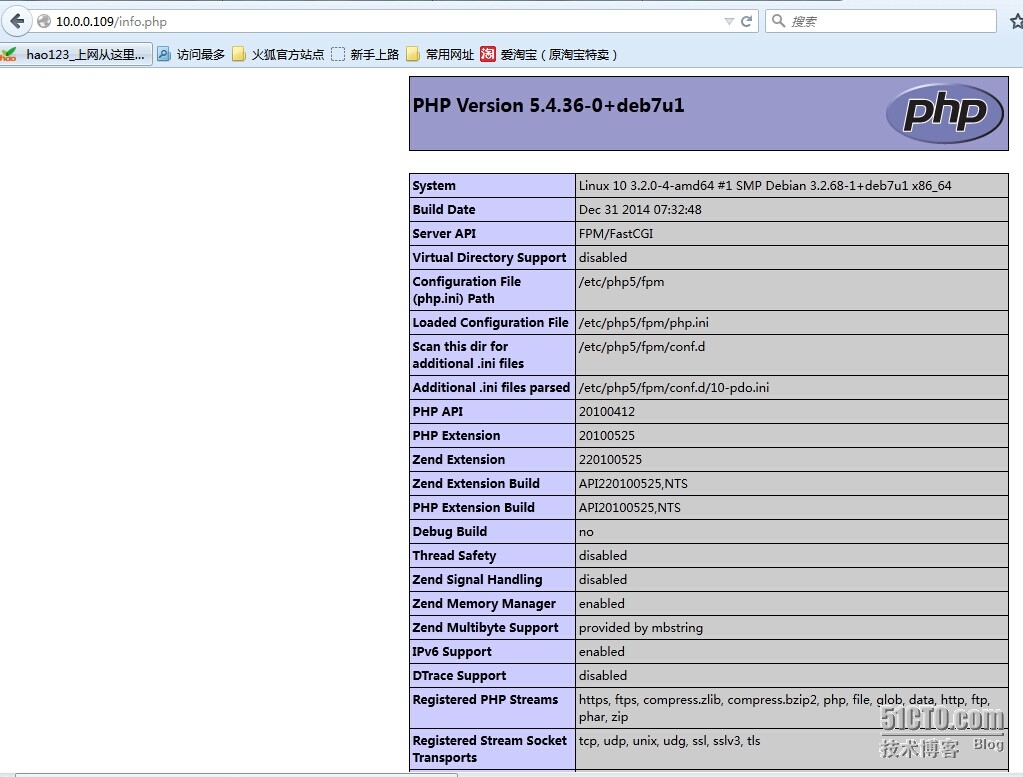
六、效果 |
本文转自 xdoujiang 51CTO博客,原文链接:http://blog.51cto.com/7938217/1675483,如需转载请自行联系原作者