规划网络如图
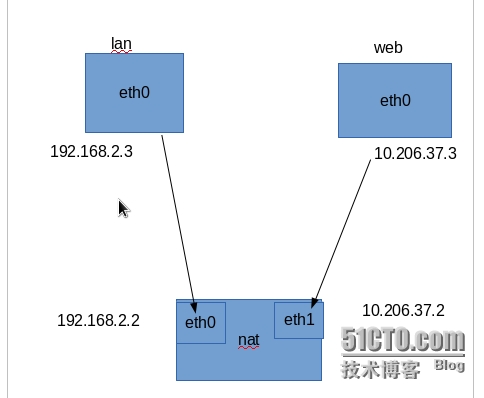
1,给各网卡配置ip,并设置nat上eth0为lan的网关,nat的eth1为web的网关(这个无所谓,不配也行)。
此时你在lan上应该能ping通192.168.2.2,但可能无法ping通10.206.37.2,这个是因为内核默认未开启ip_forward
2,nat的系统默认没有开启ip_forward转发功能,大家肯定都看过无数次了。开启
echo 1 > /proc/sys/net/ipv4/ip_forward
大家之前看的教程,到这里应该已经能在lan上ping通10.206.37.3了,可是我们发现还不行。这是为什么呢。
3,检查一下filter的默认配置。
iptables -t filter -L --line-number
会发现,filter表的FORWARD链里有一条REJECT,就是这条规则导致了无法ping通。
iptables -t filter -D FORWARD 1
现在再试试,lan应该能ping通web了。
4,我们还没开始进入正题呢。下面在nat上执行下面这行,
iptables -t nat POSTROUTING -s 192.168.2.0/24 -j SNAT --to-source 10.206.37.2
现在测试下,可以了吧。
转载于:https://blog.51cto.com/superrot/1390173