Ubuntu 16.04安装indicator-sysmonitor实现导航条显示上下行网速/CPU/内存使用率

安装:

sudo add-apt-repository ppa:fossfreedom/indicator-sysmonitor  
sudo apt-get update  
sudo apt-get install indicator-sysmonitor 

启动:

indicator-sysmonitor &

提示:按Ctrl+C退出。

开机启动:
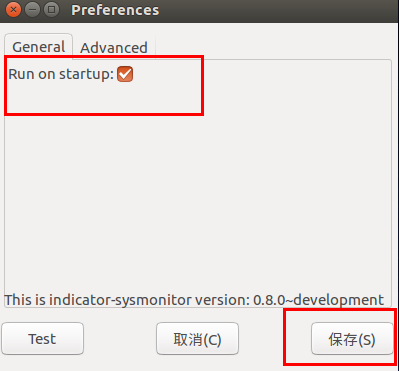
Ubuntu 16.04安装indicator-sysmonitor实现导航条显示上下行网速/CPU/内存使用率

配置:

Ubuntu 16.04安装indicator-sysmonitor实现导航条显示上下行网速/CPU/内存使用率

在上方输入:CPU: {cpu} 内存: {mem} 网络:{net},然后按Test即可看见效果,最后保存即可。

posted on 2017-08-23 18:36 lbsjs 阅读(...) 评论(...) 编辑 收藏

相关文章:

  • 2022-12-23
  • 2022-12-23
  • 2022-12-23
  • 2021-11-04
  • 2022-12-23
  • 2021-05-01
猜你喜欢
  • 2021-10-10
  • 2021-09-29
  • 2021-07-25
  • 2021-12-28
相关资源
相似解决方案