编写过程:
第一步:手动代码堆积
第二步:函数复用
第三步:数据持久化之数据保存
第四步:数据持久化之数据读取
第五步:数据持久化之数据删除
第六步:数据持久化之数据更新
初稿—》数据持久化之保存数据—–》数据持久化之加载数据—–》数据持久化之删除数据—-》数据持久化之检索数据—》数据持久化之数据更新
本演示不为堆积代码,仅为梳理一个编码的概念过程~希望对你有所帮助
第一步:手工代码堆积
|
1
2
3
4
5
6
7
8
9
10
11
12
13
14
15
16
17
18
19
20
21
22
23
24
25
26
27
28
29
30
31
32
33
34
35
36
37
38
39
40
41
42
|
#!/usr/bin/env python#coding:utf8#Author:zhuima#Email:[email protected]#Date:2015-03-23#Function:Create the address book step by step#Version:0.1 #Initialized variablesmsg = ''' 1. Add information
2. Display information
0. Exit
''' #txl content like this tex = [['name','gender','telphone'],['name','gender','telphone']]txl = [] #define Add #define display while True: print msg
op = raw_input('Please Select >>> ')
if op == '1':
name = raw_input('Please Enter Your name >>> ')
gender = raw_input('Please Enter Your gender >>> ')
tel = raw_input('Please Enter Your Telphone Number >>> ')
txl.append([name,gender,tel])
elif op == '2':
for list in txl:
for info in list:
print info,
print ''
elif op == '0':
break
else:
print ''
print 'Unkonw Choose,Please Select again!'
print ''
|
用到的python功能:
-
while循环:实现循环输入
-
if判断:判断输入内容并进行调用相关函数
-
break:跳槽循环
-
列表:在当前会话中保存数据
-
三引号的使用
测试结果:
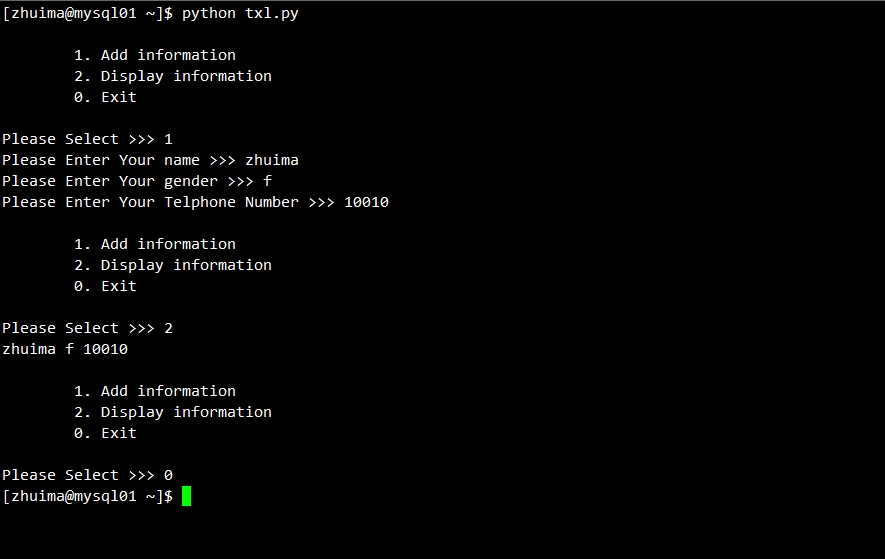
Note:
print打印时,不换行使用’,’来实现,但是针对嵌套列表来说,很可能出现下面的情况,这个时候在跳出当前循环print空白行即可。
第二步:函数复用


如此我们也能实现我们想要的功能,但是总感觉有点别扭,要不要来点高大上的,来来来,叫来函数来一发~
代码如下:
|
1
2
3
4
5
6
7
8
9
10
11
12
13
14
15
16
17
18
19
20
21
22
23
24
25
26
27
28
29
30
31
32
33
34
35
36
37
38
39
40
41
42
43
44
|
#!/usr/bin/env python#coding:utf8#Author:zhuima#Email:[email protected]#Date:2015-03-23#Function:Create the address book step by step# #Initialized variablesmsg = ''' 1. Add information
2. Display information
0. Exit
''' #txl content like this tex = [['name','gender','telphone'],['name','gender','telphone']]txl = [] #define Adddef Add(): name = raw_input('Please Enter Your name >>> ')
gender = raw_input('Please Enter Your gender >>> ')
tel = raw_input('Please Enter Your Telphone Number >>> ')
txl.append([name,gender,tel])
#define displaydef Disp(): for list in txl:
for info in list:
print info,
while True: print msg
op = raw_input('Please Select >>> ')
if op == '1':
Add()
elif op == '2':
Disp()
elif op == '0':
break
else:
print ''
print 'Unkonw Choose,Please Select again!'
print ''
|
引入新功能:
python函数功能
测试结果:
测试结果其实和第一步是一样的,没有什么区别~

第三步:数据持久化之保存数据


这里我们用函数来实现了格式化代码,复用等功能,但是我关闭了当前会话,所有的东西又都没了,那这就是闹玩呗,没有实际意义啊~
所以这里我们要引入数据持久化的概念~(这里仅讨论文件保存形式的数据持久化,不涉及数据库相关)
引入功能:
字符串和列表转换,将列表转成字符串,然后写入文件
代码如下:
|
1
2
3
4
5
6
7
8
9
10
11
12
13
14
15
16
17
18
|
#define save def Save(): temp = []
for info in txl:
temp.append(','.join(info))
s = '\n'.join(temp)
fp = file('txl.db','w')
fp.write(s)
fp.close()
while True: print msg
op = raw_input('Please Select >>> ')
if op == '1':
Add()
Save()
....
|
测试效果:

第四步:数据持久化之数据读取


引入功能:
字符串和列表转换,将字符串传换成列表,然后追加到列表中
代码如下:
|
1
2
3
4
5
6
7
8
9
10
11
12
|
#define load def Load(): fp = file('txl.db','r')
content = fp.read()
temp = content.split('\n')
for info in temp:
txl.append(info.split(','))
Load()while True: ....
|
测试效果:

第五步:数据持久化之删除数据


引入功能:
检索账号,找到账号对应的子列表所在的索引,进行删除操作
如何在嵌套列表中找到value对应的索引?
代码片段如下:
|
1
2
3
4
5
6
7
8
9
10
11
12
13
14
15
16
17
18
19
20
21
22
23
24
25
26
27
28
29
30
|
....msg = ''' 1. Add information
2. Display information
3. Delete by name
0. Exit
''' #define deldef Del(): name = raw_input('Please Enter which one name you want to delete >>> ')
for sub in txl:
if sub[0] == name:
txl.remove(sub)
break
Load()while True: print msg
op = raw_input('Please Select >>> ')
if op == '1':
Add()
Save()
elif op == '2':
Disp()
elif op == '3':
Del()
Save()
....
|
测试效果:

第六步:数据持久化之更新数据


引入功能:
和删除数据同理,检索账号,找到账号对应的子列表所在的索引,进行相关value的更新操作
代码片段如下:
|
1
2
3
4
5
6
7
8
9
10
11
12
13
14
15
16
17
18
19
20
21
22
23
24
25
26
27
28
29
30
31
32
33
34
35
36
37
38
39
40
41
42
43
44
45
46
47
48
49
50
51
52
53
54
55
|
#Initialized variablesmsg = ''' 1. Add information
2. Display information
3. Delete by name
4. Update by name
0. Exit
''' info = ''' 001. name
002. gender
003. tel
004. all
'''#define change def Change(): xingming = raw_input('Please Enter which one name you want to change >>> ')
print info
op = raw_input('Please select which one you want to change: ')
for sub in txl:
if sub[0] == xingming:
if op == '001':
name = raw_input('Please Enter Your name: ')
txl[txl.index(sub)][0] = name
elif op == '002':
gender= raw_input('Please Enter Your gender: ')
txl[txl.index(sub)][1] = gender
elif op == '003':
tel = raw_input('Please Enter Your tel: ')
txl[txl.index(sub)][2] = tel
else:
name = raw_input('Please Enter Your name: ')
gender= raw_input('Please Enter Your gender: ')
tel = raw_input('Please Enter Your tel: ')
txl[txl.index(sub)] = [name,gender,tel]
break
Load()while True: print msg
op = raw_input('Please Select >>> ')
if op == '1':
Add()
Save()
elif op == '2':
Disp()
elif op == '3':
Del()
Save()
elif op == '4':
Change()
Save()
....
|
测试效果:


整体思路:
完成一个通讯录的增删查改,局限于列表,完善自己的组建代码的一个思路,搭建起一套框架。
你要思考的问题:
-
初始化数据
-
如何增加数据
-
数据如何写入到文件
-
如何从文件中读取数据到列表
-
如何删除数据并同步到文件
-
如何更新数据并同步到文件
完整代码块:
|
1
2
3
4
5
6
7
8
9
10
11
12
13
14
15
16
17
18
19
20
21
22
23
24
25
26
27
28
29
30
31
32
33
34
35
36
37
38
39
40
41
42
43
44
45
46
47
48
49
50
51
52
53
54
55
56
57
58
59
60
61
62
63
64
65
66
67
68
69
70
71
72
73
74
75
76
77
78
79
80
81
82
83
84
85
86
87
88
89
90
91
92
93
94
95
96
97
98
99
100
101
102
103
104
105
106
107
108
109
110
111
112
113
114
115
|
#!/usr/bin/env python#coding:utf8#Author:zhuima#Email:[email protected]#Date:2015-03-23#Function:Create the address book step by step# #Initialized variablesmsg = ''' 1. Add information
2. Display information
3. Delete by name
4. Update by name
0. Exit
''' info = ''' 001. name
002. gender
003. tel
004. all
'''#txl content like this tex = [['name','gender','telphone'],['name','gender','telphone']]txl = [] #define Adddef Add(): name = raw_input('Please Enter Your name >>> ')
gender = raw_input('Please Enter Your gender >>> ')
tel = raw_input('Please Enter Your Telphone Number >>> ')
txl.append([name,gender,tel])
#define displaydef Disp(): for list in txl:
for info in list:
print info,
print ''
#define savedef Save(): temp = []
for info in txl:
temp.append(','.join(info))
s = '\n'.join(temp)
fp = file('txl.db','w')
fp.write(s+'\n')
fp.close()
#define loaddef Load(): import os
if os.path.exists('txl.db'):
fp = file('txl.db','r')
content = fp.read()
fp.close()
temp = content.split('\n')
for info in temp:
txl.append(info.split(','))
else:
fp = file('txl.db','w')
fp.close()
#define deldef Del(): name = raw_input('Please Enter which one name you want to delete >>> ')
for sub in txl:
if sub[0] == name:
txl.remove(sub)
break
#define change def Change(): xingming = raw_input('Please Enter which one name you want to change >>> ')
print info
op = raw_input('Please select which one you want to change: ')
for sub in txl:
if sub[0] == xingming:
if op == '001':
name = raw_input('Please Enter Your name: ')
txl[txl.index(sub)][0] = name
elif op == '002':
gender= raw_input('Please Enter Your gender: ')
txl[txl.index(sub)][1] = gender
elif op == '003':
tel = raw_input('Please Enter Your tel: ')
txl[txl.index(sub)][2] = tel
else:
name = raw_input('Please Enter Your name: ')
gender= raw_input('Please Enter Your gender: ')
tel = raw_input('Please Enter Your tel: ')
txl[txl.index(sub)] = [name,gender,tel]
break
Load()while True: print msg
op = raw_input('Please Select >>> ')
if op == '1':
Add()
Save()
elif op == '2':
Disp()
elif op == '3':
Del()
Save()
elif op == '4':
Change()
Save()
elif op == '0':
break
else:
print ''
print 'Unkonw Choose,Please Select again!'
print ''
|
本文转自lovelace521 51CTO博客,原文链接:http://blog.51cto.com/lovelace/1623476,如需转载请自行联系原作者