Introduction
In this post, we will introduce OTW(over the web) mode to install Teamcenter 4-tier rich client and also use WAM tool to generate it.
To install the four-tier rich client, you use a Web browser open the URL of a Web application server that serves the Over-the-Web Installer. The four-tier rich client installs silently, with no prompts. Teamcenter administrators configure all installation options and provide all the information necessary to complete installation using Web Application Manager.
To enable over-the-Web installation for the four-tier rich client, you install the following components on a server host.
• A rich client distribution server.
The distribution server software manages the connection between a rich client distribution instance and the Over-the-Web Installer. The Over-the-Web Installer contacts the distribution server for the rich client files to download to the user’s workstation. Only one rich client distribution server is required to manage multiple rich client distribution instances.
• A rich client distribution instance or instances.
A rich client distribution instance contains the Over-the-Web Installer and the rich client software to be installed on user workstations. To enable different users to install different configurations of rich client software, you must create a distribution instance for each unique configuration.
• A third-party Web server.
You deploy rich client distribution instances in a third-party Web application server.
After you install and deploy a rich client distribution server and distribution instances, you can change the distribution server contents, add components to a distribution instance, and patch components in a distribution instance using Web Application Manager. The next time users start a rich client installed from that distribution instance, the rich client startup process checks for updates and downloads them to the client hosts.
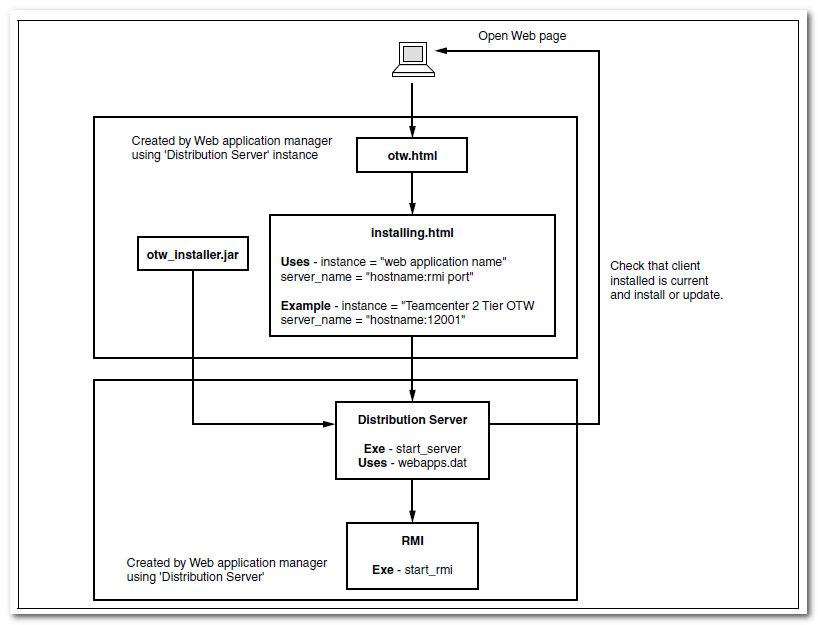
Steps
• A rich client distribution server.1) Copy otw ICD files from installation media.

2) Type the name of distribution server and enter the path to the location.

3) Verify the related parameters.

• A rich client distribution instance.
1) Type the name of distribution instance and enter the path to the location. And add the location of installation media.

2) Select necessary solution for 4-tier rich client.

3) Verify the info about distribution instance.

4) Modify necessary parameters.
WindowsLocation
JREWindows32Locaiton
JREWindows64Location

5) Set the parameters about HTTPServerTable
URI format: http://{your web application server host}:{web application port}/tc

6) Set the parameters about ParentFSCAddressTable.

7) Start to generating the distribution instance.

What’s more, we have to patch the rich client if necessary. So we will further doing the following optional steps to patch the distribution instance.
8) Add the location of path installation media.

9) Add the related patch solutions into the solution list.

What’s more , you can check the patch version info by clicking [view component version] button.

10) Click [reinstall solution] button to generate new distribution instance.

• A third-party Web server.
It’s very convenient to install and configure Apache as a third-party Web server.
1) Install and start Apache
# yum install httpd
   # chkconfig httpd on
   # service httpd start

2) Configure Apache
Modify the value of DocumentRoot in httpd.conf file.

Verification
1) Start distribution server
$ nohup ./start_rmi >>rmi_monitor.log &

$ nohup ./start_server >>distserver_monitor.log &

2) use a Web browser open the URL of a Web application server
http://{distribition server host name}/otwweb/otw.html

3) Finish installing rich client through OTW in a client.


4) Login to TC rich client
