nova的作用:
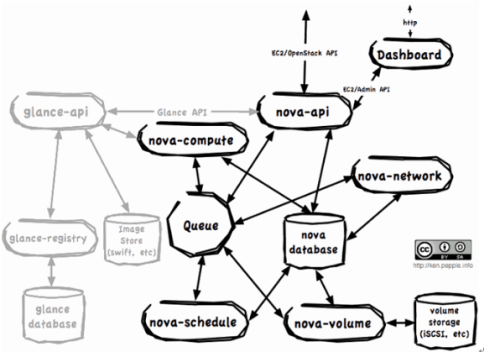
nova各个组件的基本作用
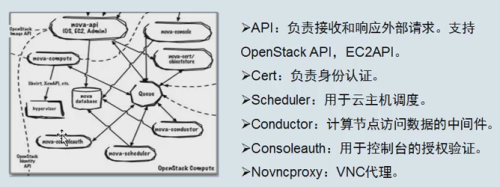
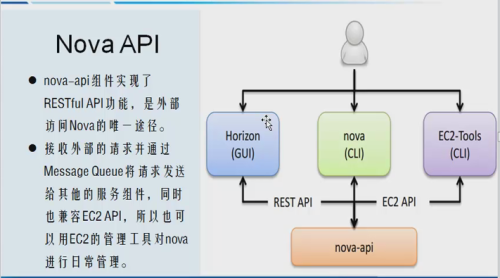
前提:source admin-openstack
6.1.创建nova和nova_api数据库
|
1
2
|
mysql> CREATE DATABASE nova_apimysql> CREATE DATABASE nova; |
6.2.数据库进行授权
|
1
2
3
4
5
6
7
8
|
mysql> GRANT ALL PRIVILEGES ON nova_api.* TO 'nova'@'localhost' \
IDENTIFIED BY 'nova';
mysql> GRANT ALL PRIVILEGES ON nova_api.* TO 'nova'@'%' \
IDENTIFIED BY 'nova';
mysql> GRANT ALL PRIVILEGES ON nova.* TO 'nova'@'localhost' \
IDENTIFIED BY 'nova';
mysql> GRANT ALL PRIVILEGES ON nova.* TO 'nova'@'%' \
IDENTIFIED BY 'nova';
|
6.3 创建nova用户 nova密码
|
1
2
3
4
5
6
7
8
9
10
11
12
13
14
|
openstack user create --domain default \
--password-prompt nova
User Password:Repeat User Password:+---------------------+----------------------------------+| Field | Value |+---------------------+----------------------------------+| domain_id | default || enabled | True || id | 8a7dbf5279404537b1c7b86c033620fe |
| name | nova || password_expires_at | None |+---------------------+----------------------------------+ |
6.4 给nova添加admin的角色
|
1
|
openstack role add --project service --user nova admi |
6.5 创建nova项目
|
1
2
3
4
5
6
7
8
9
10
11
12
|
openstack service create --name nova \ --description "OpenStack Compute" compute
+-------------+----------------------------------+| Field | Value |+-------------+----------------------------------+| description | OpenStack Compute || enabled | True || id | 060d59eac51b4594815603d75a00aba2 |
| name | nova || type | compute |
+-------------+----------------------------------+ |
6.6 创建控制节点的endopint
|
1
2
3
4
5
6
7
8
9
10
11
12
13
14
15
16
17
18
19
20
21
22
23
24
25
26
27
28
29
30
31
32
33
34
35
36
37
38
39
40
41
42
43
44
45
46
47
48
49
50
|
openstack endpoint create --region RegionOne \
compute public http://192.168.56.11:8774/v2.1/%\(tenant_id\)s
+--------------+-------------------------------------------+| Field | Value |+--------------+-------------------------------------------+| enabled | True || id | 3c1caa473bfe4390a11e7177894bcc7b |
| interface | public || region | RegionOne || region_id | RegionOne || service_id | 060d59eac51b4594815603d75a00aba2 || service_name | nova || service_type | compute || url | http://controller:8774/v2.1/%(tenant_id)s |
+--------------+-------------------------------------------+openstack endpoint create --region RegionOne \ compute internal http://192.168.56.11:8774/v2.1/%\(tenant_id\)s
+--------------+-------------------------------------------+| Field | Value |+--------------+-------------------------------------------+| enabled | True || id | e3c918de680746a586eac1f2d9bc10ab |
| interface | internal || region | RegionOne || region_id | RegionOne || service_id | 060d59eac51b4594815603d75a00aba2 || service_name | nova || service_type | compute || url | http://controller:8774/v2.1/%(tenant_id)s |
+--------------+-------------------------------------------+ openstack endpoint create --region RegionOne \
compute admin http://192.168.56.11:8774/v2.1/%\(tenant_id\)s
+--------------+-------------------------------------------+| Field | Value |+--------------+-------------------------------------------+| enabled | True || id | 38f7af91666a47cfb97b4dc790b94424 |
| interface | admin || region | RegionOne || region_id | RegionOne || service_id | 060d59eac51b4594815603d75a00aba2 || service_name | nova || service_type | compute || url | http://controller:8774/v2.1/%(tenant_id)s |
+--------------+-------------------------------------------+ |
6.7 安装软件包nova 除了nova的计算节点
|
1
2
3
|
yum install openstack-nova-api openstack-nova-conductor \
openstack-nova-console openstack-nova-novncproxy \
openstack-nova-scheduler
|
6.8 修改nova的配置文件
|
1
2
3
4
5
6
7
8
9
10
11
12
13
14
15
16
17
18
19
20
21
22
|
[[email protected] ~]# grep '^[a-Z]' /etc/nova/nova.conf
auth_strategy=keystone #使用kestone认证
use_neutron=True #使用neutron的网络
enabled_apis=osapi_compute,metadata #支持的API模型
firewall_driver = nova.virt.firewall.NoopFirewallDriver #防火墙驱动
api_servers=http://192.168.56.11:9292
auth_uri = http://192.168.56.11:5000
auth_url = http://192.168.56.11:35357
memcached_servers = 192.168.56.11:11211auth_type = passwordproject_domain_name = defaultuser_domain_name = defaultproject_name = service username = novapassword = novalock_path=/var/lib/nova/tmp #锁文件
vncserver_listen=0.0.0.0 #vnc监听的IP
vncserver_proxyclient_address=192.168.56.11 #vncproxy h5的界面化工具
[[email protected] ~]#
|
6.9 同步书nova的数据库和nova-api的 数据库
|
1
2
|
# su -s /bin/sh -c "nova-manage api_db sync" nova# su -s /bin/sh -c "nova-manage db sync" nova |
6.10 启动计算节点
|
1
2
3
4
5
6
|
# systemctl enable openstack-nova-api.service \ openstack-nova-consoleauth.service openstack-nova-scheduler.service \
openstack-nova-conductor.service openstack-nova-novncproxy.service
# systemctl start openstack-nova-api.service \ openstack-nova-consoleauth.service openstack-nova-scheduler.service \
openstack-nova-conductor.service openstack-nova-novncproxy.servic
|
6.11 验证最后的成功
|
1
2
3
4
5
6
7
8
9
|
[[email protected] nova]# openstack host list
+-------------+-------------+----------+| Host Name | Service | Zone |+-------------+-------------+----------+| linux-node1 | consoleauth | internal || linux-node1 | conductor | internal || linux-node1 | scheduler | internal |+-------------+-------------+----------+[[email protected] nova]#
|
本文转自 小小三郎1 51CTO博客,原文链接:http://blog.51cto.com/wsxxsl/1884075,如需转载请自行联系原作者