系统环境:
操作系统:RedHat EL5
Cluster: Oracle CRS 10.2.0.1.0
Oracle: Oracle 10.2.0.1.0
如图所示:RAC 系统架构
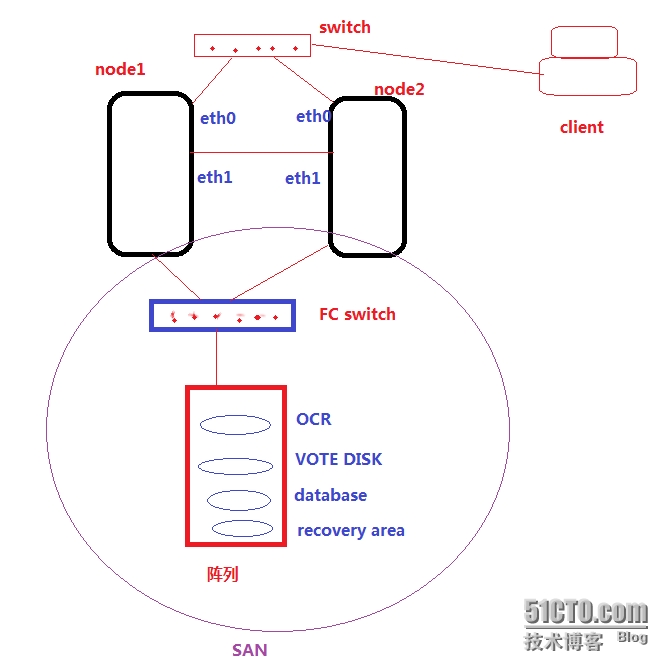
一、操作系统环境
1、网络配置(在所有节点)
[[email protected] ~]# cat /etc/hosts
|
1
2
3
4
5
6
7
8
9
10
|
# Do not remove the following line, or various programs
# that require network functionality will fail.127.0.0.1 localhost
192.168.8.21 node1 ;节点1主机名
192.168.8.23 node1-vip
10.10.10.21 node1-priv
192.168.8.22 node2 ;节点2主机名
192.168.8.24 node2-vip
10.10.10.22 node2-priv
|
2、共享磁盘配置(在所有节点)
对于Oracle 10g RAC,OCR和VOTE DISK、DataBase需建立在共享存储设备上;OCR和VOTE DISK必须以raw的方式管理,而存放DataBase的磁盘必须以ASM的方式管理。
[[email protected] ~]# fdisk -l
|
1
2
3
4
5
6
7
8
9
10
11
12
13
|
Disk /dev/sdc: 21.4 GB, 21474836480 bytes
255 heads, 63 sectors/track, 2610 cylinders
Units = cylinders of 16065 * 512 = 8225280 bytes
Device Boot Start End Blocks Id System/dev/sdc1 1 25 200781 83 Linux
/dev/sdc2 26 50 200812+ 83 Linux
/dev/sdc3 51 2610 20563200 5 Extended
/dev/sdc5 51 549 4008186 83 Linux
/dev/sdc6 550 1048 4008186 83 Linux
/dev/sdc7 1049 1422 3004123+ 83 Linux
/dev/sdc8 1423 1796 3004123+ 83 Linux
/dev/sdc9 1797 2046 2008093+ 83 Linux
/dev/sdc10 2047 2610 4530298+ 83 Linux
|
建立RAW设备:
|
1
2
3
4
5
6
7
8
9
10
11
12
13
|
# Enter raw device bindings here.# An example would be:# ACTION=="add", KERNEL=="sda", RUN+="/bin/raw /dev/raw/raw1 %N"
# to bind /dev/raw/raw1 to /dev/sda, or
# ACTION=="add", ENV{MAJOR}=="8", ENV{MINOR}=="1", RUN+="/bin/raw /dev/raw/raw2 %M %m"
# to bind /dev/raw/raw2 to the device with major 8, minor 1.
ACTION=="add", KERNEL=="sdc1", RUN+="/bin/raw /dev/raw/raw1 %N"
ACTION=="add", KERNEL=="sdc2", RUN+="/bin/raw /dev/raw/raw2 %N"
ACTION=="add", KERNEL=="sdc5", RUN+="/bin/raw /dev/raw/raw3 %N"
ACTION=="add", KERNEL=="sdc6", RUN+="/bin/raw /dev/raw/raw4 %N"
ACTION=="add", KERNEL=="sdc7", RUN+="/bin/raw /dev/raw/raw5 %N"
ACTION=="add", KERNEL=="sdc8", RUN+="/bin/raw /dev/raw/raw6 %N"
|
设置RAW设备权限:
|
1
2
3
4
5
6
7
|
KERNEL=="raw1", OWNER="oracle", GROUP="oinstall", MODE="660"
KERNEL=="raw2", OWNER="oracle", GROUP="oinstall", MODE="660"
KERNEL=="raw3", OWNER="oracle", GROUP="oinstall", MODE="660"
KERNEL=="raw4", OWNER="oracle", GROUP="oinstall", MODE="660"
KERNEL=="raw5", OWNER="oracle", GROUP="oinstall", MODE="660"
KERNEL=="raw6", OWNER="oracle", GROUP="oinstall", MODE="660"
|
启动RAW设备:
|
1
2
3
4
5
6
7
8
9
|
[[email protected] soft]# start_udevStarting udev: [ OK ][[email protected] soft]# raw -aq/dev/raw/raw1: bound to major 8, minor 33
/dev/raw/raw2: bound to major 8, minor 34
/dev/raw/raw3: bound to major 8, minor 37
/dev/raw/raw4: bound to major 8, minor 38
/dev/raw/raw5: bound to major 8, minor 39
/dev/raw/raw6: bound to major 8, minor 40
|
查看RAW设备:
|
1
2
3
4
5
6
7
8
|
[[email protected] soft]# ls -l /dev/rawtotal 0
crw-rw---- 1 oracle oinstall 162, 1 May 5 17:12 raw1
crw-rw---- 1 oracle oinstall 162, 2 May 5 17:12 raw2
crw-rw---- 1 oracle oinstall 162, 3 May 5 17:12 raw3
crw-rw---- 1 oracle oinstall 162, 4 May 5 17:12 raw4
crw-rw---- 1 oracle oinstall 162, 5 May 5 17:12 raw5
crw-rw---- 1 oracle oinstall 162, 6 May 5 17:12 raw6
|
建立Oracle用户和组(所有节点):
|
1
2
3
4
5
6
7
8
9
10
11
12
13
14
15
16
17
18
19
20
|
[[email protected] ~]# id oracleuid=200(oracle) gid=200(oinstall) groups=200(oinstall),201(dba)
注意:所有节点user ID和group id一致![[email protected] ~]# su - oracle[[email protected] ~]$ cat .bash_profile# .bash_profile# Get the aliases and functions
if [ -f ~/.bashrc ]; then
. ~/.bashrc
fi# User specific environment and startup programs
export EDITOR=viexport ORACLE_SID=prod1export ORACLE_BASE=/u01/app/oracleexport ORACLE_HOME=$ORACLE_BASE/product/10.2.0/db_1
export ORA_CRS_HOME=/u01/crs_1export LD_LIBRARY_PATH=$ORACLE_HOME/libexport PATH=$ORACLE_HOME/bin:$ORA_CRS_HOME/bin:/bin:/usr/bin:/usr/sbin:/usr/local/bin:/usr/X11R6/binumask 022
|
3、配置系统内核参数(在所有节点)
|
1
2
3
4
5
6
7
8
9
10
11
12
|
[[email protected] soft]# vi /etc/sysctl.conffs.aio-max-nr = 1048576
fs.file-max = 6815744
kernel.shmall = 2097152
kernel.shmmax = 536870912
kernel.shmmni = 4096
kernel.sem = 250 32000 100 128
net.ipv4.ip_local_port_range = 9000 65500
net.core.rmem_default = 262144
net.core.rmem_max = 4194304
net.core.wmem_default = 262144
net.core.wmem_max = 1048586
|
内核参数修改生效:
|
1
2
3
4
5
6
7
8
9
10
11
12
13
14
15
16
17
18
19
20
21
22
|
[[email protected] ~]# sysctl -pnet.ipv4.ip_forward = 0
net.ipv4.conf.default.rp_filter = 1
net.ipv4.conf.default.accept_source_route = 0
kernel.sysrq = 0
kernel.core_uses_pid = 1
net.ipv4.tcp_syncookies = 1
kernel.msgmnb = 65536
kernel.msgmax = 65536
kernel.shmmax = 4294967295
kernel.shmall = 268435456
fs.aio-max-nr = 1048576
fs.file-max = 6815744
kernel.shmall = 2097152
kernel.shmmax = 536870912
kernel.shmmni = 4096
kernel.sem = 250 32000 100 128
net.ipv4.ip_local_port_range = 9000 65500
net.core.rmem_default = 262144
net.core.rmem_max = 4194304
net.core.wmem_default = 262144
net.core.wmem_max = 1048586
|
用户资源访问限制:
|
1
2
3
4
5
6
7
8
9
10
11
12
13
14
15
16
|
[[email protected] ~]# cat /etc/security/limits.conf oracle soft nproc 2047
oracle hard nproc 16384
oracle soft nofile 1024
oracle hard nofile 65536
oracle soft stack 10240
[[email protected] ~]#cat /etc/profile if [ $USER = "oracle" ]||[ $USER = "grid" ]; then
if [ $SHELL = "/bin/ksh" ]; then
ulimit -p 16384
ulimit -n 65536
else
ulimit -u 16384 -n 65536
fi
fi |
配置认证模块:
[[email protected] ~]# cat /etc/pam.d/login
session required /lib/security/pam_limits.so
配置节点间心跳:
[[email protected] ~]# cat /etc/rc.local
options hangcheck-timer hangcheck_tick=30 hangcheck_margin=180
4、配置时间同步(NTP)
|
1
2
3
4
5
6
7
8
9
10
11
12
13
14
15
16
17
18
|
node1 作为ntp server ,node2 作为ntp client配置如下:node1:[[email protected] ~]# chkconfig --list |grep time daytime-dgram: off
daytime-stream: off
time-dgram: off
time-stream: off
[[email protected] ~]# chkconfig time-dgram on
[[email protected] ~]# chkconfig time-stream on
[[email protected] ~]# chkconfig ntpd on
[[email protected] ~]# chkconfig xinetd on
[[email protected] ~]# service ntpd startStarting ntpd: [ OK ]node2:[[email protected] asm]# crontab -l0-59/1 * * * * /usr/bin/rdate -s 192.168.8.21 >/dev/null 2>&1
0-59/1 * * * * /usr/sbin/ntpdate 192.168.8.21 >/dev/null 2>&1
|
5、配置yum 安装所需的软件包(所有节点)
|
1
2
3
4
5
6
7
8
9
10
11
12
13
14
15
16
17
18
19
20
21
22
23
24
25
26
27
28
29
30
31
|
以RedHat 安装光盘作为yum仓库:[[email protected] yum.repos.d]# cat yum.repo [base]name=Red Hat Enterprise Linux baseurl=file:///media/Server
enabled=1
gpgcheck=0
gpgkey= 安装软件包:[[email protected] yum.repos.d]# yum install -y libXp*Installed: libXp.i386 0:1.0.0-8.1.el5 libXp-devel.i386 0:1.0.0-8.1.el5
[[email protected] yum.repos.d]# yum install -y libaio*[[email protected] yum.repos.d]# yum install -y sysstat*Installed: sysstat.i386 0:7.0.2-3.el5
[[email protected] yum.repos.d]# yum install -y unix*Installed: unixODBC.i386 0:2.2.11-7.1 unixODBC-devel.i386 0:2.2.11-7.1 unixODBC-kde.i386 0:2.2.11-7.1 [[email protected] yum.repos.d]# yum install -y compat*Installed: compat-dapl.i386 0:2.0.25-2.el5 compat-dapl-devel.i386 0:2.0.25-2.el5
compat-dapl-static.i386 0:2.0.25-2.el5 compat-dapl-utils.i386 0:2.0.25-2.el5
compat-db.i386 0:4.2.52-5.1 compat-openldap.i386 0:2.3.43_2.2.29-12.el5
compat-readline43.i386 0:4.3-3 compat-slang.i386 0:1.4.9-27.2.2 Dependency Installed: libibverbs.i386 0:1.1.3-2.el5 libnes.i386 0:0.9.0-2.el5 librdmacm.i386 0:1.0.10-1.el5
openib.noarch 0:1.4.1-5.el5
|
--未完,待续
本文转自 客居天涯 51CTO博客,原文链接:http://blog.51cto.com/tiany/1407760,如需转载请自行联系原作者