实现的效果为:在编辑视图中,对DateTime类型的属性,显示jQuery UI的datepicker。效果如下:
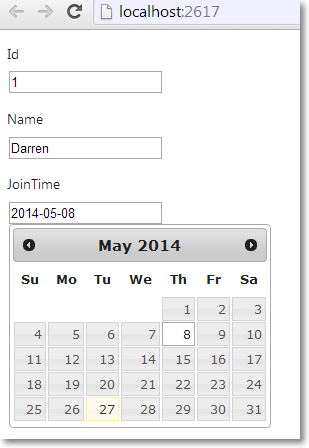
Student.cs
public class Student
{
public int Id { get; set; }
public string Name { get; set; }
public DateTime? JoinTime { get; set; }
}
HomeController:
public class HomeController : Controller
{
public ActionResult Index()
{
return View(new Student(){Id = 1, JoinTime = DateTime.Now, Name = "Darren"});
}
}
Views/Shared/EditorTemplates文件夹中创建DateTime.cshtml,视图名称必须和属性类型保持一致。另外,这里时间格式的设置必须和datepicker保持一致。
@model DateTime?
@Html.TextBox("", Model.HasValue ? Model.Value.ToString("yyyy-MM-dd") : "", new {@class = "date"})
Home/Index.cshtml视图中:
@model WebApplication1.Models.Student
@{
    ViewBag.Title = "Index";
}

<h2>Index</h2>

@using (Html.BeginForm())
{
    @Html.EditorForModel()
}

@section scripts{

    <script type="text/javascript">
        $(function () {
            $('.date').datepicker({
                dateFormat: 'yy-mm-dd'
            })
        });
    </script>
}
在_Layout.cshtml head中增加
<link href="~/Content/jquery-ui.css" rel="stylesheet" />
<link href="~/Content/Site.css" rel="stylesheet" />
在_Layout.cshtml body在jquery和bootstrap后面增加
<script src="~/Scripts/jquery-ui-1.12.1.min.js"></script>