最近试用了一下Spring Boot,发现用它创建WEB应用简直好爽啊,记录一下。
首先用Eclipse建一个maven工程,创建时选中“Create a simple proejct (skip archetype selection)”,建个简单工程就好了。
然后编辑pom.xml,引入相关的包,完整文件如下:
|
1
2
3
4
5
6
7
8
9
10
11
12
13
14
15
16
17
18
19
20
21
22
23
24
25
26
27
28
29
30
31
32
33
34
35
36
37
38
39
40
41
42
43
44
45
46
47
48
49
50
51
52
53
|
<project xmlns="http://maven.apache.org/POM/4.0.0" xmlns:xsi="http://www.w3.org/2001/XMLSchema-instance"
xsi:schemaLocation="http://maven.apache.org/POM/4.0.0 http://maven.apache.org/xsd/maven-4.0.0.xsd">
<modelVersion>4.0.0</modelVersion>
<groupId>org.test</groupId>
<artifactId>appboot</artifactId>
<version>0.0.1</version>
<name>appboot</name>
<dependencies>
<!-- 引入WEB开发支持 -->
<dependency>
<groupId>org.springframework.boot</groupId>
<artifactId>spring-boot-starter-web</artifactId>
<version>1.4.1.RELEASE</version>
</dependency>
<!-- 引入FreeMarker支持 -->
<dependency>
<groupId>org.springframework.boot</groupId>
<artifactId>spring-boot-starter-freemarker</artifactId>
<version>1.4.1.RELEASE</version>
</dependency>
<!-- 引入重编译自动加载支持,这样在Eclipse中调试时有变更会自动重新加载 -->
<dependency>
<groupId>org.springframework.boot</groupId>
<artifactId>spring-boot-devtools</artifactId>
<version>1.4.1.RELEASE</version>
<optional>true</optional>
</dependency>
<!-- 引入fastjson,用于替换默认的json包 -->
<dependency>
<groupId>com.alibaba</groupId>
<artifactId>fastjson</artifactId>
<version>1.2.17</version>
</dependency>
</dependencies>
<build>
<finalName>appboot</finalName>
<plugins>
<!-- 引入maven打包支持 -->
<plugin>
<groupId>org.springframework.boot</groupId>
<artifactId>spring-boot-maven-plugin</artifactId>
<version>1.4.1.RELEASE</version>
<executions>
<execution>
<goals>
<goal>repackage</goal>
</goals>
</execution>
</executions>
</plugin>
</plugins>
</build>
</project>
|
添加应用程序入口文件Application.java,如下:
|
1
2
3
4
5
6
7
8
9
10
11
12
13
14
15
16
17
18
19
20
21
22
23
24
25
26
27
28
29
30
31
32
33
34
35
36
37
38
|
package org.me;
import org.springframework.boot.SpringApplication;
import org.springframework.boot.autoconfigure.SpringBootApplication;
import org.springframework.boot.autoconfigure.web.HttpMessageConverters;
import org.springframework.context.annotation.Bean;
import org.springframework.http.converter.HttpMessageConverter;
import com.alibaba.fastjson.serializer.SerializerFeature;
import com.alibaba.fastjson.support.config.FastJsonConfig;
import com.alibaba.fastjson.support.spring.FastJsonHttpMessageConverter;
@SpringBootApplicationpublic class Application {
/**
* 用fastjson作为默认的json编码器
* @return
*/
@Bean
public HttpMessageConverters fastJsonHttpMessageConverters() {
FastJsonHttpMessageConverter fastConverter = new FastJsonHttpMessageConverter();
FastJsonConfig fastJsonConfig = new FastJsonConfig();
fastJsonConfig.setSerializerFeatures(SerializerFeature.WriteDateUseDateFormat, SerializerFeature.WriteMapNullValue);
fastConverter.setFastJsonConfig(fastJsonConfig);
HttpMessageConverter<?> converter = fastConverter;
return new HttpMessageConverters(converter);
}
/**
* 应用程序入口
* @param args
*/
public static void main(String[] args) {
//用SpringApplication启动
SpringApplication.run(Application.class, args);
}
} |
如果只用默认的json编码器,那么只有main方法就够了。然后来写一个控制器,比如叫HomeController:
|
1
2
3
4
5
6
7
8
9
10
11
12
13
14
15
16
17
18
19
20
21
22
23
24
25
26
27
28
29
30
31
32
33
34
35
36
37
38
39
40
|
package org.me;
import java.util.Date;
import java.util.Map;
import org.springframework.stereotype.Controller;
import org.springframework.web.bind.annotation.RequestBody;
import org.springframework.web.bind.annotation.RequestMapping;
import org.springframework.web.bind.annotation.RequestMethod;
import org.springframework.web.bind.annotation.ResponseBody;
/** * 定义一个控制器
*/
@Controllerpublic class HomeController {
/**
* 定义一个login方法,映射到/login上,返回视图为home/login.ftl
*/
@RequestMapping("/login")
public String login(Map<String, Object> model) {
model.put("time", new Date());
model.put("message", "Hello, Spring Boot");
return "home/login";
}
/**
* 定义一个Json的调用
*/
@RequestMapping(value = "/checkLogin", method = RequestMethod.POST)
@ResponseBody
public JsonResult checkLogin(@RequestBody LoginRequest request) {
JsonResult result = new JsonResult();
result.error = 2020;
result.data = String.format("%s : %s", request.user, request.pass);
return result;
}
} |
和用SpringMVC时没有什么不同。SpringBoot一般不推荐JSP视图引擎,所以这里使用了freemarker作为视图引擎。login方法里指定了视图为home/login,因此在src/main/resources/templates/home下创建视图login.ftl:
|
1
2
3
4
5
6
7
8
9
10
11
12
13
14
15
16
17
18
19
20
21
22
23
24
25
26
27
28
29
30
31
|
<!DOCTYPE html><html>
<head>
<title>Login</title>
<meta http-equiv="Content-Type" content="text/html; charset=UTF-8" />
<link rel="stylesheet" href="css/core.css" />
<script src="js/jquery-3.1.1.min.js"></script>
<script>
$(function(){
$("#login").click(function(){
$.ajax({
url: "checkLogin",
type: "POST",
contentType: "application/json",
dataType: "json",
data: JSON.stringify({user:"admin", pass:"123"}),
success: function(data) {
$("#out").text(JSON.stringify(data));
}
});
});
});
</script>
</head>
<body>
DateTime: ${time?time}<br>
Message: ${message}<br/><br/>
<button id="login">登录</button><br/><br/>
<div id="out"></div>
</body>
</html>
|
这个页面从控制器接收了time和message两个参数,用${}的形式显示在页面上。此外还包括了一个ajax调用,向后台请求checkLogin,并传入参数,显示返回值。
最后加个SpringBoot的配置文件,application.properties,放到src/main/resources下:
|
1
2
3
4
5
6
7
8
9
10
11
|
# APPLICATION SETTINGS (SpringApplication)spring.main.web-environment=truespring.main.show-banner=false# EMBEDDED SERVER CONFIGURATION (ServerProperties) server.port=8080# FREEMARKER (FreeMarkerAutoConfiguration)spring.freemarker.cache=falsespring.freemarker.templateEncoding=UTF-8spring.freemarker.suffix=.ftl |
其实主要是server.port参数,我们的工程内置了tomcat,这个参数指定了tomcat的绑定端口。
完整的项目结构如下:
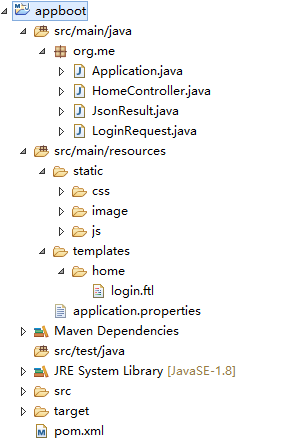
默认情况下,视图放到resources/templates下,静态资源放到resources/static下。一切准备就绪,Ctrl+F11把工程跑起来吧,用浏览器访问 http://localhost:8080/login 就可以打开页面了。一但在Eclipse里修改了java文件,SpringBoot会自动重新加载,在开发调试时会很方便。
打包的时候,可以把整个项目的相关资源打成一个jar,这样用命令行就可以运行了。
|
mvn clean package |
会在target下得到一个appboot.jar,这个jar里包含了用户代码的class文件、依赖的jar文件、视图文件、静态资源,会比较大,直接用命令行运行:
| java -jar appboot.jar |
一个完整的web应用就跑起来了,目标环境只要有JRE就够了,完全不用安装tomcat。虽然jar文件比较大,但是部署到远程环境的话可就方便多了。
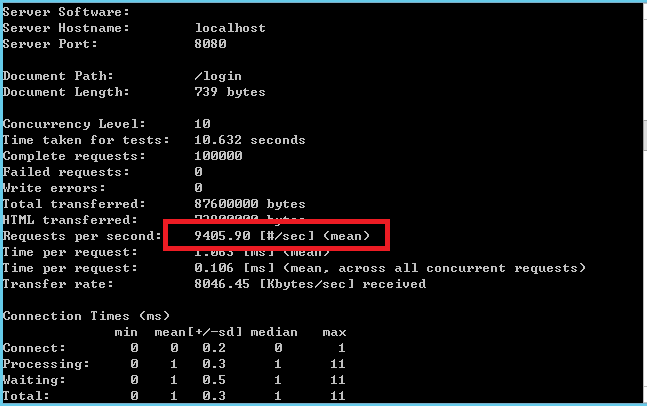
至于性能,完全不用担心,本质是基于tomcat的,性能肯定不会差,拿ab测试一下:
| ab -c 10 -n 100000 http://localhost:8080/login |
结果如下,超过9000rps:
本文转自 BoyTNT 51CTO博客,原文链接:http://blog.51cto.com/boytnt/1866267,如需转载请自行联系原作者