这里使用haproxy构建一个动静分离的集群,并且静态数据请求使用varnish做缓存。本打算做图1.1的集群,但是手头机器不够,只好委曲求全把动态服务器和静态服务器和到一起(主要是懒),数据库和共享文件和到一起如图1.2
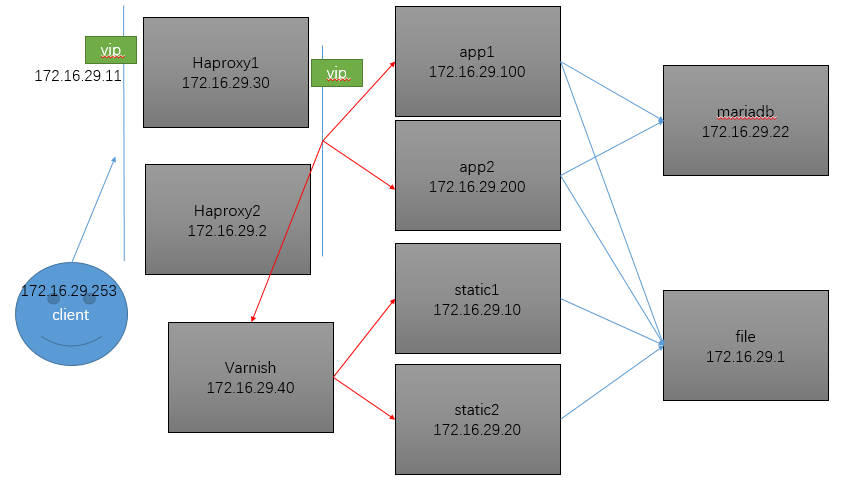
图1.1
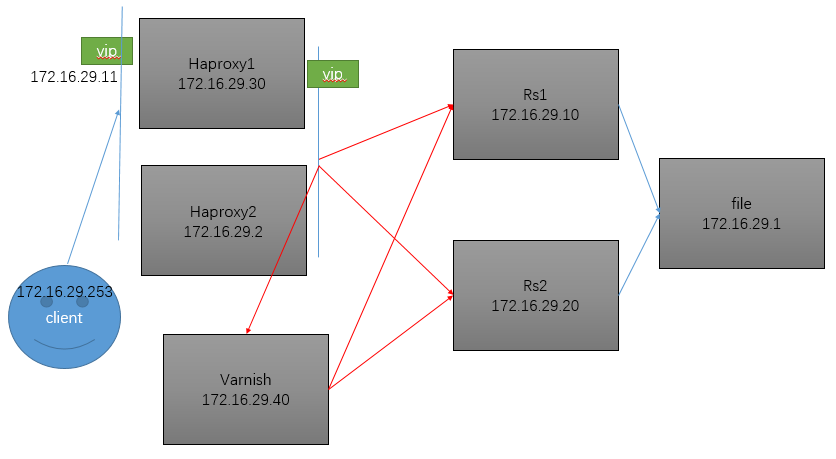
图1.2
file服务器的配置
|
1
2
3
4
5
6
7
8
9
10
11
12
13
14
15
16
|
#安装mysqld和nfs服务器yum install mysql-server nfs-utils -y
#提供网页文件mkdir /wordpress
wget http://download.comsenz.com/DiscuzX/3.2/Discuz_X3.2_SC_UTF8.zip
unzip Discuz_X3.2_SC_UTF8.zip -d /wordpress
chown -R apache:apache /wordpress
cat > /etc/exports <<eof
/wordpress 172.16.0.0/16(rw,no_root_squash)
eofservice nfs start#提供数据库service mysqld startmysql <<eofeof |
Rs服务器的配置
|
1
2
3
4
5
6
7
8
9
10
11
12
13
14
15
16
|
yum install nfs-utils httpd php php-mysql -y
cat >> /etc/fstab <<eof
172.16.29.1:/wordpress /wordpress nfs defaults 0 0
eofmkdir /wordpress
mount -a
#以下是提供httpd配置文件vim /etc/httpd/conf/httpd.conf
#把DocumentRoot "/var/www/html"改成如下DocumentRoot "/wordpress/upload"
#把<Directory "/var/www/html">改为如下内容<Directory "/wordpress">
#把DirectoryIndex index.html改成如下内容DirectoryIndex index.php index.html#启动服务systemctl start httpd.service |
varnish服务器的配置
|
1
2
3
4
|
yum install varnish -y
vim /etc/varnish/varnish.params
#把VARNISH_STORAGE="file,/var/lib/varnish/varnish_storage.bin,1G"改为如下内容,意思是使用512m的内存进行缓存数据VARNISH_STORAGE="malloc,512m"
|
|
1
2
3
4
5
6
7
8
9
10
11
12
13
14
15
16
17
18
19
20
21
22
23
24
25
26
27
28
29
30
31
32
33
34
35
36
37
38
39
40
41
42
|
cat > /etc/varnish/default.vcl <<eof
#提供如下配置文件vcl 4.0;import directors;
backend default { .host = "127.0.0.1";
.port = "8080";
}#定义后端服务器状态检测机制probe check { .url = "/robots.txt";
.window = 5;
.threshold = 3;
.interval = 2s;
.timeout = 1s;
}#定义两个服务器backend server1 { .host = "172.16.29.10";
.port = "80";
.probe = check;
}backend server2 { .host = "172.16.29.20";
.port = "80";
.probe = check;
}#定义两个服务器的调度算法sub vcl_init { new static = directors.round_robin();
static.add_backend(server1);
static.add_backend(server2);
}#定义命中sub vcl_recv { set req.backend_hint = static.backend();
}sub vcl_backend_response {}sub vcl_deliver {}eof |
haproxy服务器通用配置配置
两个haproxy服务器的keepalived的配置文件有细微的差别,注意注释信息
|
1
2
3
4
5
6
7
8
9
10
11
12
13
14
15
16
17
18
19
20
21
22
23
24
25
26
27
28
29
30
31
32
33
34
35
36
37
38
39
40
41
42
43
44
45
46
47
48
49
50
51
52
|
yum install haproxy keepalived -y
cat > /etc/haproxy/haproxy.cfg <<eof
global log 127.0.0.1 local2
chroot /var/lib/haproxy
pidfile /var/run/haproxy.pid
maxconn 4000
user haproxy
group haproxy
daemon
stats socket /var/lib/haproxy/stats
defaults mode http
log global
option httplog
option dontlognull
option http-server-close
option forwardfor except 127.0.0.0/8
option redispatch
retries 3
timeout http-request 10s
timeout queue 1m
timeout connect 10s
timeout client 1m
timeout server 1m
timeout http-keep-alive 10s
timeout check 10s
maxconn 3000
frontend main *:80#静态数据访问重定向到动态服务器,其他的动态服务器 acl url_static path_beg -i /static /images /javascript /stylesheets
acl url_static path_end -i .jpg .gif .png .css .js
use_backend static if url_static
default_backend app
#状态页listen admin_stats bind *:8080
stats enable
stats uri /haproxy11
acl hastats src 172.16.0.0/16
block unless hastats
#静态服务器backend static balance roundrobin
server static 172.16.29.40:6081 check
#动态服务器backend app balance source
server rs1 172.16.29.10:80 check
server rs2 172.16.29.20:80 check
eofsystemctl restart haproxy.service |
|
1
2
3
4
5
6
7
8
9
10
11
12
13
14
15
16
17
18
19
20
21
22
23
24
25
26
27
28
29
30
31
32
33
34
35
36
37
38
39
40
41
42
43
44
45
46
|
cat > /etc/keepalived/keepalived.conf <<eof
#keepalived的配置文件! Configuration File for keepalived
global_defs { notification_email {
}
notification_email_from [email protected]
smtp_server 127.0.0.1
smtp_connect_timeout 30
router_id node1
vrrp_mcast_group 224.0.29.29
#这个脚本是为了维护代理服务器Haproxy时使用的 vrrp_script chk_down {
script "[[ -f /etc/haproxy/down ]] && exit 1 || exit 0"
interval 1
weight -20
}
#这个脚本是为了检测代理服务器Haproxy的状态 vrrp_script chk_haproxy {
script "killall -0 haproxy && exit 0 || exit 1"
interval 1
weight -20
}
}vrrp_instance VI_1 {#另一台主机的下一行改为MASTER state BACKUP
interface eno16777736
virtual_router_id 51
#另一台主机的下一行改为100 priority 90
advert_int 1
authentication {
auth_type PASS
auth_pass oldking
}
virtual_ipaddress {
172.16.29.11/16 dev eno16777736 label eno16777736:0
}
track_script {
chk_down
chk_haproxy
}
}eof |
我这里haproxy介绍的不够详细,参考这个博客http://www.cnblogs.com/dkblog/archive/2012/03/13/2393321.html,或者官方文档
本文转自Ailu0li 51CTO博客,原文链接:http://blog.51cto.com/oldking/1897147,如需转载请自行联系原作者