在Linux下用VNC远程桌面是个很不错的玩意。但在CentOS中默认没有安装VNC的。可以用下面语句查询,如果出现下面情况说明没有安装vnc
|
1
2
3
|
#rpm -q tigervnc tigervnc-serverpackagetigervnc is not installedpackage tigervnc-server is not installed |
1、安装VNC服务
|
1
|
yum install tigervnc tigervnc-server
|
然后就等待安装完成。
2、为vncserver设置周密码
|
1
2
3
4
|
[[email protected] ~]# vncserver
You will require a password to access yourdesktops.Password:<输入vnc登录密码> Verify:<再次输入vnc登录密码> |
3、配置VNC
为了防黑屏,需要修改一下/root/.vnc/xstartup。
注释下面两行
|
1
2
|
#xterm -geometry 80x24+10+10 -ls -title"$VNCDESKTOP Desktop" &#twm & |
然后再添加下面一行
|
1
|
gnome-session & |
|
1
2
3
4
5
6
7
8
9
10
11
12
13
14
15
16
17
18
19
20
21
22
23
24
25
26
27
28
29
30
31
|
[[email protected] ~]# vi /root/.vnc/xstartup
#!/bin/sh [ -r /etc/sysconfig/i18n ] && ./etc/sysconfig/i18n
export LANG
export SYSFONT
vncconfig -iconic &unset SESSION_MANAGER
unset DBUS_SESSION_BUS_ADDRESS
OS=`uname -s`
if [ $OS = 'Linux' ]; then
case "$WINDOWMANAGER" in
*gnome*)
if [ -e /etc/SuSE-release ]; then
PATH=$PATH:/opt/gnome/bin
export PATH
fi
;;
esac
fiif [ -x /etc/X11/xinit/xinitrc ]; then
exec /etc/X11/xinit/xinitrc
fiif [ -f /etc/X11/xinit/xinitrc ]; then
exec sh /etc/X11/xinit/xinitrc
fi[ -r $HOME/.Xresources ] && xrdb$HOME/.Xresourcesxsetroot -solid grey#xterm -geometry 80x24+10+10 -ls -title"$VNCDESKTOP Desktop" &#twm &gnome-session & |
修改用户配置文件:/etc/sysconfig/vncservers
去掉下面这两行前的“#”,也就是说把这两行的注释给去掉。
|
1
2
|
VNCSERVERS="2:root"
VNCSERVERARGS[1]="-geometry 1024x768-depth 32"
|
改完后的配置文件如下
|
1
2
3
4
5
6
7
8
9
10
11
12
13
14
15
16
17
18
19
20
|
[[email protected] ~]# vi /etc/sysconfig/vncservers
# The VNCSERVERS variable is a list ofdisplay:user pairs.## Uncomment the lines below to start a VNCserver on display :2# as my 'myusername' (adjust this to yourown). You will also# need to set a VNC password; run 'manvncpasswd' to see how# to do that.## DO NOT RUN THIS SERVICE if your localarea network is# untrusted! For a secure way of using VNC, see this URL:#http://kbase.redhat.com/faq/docs/DOC-7028 # Use "-nolisten tcp" to preventX connections to your VNC server via TCP. # Use "-localhost" to preventremote VNC clients connecting except when# doing so through a secure tunnel. See the "-via" option in the# `man vncviewer' manual page. VNCSERVERS="2:root"
VNCSERVERARGS[2]="-geometry 1024x768-depth 32"
|
4、改变xstartup的权限
|
1
|
chmod 777 /root/.vnc/xstartup
|
5、防火墙开端口,netstat -antpl查看可以发现有三个端口在监听。
5901 5801 6001
这三个端口:
默认的, vnc 服务监听3个TCP端口
RFB(Remote FrameBuffer)协议默认端口 : 5900 显示器号
HTTP协议默认端口 : 5800 显示器号
X协议默认端口 : 6000 显示器号
vncserver使用的显示器编号默认从1开始, 依次使用, 也可以参数指定端口号
我们只需要RFB协议就好了,所以,我们在防火墙中加5900到5903这几个,这样就可以开3个了。
vi /etc/sysconfig/iptables 找到下面的语句:
|
1
2
3
|
-A INPUT -m state --state NEW -m tcp -ptcp --dport 22 -j ACCEPT在这之后填加:-A INPUT -m state --state NEW -m tcp -ptcp --dport 5900:5903 -j ACCEPT |
重起防火墙
|
1
|
service iptables restart |
6、起动vnc服务器
|
1
|
/etc/init.d/vncserver start
|
然后在windows中用vnc客户端登录
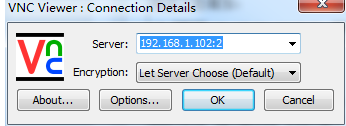
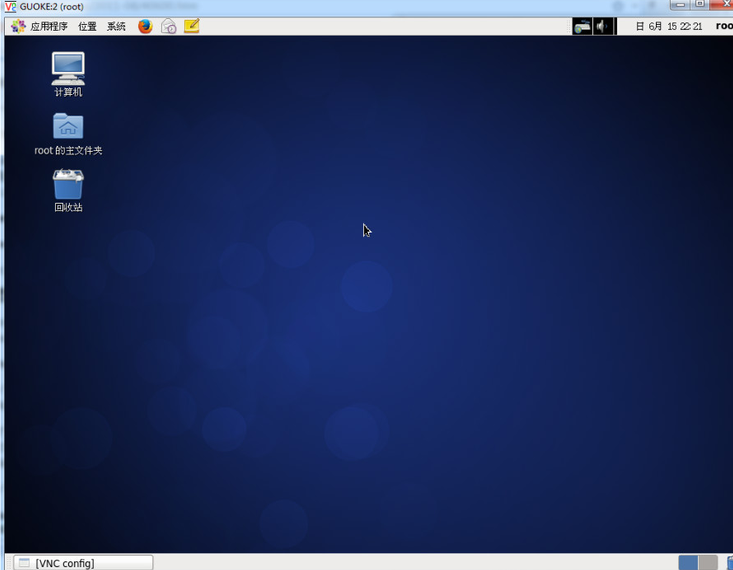
本文转自灬落魄灬 51CTO博客,原文链接:http://blog.51cto.com/smoke520/1796018,如需转载请自行联系原作者