SSH整合框架+mysql简单的实现
1. 框架整合原理:
struts2整合Spring 两种:
一种struts2自己创建Action,自动装配Service ;
一种 将Action交给Spring管理,通过Bean依赖,注入Service
**** 引入jar包,改写Struts2 默认对象工厂, 默认StrutsObjectFactory 改为 StrutsSpringObjectFactory
spring整合hibernate, 将sessionFactory 由Spring管理,将SessionFactory 注入HibernateTemplate , DAO通过HibernateTemplate 操作Hibernate 。
2. 导入jar包(struts2、spring、hibernate框架需要的包及详细说明)
通过这个过程,了解SSH框架所需要的jar包,以及它们的各自用途。下面是我引入的最小jar包的列表:
Struts2 9个
1.struts2-core-2.2.3.jar struts的核心jar包。
2.freemarker-2.3.16.jar Freemarker是struts2默认的模版语言
3.commons-logging-1.1.1.jar Apache Commons包中的一个,包含了日志功能,必须使用的jar包
4.ognl-3.0.1.jar Struts2默认的表达式语言OGNL:对象图形化导航语言
5.xwork-core-2.2.3.jar Struts2核心包,毕竟struts2很大部分是来webwork6.commons-io-2.0.1.jar 封装了一些输入输出流的常用操作
7.commons-fileupload-1.2.2.jar 用来实现文件上传
8. struts2-json-plugin-2.2.3.jar JSON 插件提供了一个 "json" 结果类型来把 action 序列化成 JSON
9. struts2-spring-plugin-2.1.6.jar 使struts2能集成到spring中
Spring框架 13个
1.org.springframework.aop.jar 包含在应用中使用Spring的AOP特性时所需的类
2. org.springframework.beans.jar 所有应用都要用到的,它包含访问配置文件、创建和管理bean以及进行Inversion of Control / Dependency Injection(IoC/DI)操作相关的所有类。
3.org.springframework.context.support.jar 包含支持缓存Cache(ehcache)、JCA、JMX、邮件服务(Java Mail、COS Mail)、任务计划Scheduling(Timer、Quartz)方面的类。
4.org.springframework.context.jar 为Spring核心提供了大量扩展。可以找到使用Spring ApplicationContext特性时所需的全部类,JDNI所需的全部类,UI方面的用来与模板(Templating)引擎如 Velocity、FreeMarker、 JasperReports集成的类,以及校验Validation方面的相关类。
5.org.springframework.core.jar 包含Spring框架基本的核心工具类,Spring其它组件要都要使用到这个包里的类,是其它组件的基本核心。
6.org.springframework.expression.jar Spring表达式语言
7.org.springframework.jdbc.jar 包含对Spring对JDBC数据访问进行封装的所有类。
8.org.springframework.jms.jar 提供了对JMS 1.0.2/1.1的支持类。
9. org.springframework.orm.jar 包含Spring对DAO特性集进行了扩展,使其支持 iBATIS、JDO、OJB、TopLink,因为Hibernate已经独立成包了,现在不包含在这个包里了。这个jar文件里大部分的类都要依赖spring-dao.jar里的类,用这个包时你需要同时包含spring-dao.jar包。
10.org.springframework.transaction.jar 为JDBC、Hibernate、JDO、JPA等提供的一致的声明式和编程式事务管理。
11.org.springframework.web.struts.jar Struts框架支持,可以更方便更容易的集成Struts框架。
12.org.springframework.web.jar 包含Web应用开发时,用到Spring框架时所需的核心类,包括自动载入WebApplicationContext特性的类、Struts与JSF集成类、文件上传的支持类、Filter类和大量工具辅助类。
13. org.springframework.asm.jar Spring独立的asm程序, Spring2.5.6的时候需要asmJar 包,3.0开始提供他自己独立的asmJar
Hibernate3框架10个
1.hibernate3.jar 这个是hibernate3.0的核心jar包,必须的,没的选,像我们常用的Session,Query,Transaction都位于这个jar文件中,必要。
2.cglib-2.1.3.jar CGLIB库,Hibernate用它来实现PO字节码的动态生成,非常核心的库,必要。
3.asm.jar ASM字节码库 如果使用“cglib”则必要,必要
4.asm-attrs.jar ASM字节码库 如果使用“cglib”则必要,必要
5.ehcache.jar EHCache缓存 如果没有其它缓存,则必要,必要
6.antlr.jar 语言转换工,Hibernate利用它实现 HQL 到 SQL。 ANother Tool for Language Recognition是一个工具,必要
7.jta.jar JTA规范,当Hibernate使用JTA的时候需要,不过AppServer都会带上,所以也是多余的。但是为了测试方便建议还是带上。必要
8.commons-collections.jar ApacheCommons包中的一个,包含了一些Apache开发的集合类,功能比java.util.*强大。必要
9.dom4j 是一个Java的XMLAPI,类似于jdom,用来读写XML文件的。Hibernate用它来读写配置文件。必要
10.C3P0.jar C3P0数据库连接池提供数据库连接池
其他4个
1. com.springsource.javax.mail-1.4.0.jar Java email组建,提供email的常用方法
2. mysql-connector-java-5.0.8-bin.jar mysql数据库驱动
3. commons-lang-2.3.jar Apache Commons包中的一个,包含了一些数据类型工具类,是java.lang.*的扩展。必须使用的jar包http://commons.apache.org/lang/
4. log4j-1.2.15.jar 提供日志功能http://logging.apache.org/log4j/
单元测试和其他
junit-4.10.jar
xercesImpl-2.8.1.jar ---这里用到Base64编码(可以不引入)
*网上下载相关包链接:
Struts2:http://struts.apache.org/2.2.3/index.html
hibernate3:http://sourceforge.net/projects/hibernate/files/hibernate3/
spring3:http://www.springsource.org/download
3. 创建web项目与包结构:

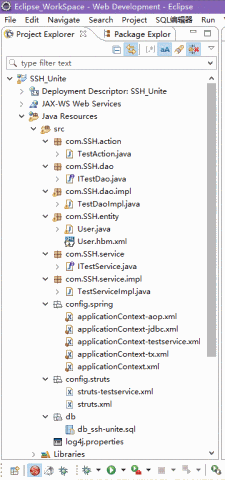

4. 配置SSH开发框架
一般Java都是三层架构 数据访问层(dao) 业务逻辑层(biz 或者services) 界面层(ui)
action 是业务层的一部分,是一个管理器 (总开关)(作用是取掉转)(取出前台界面的数据,调用biz方法,转发到下一个action或者页面)  模型成(model)一般是实体对象(把现实的的事物变成java中的对象)作用是一暂时存储数据方便持久化(存入数据库或者写入文件)而是 作为一个包裹封装一些数据来在不同的层以及各种java对象中使用  dao是数据访问层 就是用来访问数据库实现数据的持久化(把内存中的数据永久保存到硬盘中)
Dao主要做数据库的交互工作
Modle 是模型 存放你的实体类
Service 做相应的业务逻辑处理
Action是一个控制器
1.在web.xml中加入如下代码令服务器自动加载Spring ,Struts,Hibernate
1: xml version="1.0" encoding="UTF-8"?>
2: <web-app xmlns:xsi="http://www.w3.org/2001/XMLSchema-instance"
3: xmlns="http://java.sun.com/xml/ns/javaee"
4: xsi:schemaLocation="http://java.sun.com/xml/ns/javaee http://java.sun.com/xml/ns/javaee/web-app_2_5.xsd"
5: id="WebApp_ID" version="2.5">
6:
7: <listener>
8: <listener-class>org.springframework.web.context.ContextLoaderListenerlistener-class>
9: listener>
10:
11:
12: <context-param>
13: <param-name>contextConfigLocationparam-name>
14: <param-value>classpath:config/spring/applicationContext.xmlparam-value>
15: context-param>
16:
17:
18: <filter>
19: <filter-name>characterEncodingFilterfilter-name>
20: <filter-class>org.springframework.web.filter.CharacterEncodingFilterfilter-class>
21: <init-param>
22: <param-name> encodingparam-name>
23: <param-value>UTF-8param-value>
24: init-param>
25: filter>
26: <filter-mapping>
27: <filter-name>characterEncodingFilterfilter-name>
28: <url-pattern>/*url-pattern>
29: filter-mapping>
30:
31:
32:
33:
34:
35: <filter>
36: <filter-name>OpenSessionInViewFilterfilter-name>
37: <filter-class>org.springframework.orm.hibernate5.support.OpenSessionInViewFilterfilter-class>
38: filter>
39: <filter-mapping>
40: <filter-name>OpenSessionInViewFilterfilter-name>
41: <url-pattern>/*url-pattern>
42: filter-mapping>
43:
44:
45:
46: <filter>
47: <filter-name>struts2filter-name>
48: <filter-class>org.apache.struts2.dispatcher.ng.filter.StrutsPrepareAndExecuteFilterfilter-class>
49:
50: <init-param>
51: <param-name>configparam-name>
52: <param-value>struts-default.xml,struts-plugin.xml,config/struts/struts.xmlparam-value>
53: init-param>
54: filter>
55: <filter-mapping>
56: <filter-name>struts2filter-name>
57: <url-pattern>/*url-pattern>
58: filter-mapping>
59:
60: <display-name>SSH_Unitedisplay-name>
61: <welcome-file-list>
62: <welcome-file>index.jspwelcome-file>
63: welcome-file-list>
64:
65:
66: web-app>
2.配置主Spring的配置文件用于加载其实的Spring其它的配置文件:
1: xml version="1.0" encoding="UTF-8"?>
2: <beans xmlns="http://www.springframework.org/schema/beans"
3: xmlns:xsi="http://www.w3.org/2001/XMLSchema-instance" xmlns:aop="http://www.springframework.org/schema/aop"
4: xmlns:tx="http://www.springframework.org/schema/tx"
5: xsi:schemaLocation="http://www.springframework.org/schema/beans
6: http://www.springframework.org/schema/beans/spring-beans.xsd
7: http://www.springframework.org/schema/tx
8: http://www.springframework.org/schema/tx/spring-tx.xsd
9: http://www.springframework.org/schema/aop
10: http://www.springframework.org/schema/aop/spring-aop.xsd">
11:
12:
13:
14: <import resource="applicationContext-*.xml" />
15:
16:
22:
23: beans>
3.配置 applicationContext-tx.xml 文件用于统一管理事务相关的配置
1: xml version="1.0" encoding="UTF-8"?>
2: <beans xmlns="http://www.springframework.org/schema/beans"
3: xmlns:xsi="http://www.w3.org/2001/XMLSchema-instance"
4: xmlns:aop="http://www.springframework.org/schema/aop"
5: xmlns:tx="http://www.springframework.org/schema/tx"
6: xsi:schemaLocation="http://www.springframework.org/schema/beans
7: http://www.springframework.org/schema/beans/spring-beans.xsd
8: http://www.springframework.org/schema/tx
9: http://www.springframework.org/schema/tx/spring-tx.xsd
10: http://www.springframework.org/schema/aop
11: http://www.springframework.org/schema/aop/spring-aop.xsd">
12:
13:
14:
15: <bean id="transactionManager" class="org.springframework.orm.hibernate5.HibernateTransactionManager">
16:
17: <property name="sessionFactory" ref="sessionFactory">property>
18: bean>
19:
20:
21: <tx:advice id="txAdvice" transaction-manager="transactionManager">
22:
23: <tx:attributes>
24: <tx:method name="*" read-only="false" propagation="REQUIRED"/>
25: <tx:method name="find*" read-only="true" propagation="SUPPORTS"/>
26: tx:attributes>
27: tx:advice>
28:
29:
30: <aop:config>
31: <aop:advisor advice-ref="txAdvice" pointcut-ref="pt1"/>
32: aop:config>
33: beans>
4.配置 applicationContext-aop.xml 文件用于统一管理AOP相关的配置
1: xml version="1.0" encoding="UTF-8"?>
2: <beans xmlns="http://www.springframework.org/schema/beans"
3: xmlns:xsi="http://www.w3.org/2001/XMLSchema-instance" xmlns:aop="http://www.springframework.org/schema/aop"
4: xmlns:tx="http://www.springframework.org/schema/tx"
5: xsi:schemaLocation="http://www.springframework.org/schema/beans
6: http://www.springframework.org/schema/beans/spring-beans.xsd
7: http://www.springframework.org/schema/tx
8: http://www.springframework.org/schema/tx/spring-tx.xsd
9: http://www.springframework.org/schema/aop
10: http://www.springframework.org/schema/aop/spring-aop.xsd">
11:
12:
13: <aop:config>
14:
15: <aop:pointcut expression="execution(* com.SSH.service.impl.*.*(..))" id="pt1" />
16: aop:config>
17: beans>
5.配置 applicationContext-jdbc.xml 文件用于统一管理所有和连接数据库相关的配置
1: xml version="1.0" encoding="UTF-8"?>
2: <beans xmlns="http://www.springframework.org/schema/beans"
3: xmlns:xsi="http://www.w3.org/2001/XMLSchema-instance" xmlns:aop="http://www.springframework.org/schema/aop"
4: xmlns:tx="http://www.springframework.org/schema/tx"
5: xsi:schemaLocation="http://www.springframework.org/schema/beans
6: http://www.springframework.org/schema/beans/spring-beans.xsd
7: http://www.springframework.org/schema/tx
8: http://www.springframework.org/schema/tx/spring-tx.xsd
9: http://www.springframework.org/schema/aop
10: http://www.springframework.org/schema/aop/spring-aop.xsd">
11:
12:
13: <bean id="sessionFactory"
14: class="org.springframework.orm.hibernate5.LocalSessionFactoryBean">
15:
16: <property name="dataSource" ref="dataSource">property>
17:
18: <property name="hibernateProperties">
19: <props>
20: <prop key="hibernate.dialect">org.hibernate.dialect.MySQLDialectprop>
21: <prop key="hibernate.show_sql">trueprop>
22: <prop key="hibernate.format_sql">falseprop>
23: <prop key="hibernate.hbm2ddl.auto">updateprop>
24: <prop key="hibernate.current_session_context_class">org.springframework.orm.hibernate5.SpringSessionContext
25: prop>
26: props>
27: property>
28:
29: <property name="mappingLocations">
30: <array>
31:
32: <value>classpath:com/SSH/entity/*.hbm.xmlvalue>
33: array>
34: property>
35: bean>
36:
37:
38:
39: <bean id="dataSource"
40: class="org.springframework.jdbc.datasource.DriverManagerDataSource">
41: <property name="driverClassName" value="com.mysql.jdbc.Driver">property>
42: <property name="url" value="jdbc:mysql://localhost:3306/SSH_Unite">property>
43: <property name="username" value="root">property>
44: <property name="password" value="password">property>
45: bean>
46: beans>
6.配置单个指定文件 applicationContext-testservice.xml 文件 统一管理持久层,业务层与动作类
1: xml version="1.0" encoding="UTF-8"?>
2: <beans xmlns="http://www.springframework.org/schema/beans"
3: xmlns:xsi="http://www.w3.org/2001/XMLSchema-instance" xmlns:aop="http://www.springframework.org/schema/aop"
4: xmlns:tx="http://www.springframework.org/schema/tx"
5: xsi:schemaLocation="http://www.springframework.org/schema/beans
6: http://www.springframework.org/schema/beans/spring-beans.xsd
7: http://www.springframework.org/schema/tx
8: http://www.springframework.org/schema/tx/spring-tx.xsd
9: http://www.springframework.org/schema/aop
10: http://www.springframework.org/schema/aop/spring-aop.xsd">
11:
12: <bean id="testDao" class="com.SSH.dao.impl.TestDaoImpl">
13:
14: <property name="sessionFactory" ref="sessionFactory">property>
15: bean>
16:
17:
18: <bean id="testService" class="com.SSH.service.impl.TestServiceImpl">
19:
20: <property name="testDao" ref="testDao">property>
21: bean>
22:
23:
24:
25: <bean id="testAction" class="com.SSH.action.TestAction" scope="prototype">
26:
27: <property name="testService" ref="testService">property>
28: bean>
29:
30:
31: beans>
7.配置struts.xml文件 统一管理struts的公共配置文件
1: xml version="1.0" encoding="UTF-8"?>
2: DOCTYPE struts PUBLIC
3: "-//Apache Software Foundation//DTD Struts Configuration 2.3//EN"
4: "http://struts.apache.org/dtds/struts-2.3.dtd">
5: <struts>
6:
7:
8: <constant name="struts.devMode" value="true">constant>
9:
10:
11: <package name="myDefault" extends="struts-default" abstract="true">
12:
13: package>
14:
15:
16:
17: <include file="config/struts/struts-*.xml">include>
18: struts>
8.配置 struts-testservice.xml 文件 动作类配置便于统一管理动作类(TestAction)
1: xml version="1.0" encoding="UTF-8"?>
2: DOCTYPE struts PUBLIC
3: "-//Apache Software Foundation//DTD Struts Configuration 2.3//EN"
4: "http://struts.apache.org/dtds/struts-2.3.dtd">
5: <struts>
6:
7: <constant name="struts.enable.DynamicMethodInvocation" value="true">constant>
8:
9: <package name="test" extends="myDefault" namespace="/test">
10:
15:
16: <action name="testAction_*" class="testAction" method="{1}">
17: <result name="success" >/success.jspresult>
18: <result name="input">/index.jspresult>
19: action>
20:
21: package>
22: struts>
9.编写控制器action动作类 TestAction.java类
package com.SSH.action;
2:
import com.SSH.entity.User;
import com.SSH.service.ITestService;
import com.opensymphony.xwork2.ActionSupport;
import com.opensymphony.xwork2.ModelDriven;
7:
/**
* Test 动作类
*
* @author HRuinger
*
*/
14:
implements ModelDriven{
16:
long serialVersionUID = 1L;
18:
new User();
20:
private ITestService testService;
22:
void setTestService(ITestService testService) {
this.testService = testService;
25: }
26:
27: @Override
public User getModel() {
// TODO Auto-generated method stub
return user;
31: }
32:
// 用户登录
public String login() {
35: User exUser = testService.findUser(user);
if (exUser != null) {
return SUCCESS;
else {
// 说明错误了
);
return INPUT;
42: }
43: }
44:
45: }
package com.SSH.service;
2:
import com.SSH.entity.User;
4:
interface ITestService {
6:
7: User findUser(User user);
8:
9: }
11.编写Service层实现类TestServiceImpl.java
package com.SSH.service.impl;
2:
import com.SSH.dao.ITestDao;
import com.SSH.entity.User;
import com.SSH.service.ITestService;
6:
/**
* 业务实现层
*
* @author HRuinger
*
*/
13:
implements ITestService {
15:
private ITestDao testDao;
17:
void setTestDao(ITestDao testDao) {
this.testDao = testDao;
20: }
21:
22: @Override
public User findUser(User user) {
24:
return testDao.find(user);
26: }
27:
28: }
12.编写数据访问层(Dao层)接口 ITestDao.java类
package com.SSH.dao;
2:
import com.SSH.entity.User;
4:
/**
*
* @author HRuinger
*
*/
10:
11:
interface ITestDao {
13:
14:
15: User find(User user);
16:
17: }
13.编写访问层实现类TestDaoImpl.java
package com.SSH.dao.impl;
2:
import java.util.List;
4:
import org.springframework.orm.hibernate5.support.HibernateDaoSupport;
6:
import com.SSH.dao.ITestDao;
import com.SSH.entity.User;
9:
/**
*
* @author HRuinger
*
*/
15:
implements ITestDao {
17:
18: @Override
public User find(User user) {
20: String username =user.getUsername();
21: String password = user.getPassword();
;
this.getHibernateTemplate().find(hql, username,password);
if(list != null && list.size() > 0){
return list.get(0);
26: }
return null;
28: }
29:
30: }
14.编写实体类(模型)Userjava类
package com.SSH.entity;
// Generated 2016-9-26 17:31:58 by Hibernate Tools 5.1.0.Beta1
3:
/**
* User generated by hbm2java
*/
implements java.io.Serializable {
8:
private Integer id;
private String username;
private String password;
12:
public User() {
14: }
15:
public User(String username, String password) {
this.username = username;
this.password = password;
19: }
20:
public Integer getId() {
this.id;
23: }
24:
void setId(Integer id) {
this.id = id;
27: }
28:
public String getUsername() {
this.username;
31: }
32:
void setUsername(String username) {
this.username = username;
35: }
36:
public String getPassword() {
this.password;
39: }
40:
void setPassword(String password) {
this.password = password;
43: }
44:
45: @Override
public String toString() {
;
48: }
49:
50: }
15.编写映射文件User.hbm.xml
>
>
>
>
>
/>
/>
>
>
/>
>
>
/>
>
>
>
<-- 14、15 两步可以用eclipse的插件来生成对应的文件,依据对应的数据库 -->
16.用到的对应的数据库文件 db_ssh-unite.sql
首先创建ssh_unite数据库:
create database ssh_unite;
然后运行下面语句便可:
/*
Navicat MySQL Data Transfer
Source Server : Mysql
Source Server Version : 50549
Source Host : localhost:3306
Source Database : ssh_unite
Target Server Type : MYSQL
Target Server Version : 50549
File Encoding : 65001
Date: 2016-09-29 15:29:54
*/
15:
SET FOREIGN_KEY_CHECKS=0;
17:
-- ----------------------------
-- Table structure for user
-- ----------------------------
user`;
user` (
NULL AUTO_INCREMENT,
NULL,
NULL,
KEY (`id`)
DEFAULT CHARSET=utf8;
28:
-- ----------------------------
-- Records of user
-- ----------------------------
'aaa');
'bbb');
'1234');
效果图片:

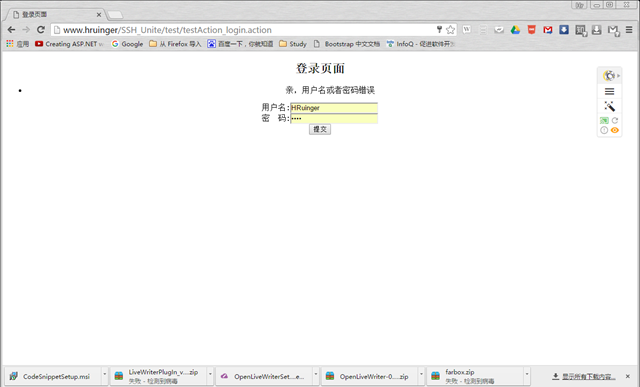
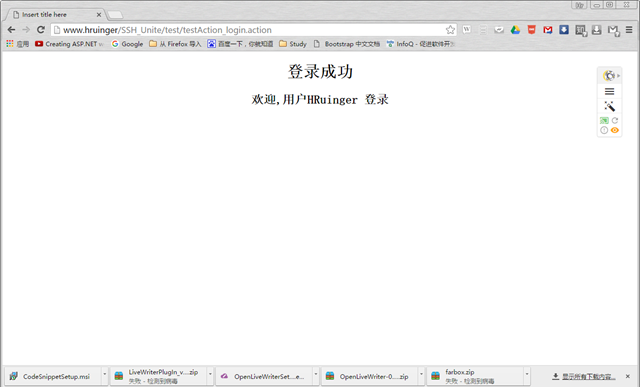
有需要源代码 的请留言,到时 再上传。