概述
RocketMQ 发送普通消息有三种
- 可靠同步发送
- 可靠异步发送
- 单向(oneway)发送 :只管发送,直接返回,不等待消息服务器的结果,也不注册回调函数,简单地说,就是只管发,不管信息是否发送到了消息服务器中。
发送消息示例
        /*
         * Instantiate with a producer group name.
         */
        DefaultMQProducer producer = new DefaultMQProducer("please_rename_unique_group_name");

        /*
         * Specify name server addresses.
         * <p/>
         *
         * Alternatively, you may specify name server addresses via exporting environmental variable: NAMESRV_ADDR
         * <pre>
         * {@code
         * producer.setNamesrvAddr("name-server1-ip:9876;name-server2-ip:9876");
         * }
         * </pre>
         */

        /*
         * Launch the instance.
         */
        producer.start();

        for (int i = 0; i < 1000; i++) {
            try {

                /*
                 * Create a message instance, specifying topic, tag and message body.
                 */
                Message msg = new Message("TopicTest" /* Topic */,
                    "TagA" /* Tag */,
                    ("Hello RocketMQ " + i).getBytes(RemotingHelper.DEFAULT_CHARSET) /* Message body */
                );

                /*
                 * Call send message to deliver message to one of brokers.
                 */
                SendResult sendResult = producer.send(msg);

                System.out.printf("%s%n", sendResult);
            } catch (Exception e) {
                e.printStackTrace();
                Thread.sleep(1000);
            }
        }

        /*
         * Shut down once the producer instance is not longer in use.
         */
        producer.shutdown();
可以看到创建一个 DefaultMQProducer ,之后调用 start 方法后就可以使用send 方法发送消息了。
源码阅读
来看一下 Message 的结构,几个字段的作用
- topic : 主题
- tag : 用于消息过滤
- key : Message 索引键,RocketMQ可以利用这些key快速检索到消息。
- body: 消息内容
public class Message implements Serializable {
    private static final long serialVersionUID = 8445773977080406428L;

    private String topic;
    private int flag;
    private Map<String, String> properties;
    private byte[] body;


    public Message(String topic, String tags, String keys, int flag, byte[] body, boolean waitStoreMsgOK) {
        this.topic = topic;
        this.flag = flag;
        this.body = body;

        if (tags != null && tags.length() > 0)
            this.setTags(tags);

        if (keys != null && keys.length() > 0)
            this.setKeys(keys);

        this.setWaitStoreMsgOK(waitStoreMsgOK);
    }

    public void setWaitStoreMsgOK(boolean waitStoreMsgOK) {
        this.putProperty(MessageConst.PROPERTY_WAIT_STORE_MSG_OK, Boolean.toString(waitStoreMsgOK));
    }

    ...
    ...

}
DefaultMQProducer
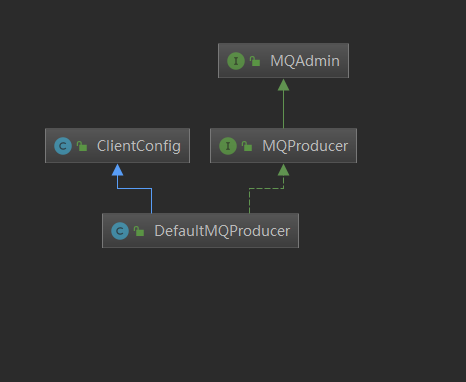
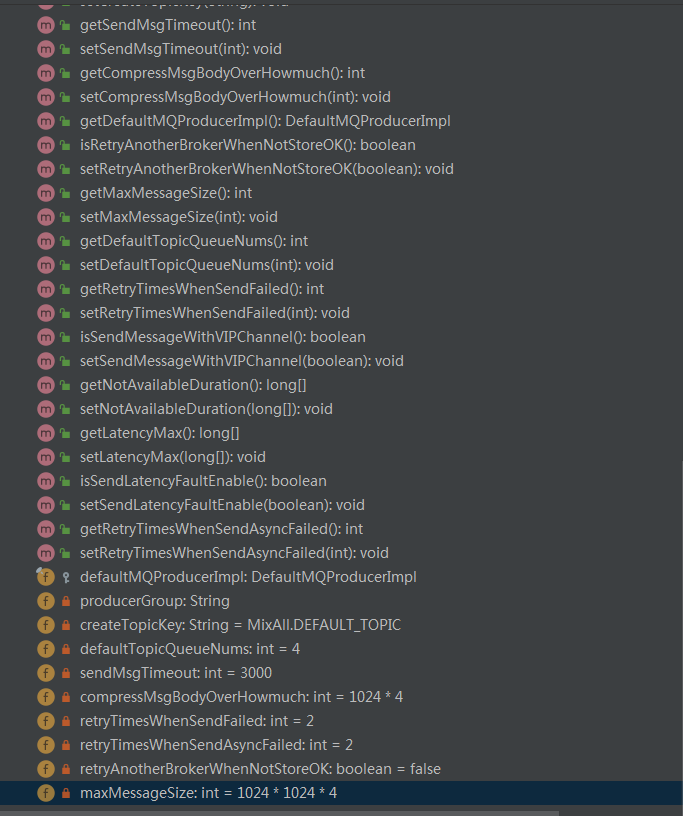
先看一下类结构和主要字段,可以知道 DefaultMQProducer 使用委托模式,维护重要的几个属性字段,其他的逻辑实现依靠 DefaultMQProducerImpl 来处理。 在一个我们可以学习类结构,继承实体类或是抽象类用于扩展,继承接口用于规范固有的功能和方法。
    @Override
    public void start() throws MQClientException {
        this.defaultMQProducerImpl.start();
    }


    //defaultMQProducerImpl#start
    public void start() throws MQClientException {
        this.start(true);
    }

    public void start(final boolean startFactory) throws MQClientException {
        switch (this.serviceState) {
            case CREATE_JUST:
                this.serviceState = ServiceState.START_FAILED;
                //No.1 检查配置,更改instanceName 为 PID
                this.checkConfig();
                if (!this.defaultMQProducer.getProducerGroup().equals(MixAll.CLIENT_INNER_PRODUCER_GROUP)) {
                    this.defaultMQProducer.changeInstanceNameToPID();
                }
                //No.2  获取一个 MQClientInstance
                this.mQClientFactory = MQClientManager.getInstance().getAndCreateMQClientInstance(this.defaultMQProducer, rpcHook);
                //No.3  向 MQClientInstance 注册,将当前生产者加入到 MQClientInstance 管理中,方便后续调用网络请求,进行心跳检测等
                boolean registerOK = mQClientFactory.registerProducer(this.defaultMQProducer.getProducerGroup(), this);
                if (!registerOK) {
                    this.serviceState = ServiceState.CREATE_JUST;
                    throw new MQClientException("The producer group[" + this.defaultMQProducer.getProducerGroup()
                        + "] has been created before, specify another name please." + FAQUrl.suggestTodo(FAQUrl.GROUP_NAME_DUPLICATE_URL),
                        null);
                }

                //放置一个默认的topic 到 topicPublishInfoTable 中去
                this.topicPublishInfoTable.put(this.defaultMQProducer.getCreateTopicKey(), new TopicPublishInfo());

                if (startFactory) {
                    //No.4 启动 MQClientInstance
                    mQClientFactory.start();
                }

                log.info("the producer [{}] start OK. sendMessageWithVIPChannel={}", this.defaultMQProducer.getProducerGroup(),
                    this.defaultMQProducer.isSendMessageWithVIPChannel());
                this.serviceState = ServiceState.RUNNING;
                break;
            case RUNNING:
            case START_FAILED:
            case SHUTDOWN_ALREADY:
                throw new MQClientException("The producer service state not OK, maybe started once, "
                    + this.serviceState
                    + FAQUrl.suggestTodo(FAQUrl.CLIENT_SERVICE_NOT_OK),
                    null);
            default:
                break;
        }
        //No.5  看名字可以知道发送心跳包给所有的 Broker 并且是带锁的
        this.mQClientFactory.sendHeartbeatToAllBrokerWithLock();
    }
public class MQClientManager {
    private final static Logger log = ClientLogger.getLog();
    private static MQClientManager instance = new MQClientManager();
    private AtomicInteger factoryIndexGenerator = new AtomicInteger();
    private ConcurrentMap<String/* clientId */, MQClientInstance> factoryTable =
        new ConcurrentHashMap<String, MQClientInstance>();

    private MQClientManager() {

    }

    public static MQClientManager getInstance() {
        return instance;
    }

    public MQClientInstance getAndCreateMQClientInstance(final ClientConfig clientConfig) {
        return getAndCreateMQClientInstance(clientConfig, null);
    }

    public MQClientInstance getAndCreateMQClientInstance(final ClientConfig clientConfig, RPCHook rpcHook) {
        // clientId为客户端IP+instance+(unitname可选)
        String clientId = clientConfig.buildMQClientId();
        MQClientInstance instance = this.factoryTable.get(clientId);
        if (null == instance) {
            instance =
                new MQClientInstance(clientConfig.cloneClientConfig(),
                    this.factoryIndexGenerator.getAndIncrement(), clientId, rpcHook);
            MQClientInstance prev = this.factoryTable.putIfAbsent(clientId, instance);
            if (prev != null) {
                instance = prev;
                log.warn("Returned Previous MQClientInstance for clientId:[{}]", clientId);
            } else {
                log.info("Created new MQClientInstance for clientId:[{}]", clientId);
            }
        }

        return instance;
    }

    public void removeClientFactory(final String clientId) {
        this.factoryTable.remove(clientId);
    }
}
MQClientManager 使用单例模式,维护一系列的 MQClientInstance
    // MQClientInstance#start 方法
    public void start() throws MQClientException {

        synchronized (this) {
            switch (this.serviceState) {
                case CREATE_JUST:
                    this.serviceState = ServiceState.START_FAILED;
                    // If not specified,looking address from name server
                    if (null == this.clientConfig.getNamesrvAddr()) {
                        this.mQClientAPIImpl.fetchNameServerAddr();
                    }
                    // Start request-response channel
                    this.mQClientAPIImpl.start();
                    // Start various schedule tasks
                    this.startScheduledTask();
                    // Start pull service
                    this.pullMessageService.start();
                    // Start rebalance service
                    this.rebalanceService.start();
                    // Start push service
                    this.defaultMQProducer.getDefaultMQProducerImpl().start(false);
                    log.info("the client factory [{}] start OK", this.clientId);
                    this.serviceState = ServiceState.RUNNING;
                    break;
                case RUNNING:
                    break;
                case SHUTDOWN_ALREADY:
                    break;
                case START_FAILED:
                    throw new MQClientException("The Factory object[" + this.getClientId() + "] has been created before, and failed.", null);
                default:
                    break;
            }
        }
    }
可以看到 MQClientInstance 的start方法才是重中之重,连接获取信息变化的逻辑都是在 start 方法中开启的。MQClientInstance 封装了网络处理 API ,是生产者,消费者与 NameServer,Broker打交道的网络通道。
消息发送
以下面发送方法为例
    public void send(Message msg, SendCallback sendCallback, long timeout)
        throws MQClientException, RemotingException, InterruptedException {
        try {
            this.sendDefaultImpl(msg, CommunicationMode.ASYNC, sendCallback, timeout);
        } catch (MQBrokerException e) {
            throw new MQClientException("unknownn exception", e);
        }
    }

    private SendResult sendDefaultImpl(
        Message msg,
        final CommunicationMode communicationMode,
        final SendCallback sendCallback,
        final long timeout
    ) throws MQClientException, RemotingException, MQBrokerException, InterruptedException {
        this.makeSureStateOK();
        Validators.checkMessage(msg, this.defaultMQProducer);

        final long invokeID = random.nextLong();
        long beginTimestampFirst = System.currentTimeMillis();
        long beginTimestampPrev = beginTimestampFirst;
        long endTimestamp = beginTimestampFirst;
        // No.1 在缓冲中寻找是否有该TopicPublishInfo ,没有(第一次)则在NameServer中获取路由信息,封装,配置最后返回一个 TopicPublishInfo
        TopicPublishInfo topicPublishInfo = this.tryToFindTopicPublishInfo(msg.getTopic());
        if (topicPublishInfo != null && topicPublishInfo.ok()) {
            MessageQueue mq = null;
            Exception exception = null;
            SendResult sendResult = null;
            //重试次数
            int timesTotal = communicationMode == CommunicationMode.SYNC ? 1 + this.defaultMQProducer.getRetryTimesWhenSendFailed() : 1;
            int times = 0;
            String[] brokersSent = new String[timesTotal];
            for (; times < timesTotal; times++) {

                String lastBrokerName = null == mq ? null : mq.getBrokerName();
                //No.2 选择一个消息发送队列
                MessageQueue mqSelected = this.selectOneMessageQueue(topicPublishInfo, lastBrokerName);
                if (mqSelected != null) {
                    mq = mqSelected;
                    brokersSent[times] = mq.getBrokerName();
                    try {
                        beginTimestampPrev = System.currentTimeMillis();
                        //No.3 最后进行发送核心方法
                        sendResult = this.sendKernelImpl(msg, mq, communicationMode, sendCallback, topicPublishInfo, timeout);
                        endTimestamp = System.currentTimeMillis();
                        this.updateFaultItem(mq.getBrokerName(), endTimestamp - beginTimestampPrev, false);
                        switch (communicationMode) {
                            case ASYNC:
                                return null;
                            case ONEWAY:
                                return null;
                            case SYNC:
                                if (sendResult.getSendStatus() != SendStatus.SEND_OK) {
                                    if (this.defaultMQProducer.isRetryAnotherBrokerWhenNotStoreOK()) {
                                        continue;
                                    }
                                }

                                return sendResult;
                            default:
                                break;
                        }
                    } catch (RemotingException e) {
       		...
       		...
       		(异常处理相关)

	}


    private TopicPublishInfo tryToFindTopicPublishInfo(final String topic) {
        TopicPublishInfo topicPublishInfo = this.topicPublishInfoTable.get(topic);
        //第一次找不到会插入一个
        if (null == topicPublishInfo || !topicPublishInfo.ok()) {
            this.topicPublishInfoTable.putIfAbsent(topic, new TopicPublishInfo());
            //更新到NameServer
            this.mQClientFactory.updateTopicRouteInfoFromNameServer(topic);
            topicPublishInfo = this.topicPublishInfoTable.get(topic);
        }

        if (topicPublishInfo.isHaveTopicRouterInfo() || topicPublishInfo.ok()) {
            return topicPublishInfo;
        } else {
            this.mQClientFactory.updateTopicRouteInfoFromNameServer(topic, true, this.defaultMQProducer);
            topicPublishInfo = this.topicPublishInfoTable.get(topic);
            return topicPublishInfo;
        }
    }


    public boolean updateTopicRouteInfoFromNameServer(final String topic) {
        return updateTopicRouteInfoFromNameServer(topic, false, null);
    }


    public boolean updateTopicRouteInfoFromNameServer(final String topic, boolean isDefault,
        DefaultMQProducer defaultMQProducer) {
        try {
            if (this.lockNamesrv.tryLock(LOCK_TIMEOUT_MILLIS, TimeUnit.MILLISECONDS)) {
                try {
                    TopicRouteData topicRouteData;
                    if (isDefault && defaultMQProducer != null) {
                        //使用默认 topic 去查询
                        topicRouteData = this.mQClientAPIImpl.getDefaultTopicRouteInfoFromNameServer(defaultMQProducer.getCreateTopicKey(),
                            1000 * 3);
                        if (topicRouteData != null) {
                            for (QueueData data : topicRouteData.getQueueDatas()) {
                                int queueNums = Math.min(defaultMQProducer.getDefaultTopicQueueNums(), data.getReadQueueNums());
                                data.setReadQueueNums(queueNums);
                                data.setWriteQueueNums(queueNums);
                            }
                        }
                    } else {
                        //使用 topic 去查询
                        topicRouteData = this.mQClientAPIImpl.getTopicRouteInfoFromNameServer(topic, 1000 * 3);
                    }
                    if (topicRouteData != null) {
                        TopicRouteData old = this.topicRouteTable.get(topic);
                        boolean changed = topicRouteDataIsChange(old, topicRouteData);
                        if (!changed) {
                            changed = this.isNeedUpdateTopicRouteInfo(topic);
                        } else {
                            log.info("the topic[{}] route info changed, old[{}] ,new[{}]", topic, old, topicRouteData);
                        }

                        if (changed) {
                            TopicRouteData cloneTopicRouteData = topicRouteData.cloneTopicRouteData();

                            for (BrokerData bd : topicRouteData.getBrokerDatas()) {
                                this.brokerAddrTable.put(bd.getBrokerName(), bd.getBrokerAddrs());
                            }

                            // Update Pub info
                            {
                                //使 topicRouteData 封装成 TopicPublishInfo
                                TopicPublishInfo publishInfo = topicRouteData2TopicPublishInfo(topic, topicRouteData);
                                publishInfo.setHaveTopicRouterInfo(true);
                                Iterator<Entry<String, MQProducerInner>> it = this.producerTable.entrySet().iterator();
                                while (it.hasNext()) {
                                    Entry<String, MQProducerInner> entry = it.next();
                                    MQProducerInner impl = entry.getValue();
                                    if (impl != null) {
                                        impl.updateTopicPublishInfo(topic, publishInfo);
                                    }
                                }
                            }

                            // Update sub info
                            {
                                Set<MessageQueue> subscribeInfo = topicRouteData2TopicSubscribeInfo(topic, topicRouteData);
                                Iterator<Entry<String, MQConsumerInner>> it = this.consumerTable.entrySet().iterator();
                                while (it.hasNext()) {
                                    Entry<String, MQConsumerInner> entry = it.next();
                                    MQConsumerInner impl = entry.getValue();
                                    if (impl != null) {
                                        impl.updateTopicSubscribeInfo(topic, subscribeInfo);
                                    }
                                }
                            }
                            log.info("topicRouteTable.put. Topic = {}, TopicRouteData[{}]", topic, cloneTopicRouteData);
                            this.topicRouteTable.put(topic, cloneTopicRouteData);
                            return true;
                        }
                  ...
                  ...
                  ...
                  (异常处理)
    }
篇幅太长,后续继续源码分析
参考资料
- 《RocketMQ技术内幕》