这是Wopus的第一篇XAMPP的文章:使用XAMPP在电脑中运行WordPress–安装篇;
XAMPP安装好之后启动,但有些用户在启动apache的时候会出现:
16:50:25 [Apache] Status change detected: running
16:50:26 [Apache] Status change detected: stopped
16:50:26 [Apache] Error: Apache shutdown unexpectedly.
16:50:26 [Apache] This may be due to a blocked port, missing dependencies,
16:50:26 [Apache] improper privileges, a crash, or a shutdown by another method.
16:50:26 [Apache] Press the Logs button to view error logs and check
16:50:26 [Apache] the Windows Event Viewer for more clues
16:50:26 [Apache] If you need more help, copy and post this
16:50:26 [Apache] entire log window on the forums
出现这个错误的原因是,XAMPP的设置的常用端口,包含http和https的端口都被占用了,解决办法:
1,打开XAMPP的控制面板,找到:Apache的Config文件:
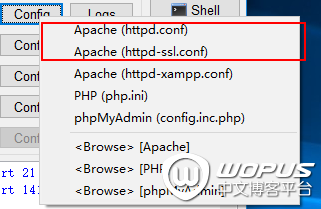
2,先打开 Apache(httpd.conf),找到:Listen 80 替换成:Listen 8080;找到:ServerName localhost:80 替换成:ServerName localhost:8080;保存。
3,再打开Apache(httpd-ssl.conf),找到:Listen 443 替换成:Listen 4433;找到:和 ServerName localhost:443 替换成:和 ServerName localhost:4433;保存。
4,关闭XAMPP,重新打开,再启动Apache就不会有问题了。