Spring Data MongoDB example with Spring MVC 3.2
Here is another example web application built with Spring MVC 3.2 and Spring Data 1.2, integrating with the MongoDB document database.
STEP 1: Create new webapp project, I will use maven for this. (Note: I am on my macbook with Maven 3 and Java 6 installed.)
mvn archetype:generate
-DgroupId=com.manishchhabra.blog
-DartifactId=HelloSpringWithMongoDB
-DarchetypeArtifactId=maven-archetype-webapp
-DinteractiveMode=false
You could create the maven project directly in your IDE as well. But I usually create it on the terminal and import it in eclipse by using the following command (Note: The following command is run within your newly created project directory, i.e. run -> cd HelloSpringWithMongoDB)
mvn eclipse:eclipse -Dwtpversion=2.0
STEP 2: Add Spring Framework 3.2 and Spring Data 1.2 dependencies to your pom.xml
|
1
2
3
4
5
6
7
8
9
10
11
12
13
14
15
16
17
|
<dependency>
<groupId>org.springframework</groupId>
<artifactId>spring-orm</artifactId>
<version>3.2.0.RELEASE</version>
</dependency>
<dependency>
<groupId>org.springframework</groupId>
<artifactId>spring-webmvc</artifactId>
<version>3.2.0.RELEASE</version>
</dependency>
<dependency>
<groupId>org.springframework.data</groupId>
<artifactId>spring-data-mongodb</artifactId>
<version>1.2.0.RELEASE</version>
</dependency>
|
STEP 3: Update your web.xml (src/main/webapp/WEB-INF/web.xml) to use Spring’s DispatcherServlet
|
1
2
3
4
5
6
7
8
9
10
11
12
13
14
15
16
17
18
19
20
21
22
23
24
25
26
27
28
|
<web-app xmlns="http://java.sun.com/xml/ns/javaee"
xmlns:xsi="http://www.w3.org/2001/XMLSchema-instance"
xsi:schemaLocation="http://java.sun.com/xml/ns/javaee http://java.sun.com/xml/ns/javaee/web-app_2_5.xsd"
version="2.5">
<display-name>Spring With MongoDB Web Application</display-name>
<servlet>
<servlet-name>dispatcher</servlet-name>
<servlet-class>org.springframework.web.servlet.DispatcherServlet</servlet-class>
<load-on-startup>1</load-on-startup>
</servlet>
<servlet-mapping>
<servlet-name>dispatcher</servlet-name>
<url-pattern>/</url-pattern>
</servlet-mapping>
<context-param>
<param-name>contextConfigLocation</param-name>
<param-value>/WEB-INF/dispatcher-servlet.xml</param-value>
</context-param>
<listener>
<listener-class>org.springframework.web.context.ContextLoaderListener</listener-class>
</listener>
</web-app>
|
STEP 4: Add your spring configuration to the dispatcher-servlet.xml
- Use MongoFactoryBean to connect to the MongoDB instance.
- Use MongoTemplate to connect and make queries to the database.
|
1
2
3
4
5
6
7
8
9
10
11
12
13
14
15
16
17
18
19
20
21
22
23
24
25
26
27
28
29
30
|
<?xml version="1.0" encoding="UTF-8"?>
<beans xmlns="http://www.springframework.org/schema/beans"
xmlns:xsi="http://www.w3.org/2001/XMLSchema-instance"
xmlns:context="http://www.springframework.org/schema/context"
xmlns:p="http://www.springframework.org/schema/p"
xsi:schemaLocation="http://www.springframework.org/schema/beans http://www.springframework.org/schema/beans/spring-beans-3.2.xsd http://www.springframework.org/schema/context http://www.springframework.org/schema/context/spring-context-3.2.xsd">
<context:component-scan base-package="com.manishchhabra.blog" />
<!-- Factory bean that creates the Mongo instance -->
<bean id="mongo" class="org.springframework.data.mongodb.core.MongoFactoryBean">
<property name="host" value="localhost" />
</bean>
<!-- MongoTemplate for connecting and quering the documents in the database -->
<bean id="mongoTemplate" class="org.springframework.data.mongodb.core.MongoTemplate">
<constructor-arg name="mongo" ref="mongo" />
<constructor-arg name="databaseName" value="test" />
</bean>
<!-- Use this post processor to translate any MongoExceptions thrown in @Repository annotated classes -->
<bean class="org.springframework.dao.annotation.PersistenceExceptionTranslationPostProcessor" />
<bean id="jspViewResolver"
class="org.springframework.web.servlet.view.InternalResourceViewResolver"
p:prefix="/WEB-INF/jsp/"
p:suffix=".jsp" />
</beans>
|
STEP 5: Create a model (using Person as an example), service and controller in the new source directory src/main/java
Model
|
1
2
3
4
5
6
7
8
9
10
11
12
13
14
15
16
17
18
19
20
21
22
23
24
25
|
package com.manishchhabra.blog.model;
import org.springframework.data.annotation.Id;
import org.springframework.data.mongodb.core.mapping.Document;
@Documentpublic class Person {
@Id
private String id;
private String name;
public String getId() {
return id;
}
public void setId(String id) {
this.id = id;
}
public String getName() {
return name;
}
public void setName(String name) {
this.name = name;
}
} |
Service
|
1
2
3
4
5
6
7
8
9
10
11
12
13
14
15
16
17
18
19
20
21
22
23
24
25
26
27
28
29
30
31
32
33
34
35
36
37
38
39
|
package com.manishchhabra.blog.service;
import java.util.List;
import java.util.UUID;
import org.springframework.beans.factory.annotation.Autowired;
import org.springframework.data.mongodb.core.MongoTemplate;
import org.springframework.stereotype.Repository;
import com.manishchhabra.blog.model.Person;
@Repositorypublic class PersonService {
@Autowired
private MongoTemplate mongoTemplate;
public static final String COLLECTION_NAME = "person";
public void addPerson(Person person) {
if (!mongoTemplate.collectionExists(Person.class)) {
mongoTemplate.createCollection(Person.class);
}
person.setId(UUID.randomUUID().toString());
mongoTemplate.insert(person, COLLECTION_NAME);
}
public List<Person> listPerson() {
return mongoTemplate.findAll(Person.class, COLLECTION_NAME);
}
public void deletePerson(Person person) {
mongoTemplate.remove(person, COLLECTION_NAME);
}
public void updatePerson(Person person) {
mongoTemplate.insert(person, COLLECTION_NAME);
}
} |
Controller for the CRUD operations
|
1
2
3
4
5
6
7
8
9
10
11
12
13
14
15
16
17
18
19
20
21
22
23
24
25
26
27
28
29
30
31
32
33
34
35
36
37
38
39
40
41
42
43
|
package com.manishchhabra.blog.controller;
import org.springframework.beans.factory.annotation.Autowired;
import org.springframework.stereotype.Controller;
import org.springframework.ui.ModelMap;
import org.springframework.util.StringUtils;
import org.springframework.web.bind.annotation.ModelAttribute;
import org.springframework.web.bind.annotation.RequestMapping;
import org.springframework.web.bind.annotation.RequestMethod;
import org.springframework.web.servlet.View;
import org.springframework.web.servlet.view.RedirectView;
import com.manishchhabra.blog.model.Person;
import com.manishchhabra.blog.service.PersonService;
@Controller public class PersonController {
@Autowired
private PersonService personService;
@RequestMapping(value = "/person", method = RequestMethod.GET)
public String getPersonList(ModelMap model) {
model.addAttribute("personList", personService.listPerson());
return "output";
}
@RequestMapping(value = "/person/save", method = RequestMethod.POST)
public View createPerson(@ModelAttribute Person person, ModelMap model) {
if(StringUtils.hasText(person.getId())) {
personService.updatePerson(person);
} else {
personService.addPerson(person);
}
return new RedirectView("/HelloSpringWithMongoDB/person");
}
@RequestMapping(value = "/person/delete", method = RequestMethod.GET)
public View deletePerson(@ModelAttribute Person person, ModelMap model) {
personService.deletePerson(person);
return new RedirectView("/HelloSpringWithMongoDB/person");
}
} |
STEP 5: Create a JSP Page in the folder WEB-INF/jsp called output.jsp (This will currently invoke create and delete).
|
1
2
3
4
5
6
7
8
9
10
11
12
13
14
15
16
17
18
19
20
21
|
<%@ taglib prefix="c" uri="http://java.sun.com/jsp/jstl/core" %><html>
<body>
<h2>Here is a simple CRUD using Spring MVC and MongoDB.</h2>
<form action="person/save" method="post">
<input type="hidden" name="id">
<label for="name">Person Name</label>
<input type="text" id="name" name="name"/>
<input type="submit" value="Submit"/>
</form>
<table border="1">
<c:forEach var="person" items="${personList}">
<tr>
<td>${person.name}</td><td><input type="button" value="delete" onclick="window.location='person/delete?id=${person.id}'"/></td>
</tr>
</c:forEach>
</table>
</body>
</html>
|
STEP 6: That’s it! Its time to run your project. You could either run directly from eclipse or you could run “mvn package” to build a war file and deploy it to your application server. I tested this on tomcat running on port 8080 (http://localhost:8080/HelloSpringWithMongoDB/person) and I could store and delete person with provided names. Working! yeah.. Here is a picture of me playing with the app
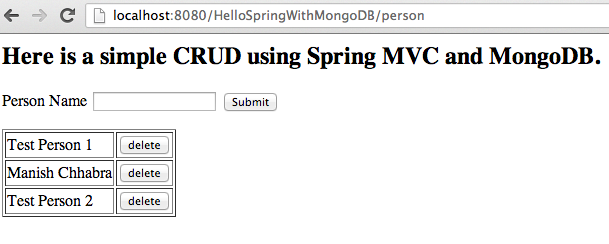
Spring Data MongoDB Spring MVC 3.2 Example App
You can view or download the full project code athttps://github.com/manishchhabra/HelloSpringWithMongoDB