原文链接地址:http://www.cnblogs.com/chuanzifan/archive/2011/11/26/2264507.html
1、在stdafx.h中
#include <GdiPlus.h>
using namespace Gdiplus;
#pragma comment(lib, "gdiplus.lib")
2、在APP.cpp中声明全局变量
ULONG_PTR m_gdiplusToken;
3、注意在App的InitInstance函数里, 在"INT_PTR nResponse = dlg.DoModal();"之前,添加下面的语句:
GdiplusStartupInput m_gdiplusStartupInput;
    GdiplusStartup(&m_gdiplusToken, &m_gdiplusStartupInput, NULL);
4、在App的ExitInstance()中调用:ExitInstance()函数在类的重写中添加
int CTestGDIApp::ExitInstance()
{
    // TODO: Add your specialized code here and/or call the base class
    GdiplusShutdown(m_gdiplusToken);
    return CWinApp::ExitInstance();
}
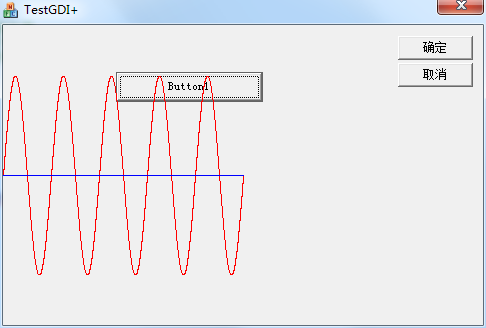
5、一个使用的小例子:按钮触发画正弦波。基于对话框的MFC。
void CTestGDIDlg::OnBnClickedButton1()
{

    // TODO: 在此添加控件通知处理程序代码
    CClientDC dc(this);
    CRect rect;
    GetClientRect(&rect);
    dc.SetMapMode(MM_ANISOTROPIC);
    dc.SetWindowOrg(0,0);
    dc.SetWindowExt(rect.right,rect.bottom);
    dc.SetViewportOrg(0,rect.bottom/2);
    dc.SetViewportExt(rect.right/2,-rect.bottom);

    Graphics graphics(dc);
    Pen myPen(Color::Red);
    myPen.SetWidth(1);
    for(int i=0;i<rect.right;i++)
        graphics.DrawLine(&myPen,i,100*sin(2*(i/(rect.right/5.0))*3.14),i+1,100*sin(2*((i+1)/(rect.right/5.0))*3.14));
    myPen.SetColor(Color::Blue);
    graphics.DrawLine(&myPen, 0, 0, rect.right, 0);

}
运行结果: