现在负载均衡是通用的解决分压的技术方案,实现方式一般分为服务端或者客户端,服务端大部分是使用中间件实现,spring cloud ribbon 是一个客户端负载均衡组件。跟spring cloud eureka、spring cloud feign 搭配的很默契,下一篇我们再讲解spring cloud feign。
(一) 版本说明
a) Spring boot 2.0.6.RELEASE
b) Spring cloud Finchley.SR2
c) Java version 1.8
d) Spring-cloud-starter-netflix-ribbon 2.0.2.RELEASE
(二) 项目配置
1. 服务端项目配置
a) 服务端主要是提供服务功能,这里是把当前的端口返回给调用者,同时把自己注册到服务中心,调用者通过服务中心调用。
b) POM设置
<dependency>

<groupId>org.springframework.cloud</groupId>

<artifactId>spring-cloud-starter-netflix-eureka-client</artifactId>

</dependency>
eureka:

datacenter: ctm

environment: dev

instance:

hostname: 192.168.1.78

prefer-ip-address: true

ip-address: 192.168.1.129

lease-renewal-interval-in-seconds: 10

lease-expiration-duration-in-seconds: 30

instance-id: ${eureka.instance.ip-address}:${server.port}

client:

service-url:

defaultZone: http://${eureka.instance.hostname}:1001/eureka/,http://${eureka.instance.hostname}:1002/eureka/,http://${eureka.instance.hostname}:1003/eureka/

fetch-registry: true

register-with-eureka: true

healthcheck:

enabled: true
d) 主要参数说明
i. eureka.instance.prefer-ip-address 使用IP显示注册信息
ii. eureka.instance.ip-address 实例IP地址,
iii. eureka.instance.instance-id 自定义实例id,服务之间调用就是使用该配置,多个实例必须保证唯一性
iv. eureka.client.service-url.defaultZone 注册中心地址
e) 服务提供者API
@Value("${server.port}")

private String getPort;

@GetMapping(name = "index", value = "/index")

public String Index() {

return getPort;

}
2. 消费端项目配置
a) POM设置
<dependency>

<groupId>org.springframework.cloud</groupId>

<artifactId>spring-cloud-starter-netflix-eureka-client</artifactId>

</dependency>

<dependency>

<groupId>org.springframework.cloud</groupId>

<artifactId>spring-cloud-starter-netflix-ribbon</artifactId>

</dependency>
i. 这里把服务消费端也注册到了服务治理中心,消费者同时也是其它服务的提供者。
b) application.yml配置文件
eureka:

datacenter: ctm

environment: dev

instance:

hostname: 192.168.1.78

prefer-ip-address: true

ip-address: 192.168.1.129

lease-renewal-interval-in-seconds: 10

lease-expiration-duration-in-seconds: 30

instance-id: ${eureka.instance.ip-address}:${server.port}

client:

service-url:

defaultZone: http://${eureka.instance.hostname}:1001/eureka/,http://${eureka.instance.hostname}:1002/eureka/,http://${eureka.instance.hostname}:1003/eureka/

fetch-registry: true

register-with-eureka: true

healthcheck:

enabled: true
c) 服务消费者API
@Bean

@LoadBalanced

RestTemplate restTemplate(){

return new RestTemplate();

}

@Service

public class RibbonService {

@Autowired

RestTemplate restTemplate;

@HystrixCommand(fallbackMethod = "fallBackIndex")

public String Index(){

return restTemplate.getForObject("http://DEMOSERVICEIMPL/index",String.class);

}

public String fallBackIndex(){

return "hi,ribbon,error!";

}

}
3. 重点提示
a) 为了演示负载,3个服务提供者必须设置3个不同的端口,并且其它相同,不然会被认为是不同的服务,起不到均衡的作用。
b) LoadBalanced 该注解实现了负载均衡功能,默认策略是轮询
4. 项目运行
a) 运行服务提供者
i. 运行3个服务者实例后,会在服务中心看到如下效果,服务提供者已经注册成功

b) 运行服务消费者
i. 运行消费者,如下图所示
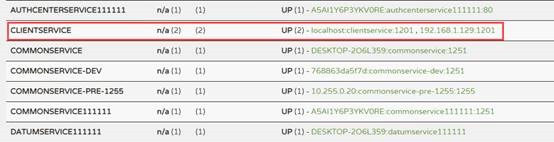
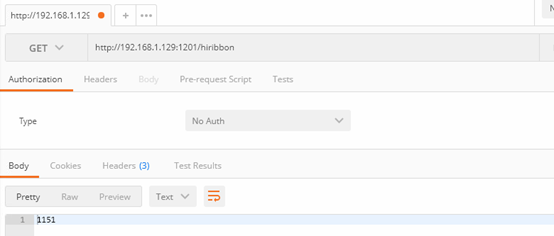
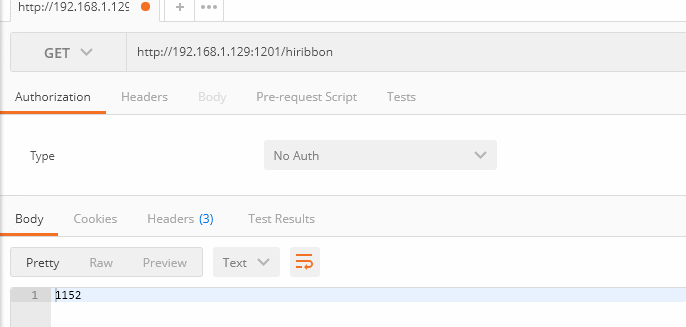
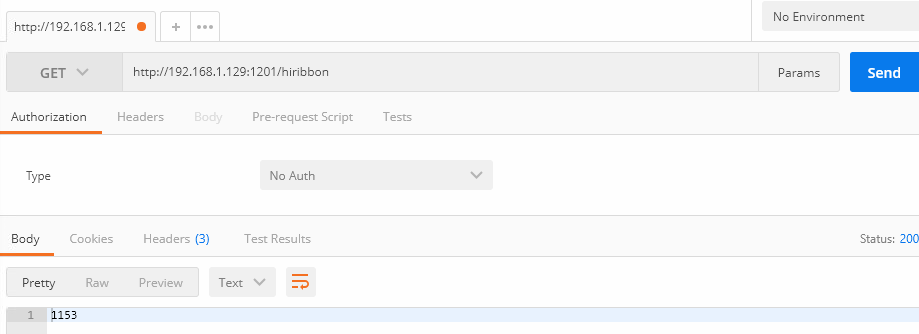
c) 打开PostMan,输入消费者地址,多刷新几次,即可看到负载效果
这样spring cloud ribbon负载组件就介绍完了,如果在开发中遇到问题,也可以留言共同探讨共同进步。