1.问题描述

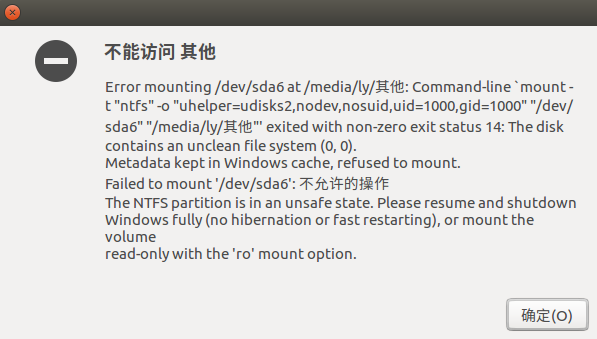
  在Ubuntu系统下访问Windows系统中磁盘时出现无法访问的情况,具体如下显示:
![](https://images2018.cnblogs.com/blog/1238724/201808/1238724-20180809085339718-666000814.png)
  该问题为磁盘挂载错误,需要进行修复。

2.解决办法

  (1)打开终端:如果没有安装ntfs-3g,需要先进行安装:

sudo apt-get install ntfs-3g

  (2)安装成功后,对挂载错误的相应分区进行修复。例如以上错误信息中显示:/dev/sda5挂载错误。在终端输入:

sudo ntfsfix /dev/sda5

即可。

相关文章:

  • 2021-12-12
  • 2021-10-31
  • 2022-12-23
  • 2021-12-04
  • 2021-12-02
  • 2021-11-19
  • 2022-12-23
  • 2022-12-23
猜你喜欢
  • 2021-04-08
  • 2021-10-26
  • 2021-11-18
  • 2022-12-23
  • 2021-09-09
  • 2021-06-13
  • 2021-07-28
相关资源
相似解决方案