I have a Cisco C240 server, and everytime after reboot, it will got stuck at screen like below.
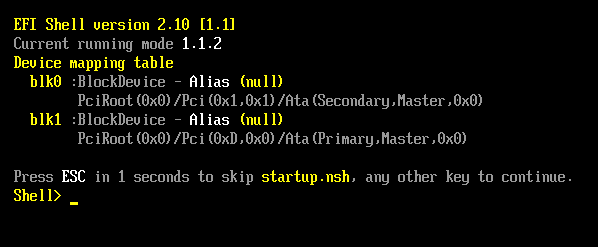
Reboot server stuck at “Press ESC in 1 seconds to skip startup.nsh”

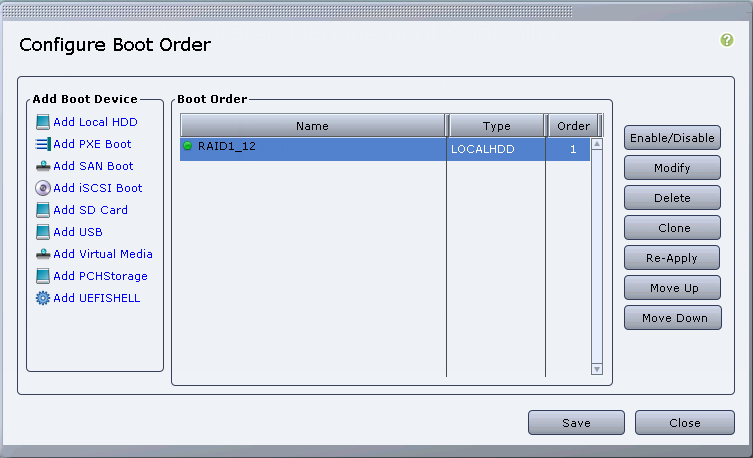
To resolve this, I logged on to CIMC (cisco integrated management controller), and reconfigured the boot order.

Reboot server stuck at “Press ESC in 1 seconds to skip startup.nsh”

Or

Reboot server stuck at “Press ESC in 1 seconds to skip startup.nsh”

Reboot server stuck at “Press ESC in 1 seconds to skip startup.nsh”


The article in the reference did not help.


Reference

=================

UCS : Press ESC in 2 Seconds to skip startup.nsh,any other key to continue (Boot Sequence)

https://supportforums.cisco.com/document/12689411/ucs-press-esc-2-seconds-skip-startupnshany-other-key-continue-boot-sequence

相关文章:

  • 2021-08-12
  • 2021-04-05
  • 2021-11-26
  • 2021-05-29
  • 2021-11-15
  • 2021-09-23
  • 2021-05-04
猜你喜欢
  • 2022-12-23
  • 2021-06-16
  • 2021-08-18
  • 2022-12-23
  • 2021-09-03
  • 2021-06-20
  • 2021-12-28
相关资源
相似解决方案