使用HTML5的canvas画布功能,在页面进行绘画,然后通过SignalR将画布的每个点的颜色提交到服务端,服务端同时将这些画布的信息推送到其他客户端,实现共享同一个画板的功能
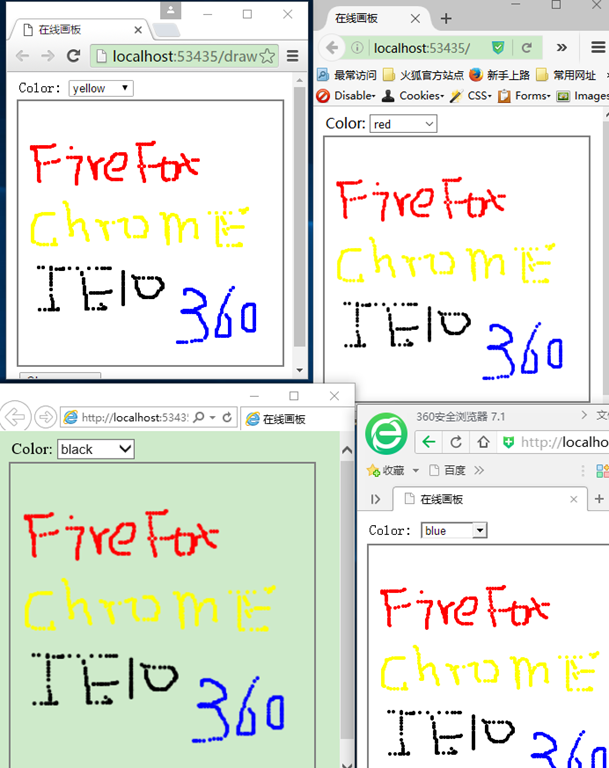
类似下图,在某一个浏览器进行绘画,其他浏览器同步显示内容,并且页面刷新或者首次加载还能显示之前的绘画内容(站点不重启的情况下)
实现过程
一、服务端
服务端的代码主要功能是接收客户端发送过来的绘画坐标点和坐标点的颜色,同时将新的坐标点信息推送给客户端,最后服务端还会保存这些绘画坐标点信息到内存中,这样客户端刷新或者首次进入就能看到之前的绘画信息。
step1:
创建一个Empty类型的ASP.NET 4.5的站点

step2:
引入SignalR的nuget包,将自动引入相关的关联包
Install-Package Microsoft.AspNet.SignalR
step3:
新建一个SignalR Hub Class
实现代码如下:
public class DrawingBoard : Hub
    {
        private const int BoardWidth = 300;
        private const int BoardHeight = 300;
        private static int[,] _pointBuffer = GetEmptyPointBuffer();

        public Task DrawPoint(int x, int y)
        {
            if (x < 0)
            {
                x = 0;
            }
            if (x >= BoardWidth)
            {
                x = BoardWidth - 1;
            }
            if (y <0)
            {
                y = 0;
            }
            if (y >= BoardHeight)
            {
                y = BoardHeight - 1;
            }
            int color = 0;
            int.TryParse(Clients.Caller.color, out color);
            _pointBuffer[x, y] = color;
            return Clients.Others.drawPoint(x, y, Clients.Caller.color);
        }

        public Task Clear()
        {
            _pointBuffer = GetEmptyPointBuffer();
            return Clients.Others.clear();
        }

        public override Task OnConnected()
        {
            return Clients.Caller.update(_pointBuffer);
        }

        private static int[,] GetEmptyPointBuffer()
        {
            var buffer = new int[BoardWidth, BoardWidth];
            return buffer;
        }
    }