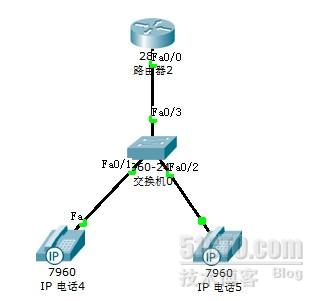
路由:
Router>en
Router#conf t
Router(config)#ip dhcp excluded-address 192.168.1.1
Router(config)#ip dhcp pool jia
Router(dhcp-config)#default-router 192.168.1.1
Router(dhcp-config)#network 192.168.1.0 255.255.255.0
Router(dhcp-config)#option 150 ip 192.168.1.1
Router(dhcp-config)#exit
Router(config)#int f0/0
Router(config-if)#ip add 192.168.1.1 255.255.255.0
Router(config-if)#no shut
Router(config-if)#exit
Router(config)#telephony-service
Router(config-telephony)#max-ephones 42
Router(config-telephony)#max-dn 42
Router(config-telephony)#create cnf-files
Router(config-telephony)#ip source-address 192.168.1.1 port 2000
Router(config-telephony)#exit
Router(config)#ephone-dn 1
Router(config-ephone-dn)#number 111
Router(config-ephone-dn)#exit
Router(config)#ephone-dn 2
Router(config-ephone-dn)#number 112
Router(config-ephone-dn)#exit
Router(config)#exit
Router#show ip dhcp binding
Router#conf t
.
Router(config)#ephone 1
Router(config-ephone)#mac-address 000C.85BE.AEBE
Router(config-ephone)#type 7960
Router(config-ephone)#button 1:1
Router(config-ephone)#exit
Router(config)#ephone 1
Router(config-ephone)#mac-address 0030.F2BB.B825
Router(config-ephone)#ty 7
Router(config-ephone)#button 1:2
Router(config-ephone)#exit
Router(config)#exit
Router#wr
交换:
Switch>en
Switch#conf t
Enter configuration commands, one per line. End with CNTL/Z.
Switch(config)#no ip domain-lookup
Switch(config)#spanning-tree portfast default
Switch(config)#int range f0/1 - 3
Switch(config-if-range)#sw voice vlan 1
Switch(config-if-range)#exit
转载于:https://blog.51cto.com/jiangjieshi/660849