用途
mmm是基于信息探测方式进行mysql主从复制架构的监测与故障转移
mmm可以做到负载均衡,100%的数据可用性
mmm所涉及的检查项 服务器可达性,服务可达性,复制线程可控性
如图: 当 master1在宕机时, mmm可以将之前分摊的流量进行转移,甚至于将从服务器提升为主
延续双主模型.
mmm-agent端状态一览
online 节点可用
replication_delay 复制延迟或无法进行(检查req_backlog文件)
replication_fail 复制失败
awating_recovery 等待恢复
hard_offline 主机离线
admin_offline 主控端离线
unknown 未知错误
规划如下
172.16.43.200 主控机器负责监测与资源的管理
172.16.43.1 vip(172.16.43.11) master1 主主复制第一台(可读写)
172.16.43.2 vip(172.16.43.12) master2 主主复制第二台(只读)
172.16.43.3 vip(172.16.43.13) slave 主从方式复制 1 , 2 的信息(只读)

实验过程如下
主控安装安装: ansible, mysql客户端, mysql-mmm
集群节点安装如下: mariadb, mysql-agent
|
1
2
3
4
5
6
7
8
9
10
11
12
13
14
15
16
17
18
19
20
21
22
23
24
25
26
27
28
29
30
31
32
33
34
35
36
37
38
39
40
41
42
43
44
45
46
47
48
49
50
51
52
53
54
55
56
57
58
59
60
61
62
63
64
65
66
67
68
69
70
71
72
73
|
yum -y install ansible-1.5.4-1.el6.noarch.rpm
vim /etc/ansible/hosts
# 主控节点完成[masterserver]master1.king.commaster2.king.com.[slaveserver]slave.king.com# 主控节点完成互信多个被管理节点不重复了ssh-****** -t rsa
.# 主控节点完成安装mysql-mmm*yum -y install mysql mysql-mmm*
.# 实现mmm配置文件有两种# 1. 主控端 mmm_common, mmm_mon# 2. 集群端 mmm_common, mmm_agent# 主控端配置common /etc/mysql-mmm/mmm_common.confactive_master_role writer.<host default>cluster_interface eth0pid_path /var/run/mysql-mmm/mmm_agentd.pid
bin_path /usr/sbin
replication_user replreplication_password replagent_user mmm_agentagent_password agent_password</host>
.<host master1>ip 172.16.43.1mode masterpeer master2</host>
.<host master2>ip 172.16.43.2mode masterpeer master1</host>
.<host slave>ip 172.16.43.3mode slave</host>
.# 谁能写 vip是多少(参照本文配置)<role writer>hosts master1, master2ips 172.16.43.11mode exclusive</role>
.# 谁能读 vip是多少(参照本文配置)<role reader>hosts master1, master2ips 172.16.43.11, 172.16.43.12, 172.16.43.13mode balanced</role>
.# 主控节点完成vim /etc/mysql-mmm/mmm_mon.conf
# 需要改 ping_ips, 把你想监控的集群加入进入就可以了# 172.16.0.1 是网关ipping_ips 172.16.0.1, 172.16.43.1, 172.16.43.2, 172.16.43.3.<host default> monitor_user mmm_monitor
monitor_password monitor_password
</host>
|
ii) 安装 mariadb, mysql-agent安装与配置
|
1
2
3
4
5
6
7
8
9
10
11
12
13
14
15
16
17
18
19
20
21
22
23
24
25
26
27
28
29
30
31
32
33
34
35
36
37
38
39
40
41
42
43
44
45
46
47
48
49
50
51
52
53
54
55
56
57
|
# 编写 install.yaml, 使用ansible-playbook执行按成安装配置- hosts: masterserver:slaveserver remote_user: root
tasks:
- name: mariadb install
copy: src=/root/mariadb-10.0.10-linux-x86_64.tar.gz dest=/tmp
- name: conf service
command: tar xf /tmp/mariadb-10.0.10-linux-x86_64.tar.gz -C /usr/local
###############################################################
# 见谅下面的 name: x , 写了半天才知道不能在一个name中包含多个command,所以.. #
###############################################################
- name: 1
command: ln -sv /usr/local/mariadb-10.0.10-linux-x86_64 /usr/local/mysql
- name: 2
command: cp /usr/local/mysql/support-files/mysql.server /etc/rc.d/init.d/mysqld
- name: 3
command: chmod +x /etc/rc.d/init.d/mysqld
- name: 4
command: mkdir /mydata/data -p
- name: 5
command: mkdir /mydata/binlogs -p
- name: 6
command: mkdir /mydata/relaylogs -p
- name: 7
command: useradd -r -s /sbin/nologin mysql -U
- name: 8
command: chown mysql.mysql /mydata -R
- name: 9
command: chown mysql.mysql /usr/local/mysql -R
- name: 9-1
# 将本地配置好的安装文件移植到集群节点, 解压的配置文件可能不符合要求
copy: src=/usr/local/mysql/scripts/mysql_install_db dest=/usr/local/mysql/scripts/
- name: 10
command: /usr/local/mysql/scripts/mysql_install_db --user=mysql --datadir=/mydata/data
- name: mariadb conf
# 此处配置文件 /etc/my.cnf 配置好
# log-bin=/mydata/binlogs/mysql-bin
# relay-log=/mydata/relaylogs/relay-bin
# datadir=/mydata/data
copy: src=/etc/my.cnf dest=/etc/my.cnf
notify:
- restart mariadb
- name: install mysql-mmm-agent
yum: name=mysql-mmm-agent state=present
- name: conf mysql-mmm-agent
copy: src=/etc/mysql-mmm/mmm_common.conf dest=/etc/mysql-mmm
- name: modify mmm_agent.conf
with_items:
- master1
- master2
- slave
- name: 11
handlers:
- name: restart mariadb
service: name=mysqld state=restarted
|

不熟yaml的童鞋可以 yaml.org
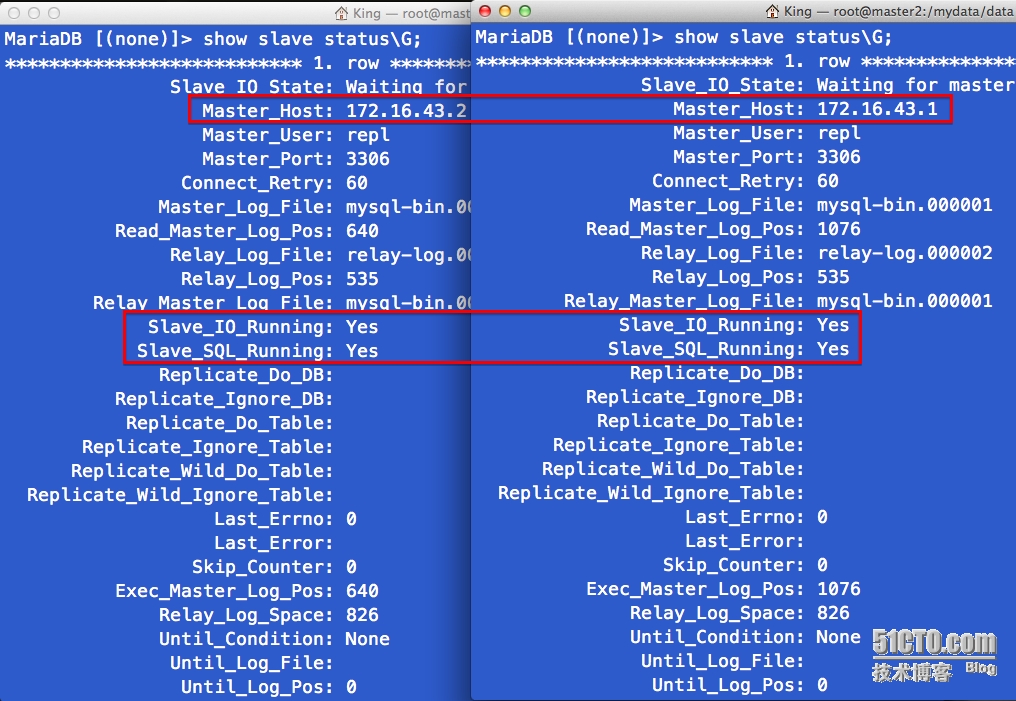
iii) 实现双主复制与主从复制
|
1
2
3
4
5
6
7
8
9
10
11
12
13
14
15
16
17
18
19
20
21
22
23
24
25
26
27
28
29
30
|
1. 双主配置 (master1.king.com , master2.king.com)vim /etc/my.cnf
service-id = 1 | 2 (不可相同分别设置)
log-slave-updates = 1*** 自动增长列的配置要隔开auto-increment-offset = 1auto-increment-increment = 22. 均授权复制账号给对方, 进入命令行mysql> grant replication client, replication slave on *.* to [email protected]'172.16.%.%' identified by 'repl';
mysql> flush privileges;3. 均授权监控账号mysql> grant replication client on *.* to 'mmm_monitor'@'172.16.%.%' identified by 'monitor_password';
mysql> grant super, replication client, process on *.* to 'mmm_agent'@'172.16.%.%' identified by 'agent_password';
4. 均连接对方服务器mysql> change master to master_host='172.16.43.1',master_user='repl', master_password='repl', master_log_file='mysql-bin.000001', master_log_pos=312;
5. 均启动复制线程mysql> start salve;..# 主从复制 (slave.king.com)1、改server-id 配置文件中
vim /etc/my.cnf
server-id = 3
2, 授权监控账号,进入命令行 mysqlmysql> grant replication client on *.* to 'mmm_monitor'@'172.16.%.%' identified by 'monitor_password';
mysql> grant super, replication client, process on *.* to 'mmm_agent'@'172.16.%.%' identified by 'agent_password';
3、连接主服务器mysql> change master to master_host='172.16.43.1',master_user='repl', master_password='repl', master_log_file='mysql-bin.000001', master_log_pos=312;
4、启动复制线程mysql> start slave; |

iv) 启动测试
|
1
2
3
4
5
6
7
8
9
10
|
# mmm的停止与启动/etc/init.d/mysql-mmm-agent stop | start
/etc/init.d/mysql-mmm-monitor stop | start
.# 离线或上线一个节点mmm_control set_offline master1mmm_control set_online master1.# 查看节点状态mmm_control show |
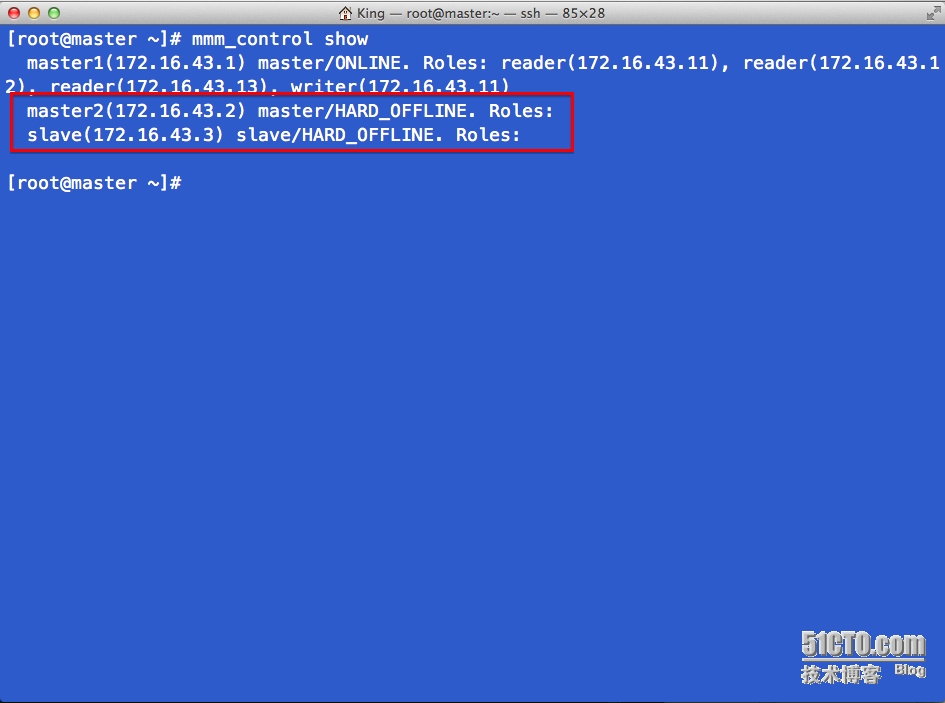
测试1
如图: 让 master2 离线,读写均不受影响 (抱歉此图没有截图下来,,但最后结果图中有所显示 : )
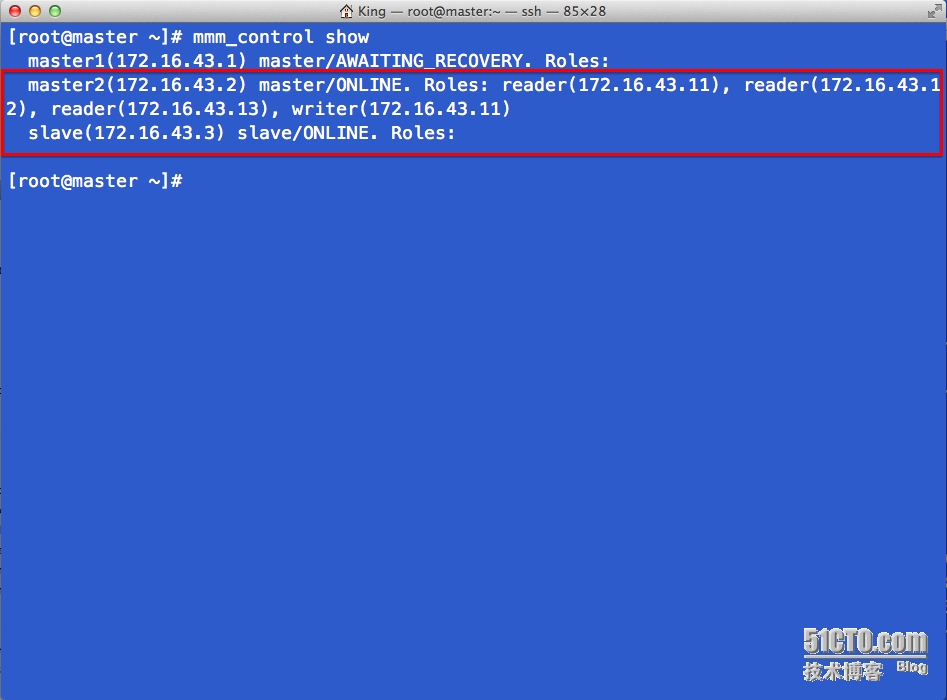
测试2:
再来一次测试,将master1主节点下线,我们观察一下情况, 在图中我们可以看到读写资源已经迁移到了master2节点
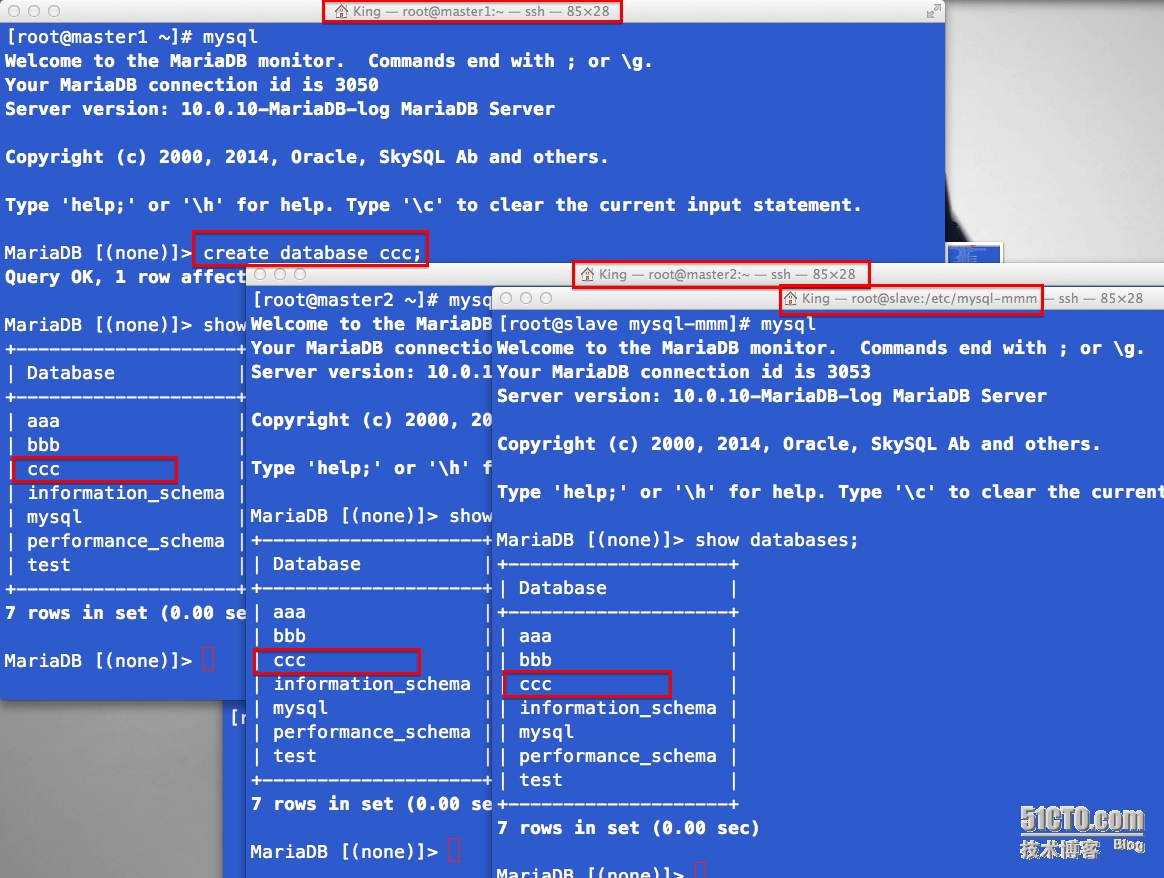
总结
经过测试可以看出MMM在mysql的高可用表现非常良好,无论是只剩一主还是一主一从,数据的同步确实比较及时准确
生产环境还需观察...
本文转自My_King1 51CTO博客,原文链接:http://blog.51cto.com/apprentice/1399141,如需转载请自行联系原作者