大纲
一、Mysql-Proxy 简单介绍
二、环境准备
三、Mysql-Proxy 命令简介
四、Mysql-Proxy主从分离
注,此实验是基于上一篇博客,http://freeloda.blog.51cto.com/2033581/1282879,先实现主从复制,再实现读写分离。(对于主从复制不清楚的博友可以参考一下)
一、Mysql-Proxy 简单介绍
MySQL-Proxy是一个处于你的client端和MySQL server端之间的简单程序,它可以监测、分析或改变它们的通信。它使用灵活,没有限制,常见的用途包括:负载平衡,故障、查询分析,查询过滤和修改等等。
MySQL-Proxy就是这么一个中间层代理,简单的说,MySQL-Proxy就是一个连接池,负责将前台应用的连接请求转发给后台的数据库,并且通过使用lua脚本,可以实现复杂的连接控制和过滤,从而实现读写分离和负载平衡。对于应用来说,MySQL-Proxy是完全透明的,应用则只需要连接到MySQL-Proxy的监听端口即可。当然,这样proxy机器可能成为单点失效,但完全可以使用多个proxy机器做为冗余,在应用服务器的连接池配置中配置到多个proxy的连接参数即可。
MySQL-Proxy更强大的一项功能是实现“读写分离”,基本原理是让主数据库处理事务性查询,让从库处理SELECT查询。数据库复制被用来把事务性查询导致的变更同步到集群中的从库。
二、环境准备
1.实验拓扑
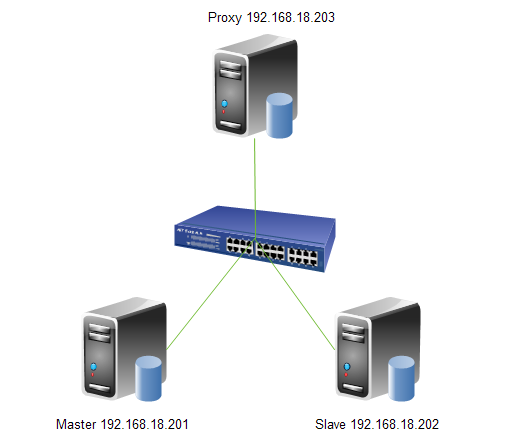
2.操作系统
CentOS 6.4 x86_64
3.软件版本
Mysql-Proxy0.8.3
4.时间同步
|
1
2
3
|
[[email protected] ~]# ntpdate 202.120.2.101
[[email protected] ~]# ntpdate 202.120.2.101
[[email protected] ~]# ntpdate 202.120.2.101
|
三、Mysql-Proxy 命令简介
mysql-proxy 命令
--help-all ———— 用于获取全部帮助信息
--proxy-address=host:port ———— 代理服务监听的地址和端口
--admin-address=host:port ———— 管理模块监听的地址和端口
--proxy-backend-addresses=host:port ———— 后端mysql服务器的地址和端口(主服务器)
--proxy-read-only-backend-addresses=host:port ———— 后端只读mysql服务器的地址和端口(从服务器)
--proxy-lua-script=file ———— 完成mysql代理功能的Lua脚本
--daemon ———— 以守护进程模式启动mysql-proxy
--defaults-file=/path/to/conf_file_name ———— 默认使用的配置文件路径
--log-file=/path/to/log_file_name ———— 日志文件名称
--log-level=level ———— 日志级别
--log-use-syslog ———— 基于syslog记录日志
--user=user_name ———— 运行mysql-proxy进程的用户
四、Mysql-Proxy主从分离
1.增加代理用户
|
1
2
3
4
|
[[email protected] ~]# groupadd -g 3306 mysql-proxy
[[email protected] ~]# useradd -u 3306 -g mysql-proxy -s /sbin/nologin -M mysql-proxy
[[email protected] ~]# id mysql-proxy
uid=3306(mysql-proxy) gid=3306(mysql-proxy) 组=3306(mysql-proxy) |
2.安装mysql-proxy
|
1
2
3
4
5
6
7
8
9
10
11
12
13
|
[[email protected] src]# tar xf mysql-proxy-0.8.3-linux-glibc2.3-x86-64bit.tar.gz -C /usr/local/
[[email protected] src]# cd /usr/local/
"mysql-proxy"-> "mysql-proxy-0.8.3-linux-glibc2.3-x86-64bit"
[[email protected] mysql-proxy]# ll
总用量 24 drwxr-xr-x 2 7157 wheel 4096 8月 6 2012 bin drwxr-xr-x 2 7157 wheel 4096 8月 6 2012 include drwxr-xr-x 4 7157 wheel 4096 8月 6 2012 lib drwxr-xr-x 2 7157 wheel 4096 8月 6 2012 libexec drwxr-xr-x 3 7157 wheel 4096 8月 6 2012 licenses drwxr-xr-x 3 7157 wheel 4096 8月 6 2012 share |
3.修改文件的拥有者与所属组
|
1
2
3
4
5
6
7
8
9
|
[[email protected] mysql-proxy]# chown -R root:mysql-proxy /usr/local/mysql-proxy/*
[[email protected] mysql-proxy]# ll
总用量 24 drwxr-xr-x 2 root mysql-proxy 4096 8月 6 2012 bin drwxr-xr-x 2 root mysql-proxy 4096 8月 6 2012 include drwxr-xr-x 4 root mysql-proxy 4096 8月 6 2012 lib drwxr-xr-x 2 root mysql-proxy 4096 8月 6 2012 libexec drwxr-xr-x 3 root mysql-proxy 4096 8月 6 2012 licenses drwxr-xr-x 3 root mysql-proxy 4096 8月 6 2012 share |
4.修改PATH环境变量
|
1
2
3
4
5
6
7
8
9
10
11
12
13
14
15
16
17
18
19
20
21
22
23
24
25
26
27
28
29
30
31
32
33
34
35
36
37
38
39
40
41
|
[[email protected] ~]# vim /etc/profile.d/mysql-proxy.sh
exportPATH=$PATH:/usr/local/mysql-proxy/bin
[[email protected] ~]# source /etc/profile
[[email protected] ~]# mysql-proxy --help-all
Usage: mysql-proxy [OPTION...] - MySQL Proxy
Help Options: -?, --help Show help options
--help-all Show all help options
--help-proxy Show options forthe proxy-module
proxy-module -P, --proxy-address=<host:port> listening address:port of the proxy-server (default: :4040)
-r, --proxy-read-only-backend-addresses=<host:port> address:port of the remote slave-server (default: not set)
-b, --proxy-backend-addresses=<host:port> address:port of the remote backend-servers (default: 127.0.0.1:3306)
--proxy-skip-profiling disables profiling of queries (default: enabled)
--proxy-fix-bug-25371 fix bug #25371 (mysqld > 5.1.12) for older libmysql versions
-s, --proxy-lua-script=<file> filename of the lua script (default: not set)
--no-proxy don't start the proxy-module (default: enabled)
--proxy-pool-no-change-user don't use CHANGE_USER to reset the connection coming from the pool (default: enabled)
--proxy-connect-timeout connect timeout inseconds (default: 2.0 seconds)
--proxy-read-timeout readtimeout inseconds (default: 8 hours)
--proxy-write-timeout write timeout inseconds (default: 8 hours)
Application Options: -V, --version Show version
--defaults-file=<file> configuration file
--verbose-shutdownAlways log the exitcode when shutting down
--daemon Start indaemon-mode
--user=<user> Run mysql-proxy as user
--basedir=<absolute path> Base directory to prepend to relative paths inthe config
--pid-file=<file> PID fileincasewe are started as daemon
--plugin-dir=<path> path to the plugins
--plugins=<name> plugins to load
--log-level=(error|warning|info|message|debug) log all messages of level ... or higher
--log-file=<file> log all messages ina file
--log-use-syslog log all messages to syslog
--log-backtrace-on-crash try to invoke debugger on crash
--keepalive try to restart the proxy ifit crashed
--max-open-files maximum number of openfiles (ulimit-n)
--event-threads number of event-handling threads (default: 1)
--lua-path=<...> setthe LUA_PATH
--lua-cpath=<...> setthe LUA_CPATH
|
5.启动mysql-proxy
|
1
2
3
4
5
6
7
8
9
10
11
12
|
[[email protected] ~]# mysql-proxy --daemon --log-level=debug --log-file=/var/log/mysql-proxy.log --plugins="proxy" --proxy-backend-addresses="192.168.18.201:3306" --proxy-read-only-backend-addresses="192.168.18.202:3306" #启动mysql-proxy
[[email protected] ~]# tail /var/log/mysql-proxy.log #查看启动日志
2013-08-27 09:58:42: (critical) mysql-proxy-cli.c:597: Failure from chassis_mainloop. Shutting down. 2013-08-27 09:58:42: (message) Initiating shutdown, requested from mysql-proxy-cli.c:598
2013-08-27 09:58:42: (message) shutting down normally, exitcode is: 1
2013-08-27 09:59:14: (message) Initiating shutdown, requested from signal handler
2013-08-27 09:59:14: (message) shutting down normally, exitcode is: 0
2013-08-27 09:59:26: (critical) plugin proxy 0.8.3 started 2013-08-27 09:59:26: (debug) max openfile-descriptors = 1024
2013-08-27 09:59:26: (message) proxy listening on port :4040 2013-08-27 09:59:26: (message) added read/writebackend: 192.168.18.201:3306
2013-08-27 09:59:26: (message) added read-only backend: 192.168.18.202:3306
|
注,从日志可以看启动成功
|
1
2
|
[[email protected] ~]# netstat -ntulp | grep :4040 #查看端口
tcp 0 0 0.0.0.0:4040 0.0.0.0:* LISTEN 1554/mysql-proxy
|
6.在主服务器上创建测试的账号与密码
master:
|
1
2
3
4
|
Query OK, 0 rows affected (0.07 sec)mysql> FLUSH PRIVILEGES; Query OK, 0 rows affected (0.04 sec) |
7.在从服务上进行测试
slave:
注,验证是否能通过代理端口4040 端口连接到 mysql-proxy
|
1
2
3
4
5
6
7
8
9
10
11
12
13
14
15
16
17
18
19
20
21
22
|
[[email protected] ~]# mysql -uroot -p -h192.168.18.203 --port=4040
Enter password: Welcome to the MySQL monitor. Commands end with ; or \g. Your MySQL connection idis 10
Server version: 5.6.13-log MySQL Community Server (GPL)Copyright (c) 2000, 2013, Oracle and/orits affiliates. All rights reserved.
Oracle is a registered trademark of Oracle Corporation and/orits
affiliates. Other names may be trademarks of their respective owners.Type 'help;'or '\h'forhelp. Type '\c'to clearthe current input statement.
mysql> show databases; +--------------------+ | Database | +--------------------+ | information_schema | | mydb | | mydb1 | | mysql | | performance_schema | | test|
+--------------------+ 6 rows inset(0.00 sec)
|
注,已经成功从4040端口,连接进mysql-proxy。下面我们来实现读写分离。
8.Mysql-Proxy本身不会实现读写分离,主要是依靠 Lua 脚本实现的,在 mysql-proxy 主机上 杀死mysql-proxy 进程并添加读写分离脚本
|
1
2
|
[[email protected] ~]# killall mysql-proxy
[[email protected] ~]# netstat -ntulp | grep 4040
|
9.在mysql-proxy 的安装目录中有一个rw-splitting.lua 脚本,专门用来实现 读写分离,路径是/usr/local/mysql-proxy/share/doc/mysql-proxy/rw-splitting.lua
|
1
2
3
|
[[email protected] ~]# cd /usr/local/mysql-proxy/share/doc/mysql-proxy/
[[email protected] mysql-proxy]# ls | grep rw-splitting.lua
rw-splitting.lua |
10.重新启动mysql-proxy,把此脚本加入到启动选项里面,实现读写分离
|
1
2
3
4
5
6
7
8
9
10
11
12
13
14
|
[[email protected] ~]# mysql-proxy --daemon --log-level=debug --log-file=/var/log/mysql-proxy.log --plugins="proxy" --proxy-backend-addresses="192.168.18.201:3306" --proxy-read-only-backend-addresses="192.168.18.202:3306" --proxy-lua-script=" /usr/local/mysql-proxy/share/doc/mysql-proxy/rw-splitting.lua"
[[email protected] ~]# tail /var/log/mysql-proxy.log #查看日志
2013-08-27 09:59:26: (message) added read/writebackend: 192.168.18.201:3306
2013-08-27 09:59:26: (message) added read-only backend: 192.168.18.202:3306
2013-08-27 10:05:51: (message) Initiating shutdown, requested from signal handler
2013-08-27 10:05:51: (message) shutting down normally, exitcode is: 0
2013-08-27 10:10:29: (debug) chassis-path.c.122: adjusting relative path ( /usr/local/mysql-proxy/share/doc/mysql-proxy/rw-splitting.lua) to base_dir (/usr/local/mysql-proxy-0.8.3-linux-glibc2.3-x86-64bit). New path: /usr/local/mysql-proxy-0.8.3-linux-glibc2.3-x86-64bit//usr/local/mysql-proxy/share/doc/mysql-proxy/rw-splitting.lua
2013-08-27 10:10:29: (critical) plugin proxy 0.8.3 started 2013-08-27 10:10:29: (debug) max openfile-descriptors = 1024
2013-08-27 10:10:29: (message) proxy listening on port :4040 2013-08-27 10:10:29: (message) added read/writebackend: 192.168.18.201:3306
2013-08-27 10:10:29: (message) added read-only backend: 192.168.18.202:3306
[[email protected] ~]# netstat -ntlp | grep :4040 #查看一下端口
tcp 0 0 0.0.0.0:4040 0.0.0.0:* LISTEN 2944/mysql-proxy
|
11.为mysql-proxy 提供一个管理接口,方便以后随时查看后端mysql 服务器的状态和访问类型,实现管理功能
注,下面为大家提供一个管理接口的脚本,同样也是一个LUA 脚本,建议跟 读写分离脚本放在同一目录。
|
1
2
3
4
5
6
7
8
9
10
11
12
13
14
15
16
17
18
19
20
21
22
23
24
25
26
27
28
29
30
31
32
33
34
35
36
37
38
39
40
41
42
43
44
45
46
47
48
49
50
51
52
53
54
55
56
57
58
59
60
61
62
63
64
65
66
67
68
69
70
71
72
73
|
[[email protected] ~]# vim /usr/local/mysql-proxy/share/doc/mysql-proxy/admin.lua
functionset_error(errmsg)
proxy.response = {
type= proxy.MYSQLD_PACKET_ERR,
errmsg = errmsg or "error"
}
endfunctionread_query(packet)
ifpacket:byte() ~= proxy.COM_QUERY then
set_error("[admin] we only handle text-based queries (COM_QUERY)")
returnproxy.PROXY_SEND_RESULT
end
localquery = packet:sub(2)
localrows = { }
localfields = { }
ifquery:lower() == "select * from backends"then
fields = {
{ name = "backend_ndx",
type= proxy.MYSQL_TYPE_LONG },
{ name = "address",
type= proxy.MYSQL_TYPE_STRING },
{ name = "state",
type= proxy.MYSQL_TYPE_STRING },
{ name = "type",
type= proxy.MYSQL_TYPE_STRING },
{ name = "uuid",
type= proxy.MYSQL_TYPE_STRING },
{ name = "connected_clients",
type= proxy.MYSQL_TYPE_LONG },
}
fori = 1, #proxy.global.backends do
localstates = {
"unknown",
"up",
"down"
}
localtypes = {
"unknown",
"rw",
"ro"
}
localb = proxy.global.backends[i]
rows[#rows + 1] = {
i,
b.dst.name, -- configured backend address
states[b.state + 1], -- the C-idis pushed down starting at 0
types[b.type+ 1], -- the C-idis pushed down starting at 0
b.uuid, -- the MySQL Server's UUID ifit is managed
b.connected_clients -- currently connected clients
}
end
elseif query:lower() == "select * from help"then
fields = {
{ name = "command",
type= proxy.MYSQL_TYPE_STRING },
{ name = "description",
type= proxy.MYSQL_TYPE_STRING },
}
rows[#rows + 1] = { "SELECT * FROM help", "shows this help" }
rows[#rows + 1] = { "SELECT * FROM backends", "lists the backends and their state" }
else
set_error("use 'SELECT * FROM help' to see the supported commands")
returnproxy.PROXY_SEND_RESULT
end
proxy.response = {
type= proxy.MYSQLD_PACKET_OK,
resultset = {
fields = fields,
rows = rows
}
}
returnproxy.PROXY_SEND_RESULT
end |
12.重新启动mysql-proxy
注,这次启动要添加以下启动选项 ,因为我们添加了额外的插件,把新加功能添加进来,选项如下。
--plugins=admin 在mysql-proxy启动时加载的插件;
--admin-username="admin" 运行mysql-proxy进程管理的用户;
--admin-password="admin" 密码
--admin-lua-script="/usr/local/mysql-proxy/share/doc/mysql-proxy/admin.lua" 插件使用的配置文件路径;
|
1
2
3
4
5
6
7
8
9
10
11
12
13
14
|
[[email protected] ~]# mysql-proxy --daemon --log-level=debug --log-file=/var/log/mysql-proxy.log --plugins="proxy" --proxy-backend-addresses="192.168.18.201:3306" --proxy-read-only-backend-addresses="192.168.18.202:3306" --proxy-lua-script=" /usr/local/mysql-proxy/share/doc/mysql-proxy/rw-splitting.lua" --plugins=admin --admin-username="admin" --admin-password="admin" --admin-lua-script="/usr/local/mysql-proxy/share/doc/mysql-proxy/admin.lua"
[[email protected] ~]# netstat –ntlp #查看一下端口
Active Internet connections (only servers) Proto Recv-Q Send-Q Local Address Foreign Address State PID/Programname
tcp 0 0 0.0.0.0:111 0.0.0.0:* LISTEN 1066/rpcbind
tcp 0 0 0.0.0.0:22 0.0.0.0:* LISTEN 1223/sshd
tcp 0 0 127.0.0.1:25 0.0.0.0:* LISTEN 1299/master
tcp 0 0 0.0.0.0:54053 0.0.0.0:* LISTEN 1084/rpc.statd
tcp 0 0 0.0.0.0:4040 0.0.0.0:* LISTEN 2970/mysql-proxy
tcp 0 0 0.0.0.0:4041 0.0.0.0:* LISTEN 2970/mysql-proxy#生成新的管理端口4041
tcp 0 0 :::111 :::* LISTEN 1066/rpcbind
tcp 0 0 :::22 :::* LISTEN 1223/sshd
tcp 0 0 :::39894 :::* LISTEN 1084/rpc.statd
tcp 0 0 ::1:25 :::* LISTEN 1299/master
|
13.在slave测试一下,记得使用管理端口4041 登陆,密码是admin。
|
1
2
3
4
5
6
7
8
9
10
11
|
[[email protected] ~]# mysql -uadmin -p -h192.168.18.203 --port 4041
Enter password: Welcome to the MySQL monitor. Commands end with ; or \g. Your MySQL connection idis 1
Server version: 5.0.99-agent-adminCopyright (c) 2000, 2013, Oracle and/orits affiliates. All rights reserved.
Oracle is a registered trademark of Oracle Corporation and/orits
affiliates. Other names may be trademarks of their respective owners.Type 'help;'or '\h'forhelp. Type '\c'to clearthe current input statement.
mysql> |
注,登录成功,下面我们来查看一下状态。
14.测试读写分离状态
|
1
2
3
4
5
6
7
8
9
10
11
12
13
14
15
16
17
18
|
[[email protected] ~]# mysql -uadmin -p -h192.168.18.203 --port 4041 -padmin
Warning: Using a password on the commandline interface can be insecure.
Welcome to the MySQL monitor. Commands end with ; or \g. Your MySQL connection idis 1
Server version: 5.0.99-agent-adminCopyright (c) 2000, 2013, Oracle and/orits affiliates. All rights reserved.
Oracle is a registered trademark of Oracle Corporation and/orits
affiliates. Other names may be trademarks of their respective owners.Type 'help;'or '\h'forhelp. Type '\c'to clearthe current input statement.
mysql> select* from backends;
+-------------+---------------------+---------+------+------+-------------------+ | backend_ndx | address | state | type| uuid | connected_clients |
+-------------+---------------------+---------+------+------+-------------------+ | 1 | 192.168.18.201:3306 | unknown | rw | NULL | 0 | | 2 | 192.168.18.202:3306 | unknown | ro | NULL | 0 | +-------------+---------------------+---------+------+------+-------------------+ 2 rows inset(0.00 sec)
|
注,大家可以看到状态信息是unknown,因为我们还没有执行读写操作,所有状态还有UP起来,下面我们来测试一下读写信息,再来查看状态。
15.执行一下读写操作
|
1
2
3
4
5
6
7
8
9
10
11
12
13
14
15
|
[[email protected] ~]# mysql -uroot -p -h192.168.18.203 --port=4040 -e "select user from mysql.user;"
Enter password: +----------+ | user | +----------+ | root | | repluser | | root | | root | | | | root | | | | root | +----------+[[email protected] ~]# mysql -uroot -p -h192.168.18.203 --port=4040 -e "create database mydb2;"
|
16.再次查看一下读写分离状态
|
1
2
3
4
5
6
7
8
9
10
11
12
13
14
15
16
17
18
19
|
[[email protected] ~]# mysql -uadmin -p -h192.168.18.203 --port=4041
Enter password: Welcome to the MySQL monitor. Commands end with ; or \g. Your MySQL connection idis 1
Server version: 5.0.99-agent-adminCopyright (c) 2000, 2013, Oracle and/orits affiliates. All rights reserved.
Oracle is a registered trademark of Oracle Corporation and/orits
affiliates. Other names may be trademarks of their respective owners.Type 'help;'or '\h'forhelp. Type '\c'to clearthe current input statement.
mysql> SELECT * FROM backends; +-------------+---------------------+-------+------+------+-------------------+ | backend_ndx | address | state | type| uuid | connected_clients |
+-------------+---------------------+-------+------+------+-------------------+ | 1 | 192.168.18.201:3306 | up | rw | NULL | 0 | | 2 | 192.168.18.202:3306 | up | ro | NULL | 0 | +-------------+---------------------+-------+------+------+-------------------+ 2 rows inset(0.00 sec)
mysql> |
注,大家可以看到,这时状态全部是up。说明读写分离配置成功。 在测试读写分离的时候,我们可以分布测试,比如先测试读的语句,查看读写状态是否UP ,然后在测试写的语句,反反复复多测试几次才能看出效果,本人在测试的时候也出现过读的状态不能up,解决办法是:多测试即便就出来了。好了,读写分离配置全部完成,下面我们进行优化一下,大家可以看到,启动mysql-proxy时要写很多参数,能不能写到一个文件中呢?还有连接mysql-proxy时,用的端口是4040,我们能不能修改为3306呢?答案是可以的下面我们优化一下。
17.优化配置启动脚本,并修连接端口。
注,博友看到每次启动的时候,启动选项非常多,一不小心都会写错,所以我们创建一个脚本或者配置文件把选项都写进去,每次启动的时候都调用此脚本。
(1).增加配置文件
|
1
2
3
4
5
6
7
8
9
|
[[email protected] ~]# vim /etc/sysconfig/mysql-proxy
# Options for mysql-proxy ADMIN_USER="admin"
ADMIN_PASSWORD="admin"
ADMIN_ADDRESS=""
ADMIN_LUA_SCRIPT="/usr/local/mysql-proxy/share/doc/mysql-proxy/admin.lua"
PROXY_ADDRESS="0.0.0.0:3306"
PROXY_USER="mysql-proxy"
PROXY_OPTIONS="--daemon --log-level=info --log-file="/var/log/mysql-proxy.log" --plugins=proxy --plugins=admin --proxy-backend-addresses=192.168.18.201:3306 --proxy-read-only-backend-addresses=192.168.18.202:3306 --proxy-lua-script=/usr/local/mysql-proxy/share/doc/mysql-proxy/rw-splitting.lua"
|
(2).增加sysV脚本
|
1
2
3
4
5
6
7
8
9
10
11
12
13
14
15
16
17
18
19
20
21
22
23
24
25
26
27
28
29
30
31
32
33
34
35
36
37
38
39
40
41
42
43
44
45
46
47
48
49
50
51
52
53
54
55
56
57
58
59
60
61
62
63
64
65
66
67
68
69
70
71
72
73
74
75
|
[[email protected] ~]# vim /etc/init.d/mysql-proxy #增加sysV脚本
#!/bin/bash # # mysql-proxy This script starts and stops the mysql-proxy daemon # # chkconfig: - 78 30 # processname: mysql-proxy # description: mysql-proxy is a proxy daemon for mysql# Source function library. . /etc/rc.d/init.d/functions
prog="/usr/local/mysql-proxy/bin/mysql-proxy"
# Source networking configuration. if[ -f /etc/sysconfig/network]; then
. /etc/sysconfig/network
fi# Check that networking is up. [ ${NETWORKING} = "no"] && exit0
# Set default mysql-proxy configuration. ADMIN_USER="admin"
ADMIN_PASSWD="admin"
ADMIN_LUA_SCRIPT="/usr/local/mysql-proxy/share/doc/mysql-proxy/admin.lua"
PROXY_OPTIONS="--daemon"
PROXY_PID=/var/run/mysql-proxy.pid
PROXY_USER="mysql-proxy"
# Source mysql-proxy configuration. if[ -f /etc/sysconfig/mysql-proxy]; then
. /etc/sysconfig/mysql-proxy
fiRETVAL=0start() { echo-n $"Starting $prog: "
daemon $prog $PROXY_OPTIONS --pid-file=$PROXY_PID --proxy-address="$PROXY_ADDRESS"--user=$PROXY_USER --admin-username="$ADMIN_USER"--admin-lua-script="$ADMIN_LUA_SCRIPT"--admin-password="$ADMIN_PASSWORD"
RETVAL=$?
echo
if[ $RETVAL -eq0 ]; then
touch/var/lock/subsys/mysql-proxy
fi
}stop() { echo-n $"Stopping $prog: "
killproc -p $PROXY_PID -d 3 $prog
RETVAL=$?
echo
if[ $RETVAL -eq0 ]; then
rm-f /var/lock/subsys/mysql-proxy
rm-f $PROXY_PID
fi
} # See how we were called. case"$1"in
start)
start
;;
stop)
stop
;;
restart)
stop
start
;;
condrestart|try-restart)
ifstatus -p $PROXY_PIDFILE $prog >&/dev/null; then
stop
start
fi
;;
status)
status -p $PROXY_PID $prog
;;
*)
echo"Usage: $0 {start|stop|restart|reload|status|condrestart|try-restart}"
RETVAL=1
;;
esacexit$RETVAL
|
|
1
2
3
|
[[email protected] ~]# chmod +x /etc/rc.d/init.d/mysql-proxy #增加执行权限
[[email protected] ~]# chkconfig --add mysql-proxy #加入服务
[[email protected] ~]# killall mysql-proxy #关闭mysql-proxy
|
18.启动并测试一下脚本
(1).启动并查看日志与端口
|
1
2
3
4
5
6
7
8
9
10
11
12
13
14
15
16
17
18
19
20
21
22
23
24
25
26
27
28
29
30
31
32
33
|
[[email protected] ~]# service mysql-proxy start #启动mysql-proxy
正在启动 /usr/local/mysql-proxy/bin/mysql-proxy: [确定]
[[email protected] ~]# netstat –ntulp #查看一下端口
Active Internet connections (only servers) Proto Recv-Q Send-Q Local Address Foreign Address State PID/Programname
tcp 0 0 0.0.0.0:111 0.0.0.0:* LISTEN 1066/rpcbind
tcp 0 0 0.0.0.0:22 0.0.0.0:* LISTEN 1223/sshd
tcp 0 0 127.0.0.1:25 0.0.0.0:* LISTEN 1299/master
tcp 0 0 0.0.0.0:54053 0.0.0.0:* LISTEN 1084/rpc.statd
tcp 0 0 0.0.0.0:4041 0.0.0.0:* LISTEN 3084/mysql-proxy
tcp 0 0 0.0.0.0:3306 0.0.0.0:* LISTEN 3084/mysql-proxy#大家可以看到端口已变为3306
tcp 0 0 :::111 :::* LISTEN 1066/rpcbind
tcp 0 0 :::22 :::* LISTEN 1223/sshd
tcp 0 0 :::39894 :::* LISTEN 1084/rpc.statd
tcp 0 0 ::1:25 :::* LISTEN 1299/master
udp 0 0 0.0.0.0:37355 0.0.0.0:* 1084/rpc.statd
udp 0 0 0.0.0.0:111 0.0.0.0:* 1066/rpcbind
udp 0 0 0.0.0.0:817 0.0.0.0:* 1066/rpcbind
udp 0 0 0.0.0.0:836 0.0.0.0:* 1084/rpc.statd
udp 0 0 :::111 :::* 1066/rpcbind
udp 0 0 :::817 :::* 1066/rpcbind
udp 0 0 :::43102 :::* 1084/rpc.statd
[[email protected] ~]# tail /var/log/mysql-proxy.log #查看一下日志
2013-08-27 10:54:07: (message) added read/writebackend: 192.168.18.201:3306
2013-08-27 10:54:07: (message) added read-only backend: 192.168.18.202:3306
2013-08-27 10:56:38: (debug) [network-mysqld.c:1134]: error on a connection (fd: -1 event: 0). closing client connection. 2013-08-27 11:22:52: (message) Initiating shutdown, requested from signal handler
2013-08-27 11:22:52: (message) shutting down normally, exitcode is: 0
2013-08-27 11:25:56: (critical) plugin proxy 0.8.3 started 2013-08-27 11:25:56: (critical) plugin admin 0.8.3 started 2013-08-27 11:25:56: (message) proxy listening on port 0.0.0.0:3306 2013-08-27 11:25:56: (message) added read/writebackend: 192.168.18.201:3306
2013-08-27 11:25:56: (message) added read-only backend: 192.168.18.202:3306
|
(2).测试连接一下
|
1
2
3
4
5
6
7
8
9
10
11
12
13
14
15
16
17
18
19
20
21
22
23
24
25
|
[[email protected] ~]# mysql -uroot -p -h192.168.18.203
Enter password: Welcome to the MySQL monitor. Commands end with ; or \g. Your MySQL connection idis 18
Server version: 5.6.13-log MySQL Community Server (GPL)Copyright (c) 2000, 2013, Oracle and/orits affiliates. All rights reserved.
Oracle is a registered trademark of Oracle Corporation and/orits
affiliates. Other names may be trademarks of their respective owners.Type 'help;'or '\h'forhelp. Type '\c'to clearthe current input statement.
mysql> show databases; +--------------------+ | Database | +--------------------+ | information_schema | | mydb | | mydb1 | | mydb2 | | mydb3 | | mysql | | performance_schema | | test|
+--------------------+ 8 rows inset(0.00 sec)
mysql> |
注,大家可以看到,现在连接不用指定端口,默认使用3306端口。好了,到这里mysql-proxy实现读写分离配置全部完成,希望大家有所收获。^_^……
转载于:https://blog.51cto.com/alvin1/1360545