目的:nginx处理用户请求的静态页面,tomcat处理用户请求jsp页面,来实现动态分离,nginx处理静态页面效率远高于tomcat,这样一来就能更好的提高并发,处理性能。
准备软件:
下载jdk1.7:http://www.oracle.com/technetwork/java/javase/downloads/jdk7-downloads-1880260.html
下载tomcat8.0:http://tomcat.apache.org/download-80.cgi
下载nginx1.4.4:http://nginx.org/en/download.html
1、JDK配置
|
1
2
3
4
5
6
7
8
9
10
|
[[email protected] ~]# tar xvfjdk-7u45-linux-x64.tar.gz
[[email protected] ~]# mv jdk1.7.0_45/ /usr/local/jdk
[[email protected] ~]# vi /etc/profile
JAVA_HOME=/usr/local/jdk
PATH=$PATH:$JAVA_HOME/bin
CLASSPATH=.:$JAVA_HOME/lib:$JAVA_HOME/jre/lib
export JAVA_HOME PATHCLASSPATH
[[email protected] ~]# source /etc/profile
[[email protected] ~]# java -version #显示版本说明成功
java version"1.7.0_45"
|
2、Tomcat配置
|
1
2
|
[[email protected] ~]# tar zxvfapache-tomcat-8.0.0-RC5.tar.gz
[[email protected] ~]# mv apache-tomcat-8.0.0-RC5/usr/local/tomcat
|
#默认tomcat是root身份运行的,这样不安全,我们设置来用普通用户
|
1
2
3
4
5
6
|
[[email protected] ~]# groupadd tomcat
[[email protected] ~]# useradd -g tomcat tomcat
[[email protected] ~]# passwd tomcat
[[email protected] ~]# chown tomcat.tomcat -R /usr/local/tomcat
[[email protected] ~]# su - tomcat /usr/local/tomcat/bin/startup.sh
[[email protected] ~]# echo "su - tomcat /usr/local/tomcat/bin/startup.sh" >> /etc/rc.local #开机启动
|
3、Nginx安装配置
|
1
2
3
4
5
6
7
|
[[email protected] ~]# groupaddnginx
[[email protected] ~]# useradd -gnginx -s /sbin/nologin nginx
[[email protected] ~]# yuminstall –y make zlib-devel openssl-devel pcre-devel
[[email protected] ~]# tar zxvfnginx-1.4.4.tar.gz
[[email protected] ~]# cdnginx-1.4.4
[[email protected] nginx-1.4.4]# ./configure --prefix=/usr/local/nginx --with-http_ssl_module --with-http_gzip_static_module--with-http_stub_status_module
[[email protected] nginx-1.4.4]# make && make install
|
#主配置文件配置
|
1
2
3
4
5
6
7
8
9
10
11
12
13
14
15
16
17
18
19
20
21
22
23
24
25
26
27
28
29
30
31
32
33
34
35
36
37
38
39
40
41
42
43
44
45
46
47
48
49
50
51
52
53
54
55
56
57
58
59
60
61
62
63
64
65
66
67
68
|
[[email protected] ~]# vi /usr/local/nginx/conf/nginx.conf
user nginx;worker_processes 1;error_log logs/error.log;
pid logs/nginx.pid;
events { worker_connections 1024;
}http { include mime.types;
default_type application/octet-stream;
#日志格式定义
log_format main '$remote_addr - $remote_user[$time_local] "$request" '
'$status $body_bytes_sent"$http_referer" '
'"$http_user_agent" "$http_x_forwarded_for"';
access_log logs/access.log main;
sendfile on;
keepalive_timeout 65;#gzip压缩功能设置 gzip on;
gzip_min_length 1k;
gzip_buffers 4 16k;
gzip_http_version 1.0;
gzip_comp_level 2;
gzip_types text/plain application/x-javascripttext/css application/xml;
gzip_vary on;
server {
listen 80;
server_name www.test.com;
location / {
#jsp网站程序根目录,一般nginx与tomcat在同一个目录
root /usr/local/tomcat/webapps/ROOT;
index index.html index.jsp index.html;
}
location ~ .*.jsp$ {
index index.jsp;
proxy_pass http://127.0.0.1:8080; #来自jsp请求交给tomcat处理
proxy_set_header Host $host;
proxy_set_header X-Real-IP$remote_addr;
proxy_set_header X-Forwarded-For$proxy_add_x_forwarded_for;
proxy_redirect off;
proxy_set_header Host $host; #后端的Web服务器可以通过X-Forwarded-For获取用户真实IP
proxy_set_header X-Real-IP $remote_addr;
proxy_set_header X-Forwarded-For $proxy_add_x_forwarded_for;
client_max_body_size 10m; #允许客户端请求的最大单文件字节数
client_body_buffer_size 128k; #缓冲区代理缓冲用户端请求的最大字节数,
proxy_connect_timeout 90; #nginx跟后端服务器连接超时时间(代理连接超时)
proxy_read_timeout 90; #连接成功后,后端服务器响应时间(代理接收超时)
proxy_buffer_size 4k; #设置代理服务器(nginx)保存用户头信息的缓冲区大小
proxy_buffers 6 32k; #proxy_buffers缓冲区,网页平均在32k以下的话,这样设置
proxy_busy_buffers_size 64k; #高负荷下缓冲大小(proxy_buffers*2)
proxy_temp_file_write_size 64k; #设定缓存文件夹大小,大于这个值,将从upstream服务器传
}
location ~ .*\.(gif|jpg|png|bmp|swf)$ #由nginx处理静态页面
{
expires 30d; #使用expires缓存模块,缓存到客户端30天
}
location ~ .*\.( jsp|js|css)?$
{
expires 1d;
}
error_page 404 /404.html; #错误页面
error_page 500 502 503 504 /50x.html;
location = /50x.html {
root html;
}
}
} |
#编写nginx启动、停止、重启等SysV管理脚本,方便使用
|
1
2
3
4
5
6
7
8
9
10
11
12
13
14
15
16
17
18
19
20
21
22
23
24
25
26
27
|
[[email protected] ~]# vi /etc/init.d/nginx
#!/bin/bash# chkconfig: 345 99 20# description: Nginx servicecontrol scriptPROG="/usr/local/nginx/sbin/nginx"
PIDF="/usr/local/nginx/logs/nginx.pid"
case "$1" in
start)$PROGecho "Nginx servicestart success."
;;stop)kill -s QUIT $(cat $PIDF)
echo "Nginx service stopsuccess."
;;restart)$0 stop$0 start;;reload)kill -s HUP $(cat $PIDF)
echo"reload Nginx configsuccess."
;;*)echo "Usage: $0{start|stop|restart|reload}"
exit 1
esac |
|
1
2
3
4
|
[[email protected] ~]# chmod +x /etc/init.d/nginx
[[email protected] ~]# service nginx restart
[[email protected] ~]# chkconfig --add nginx
[[email protected] ~]# chkconfig nginx on
|
4、性能测试
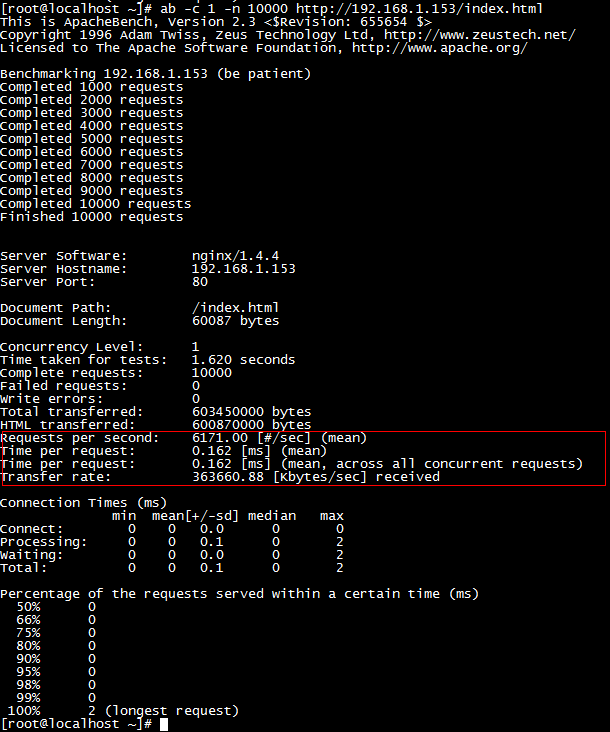
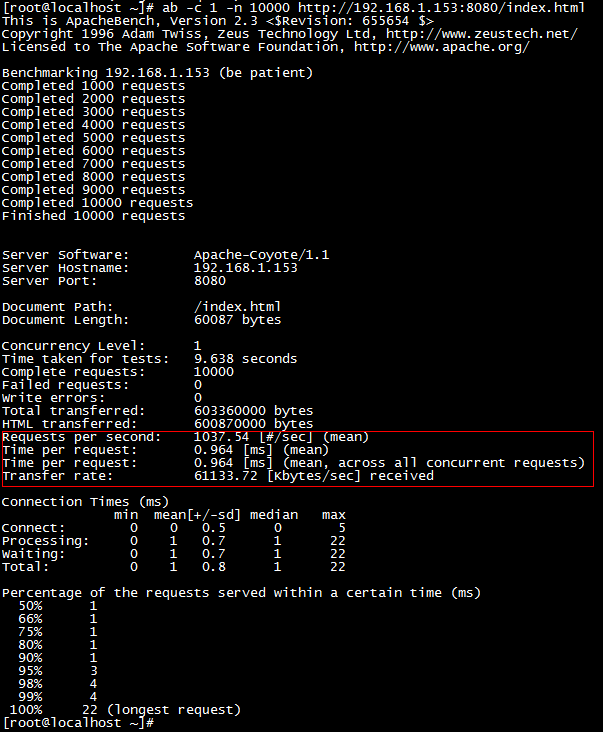
下面我们使用的ab压力测试工具,模拟发起一次1万的并发请求,使用的index.html页面是百度首页代码

Nginx测试
Tomcat测试
主要参数说明:
Requests per second:平均每秒处理事务数
Time per request:平均事务响应时间
Tranfer rate:平均每秒吞吐量
经上面测试得出:nginx每秒能请求6000次,而tomcat只请求1000次。
nginx每秒吞吐量是3.6M,tomcat每秒吞吐量0.6M
由此看来,nginx是tomcat6倍的处理能力,如果网站程序静态页面多的话,就应该考虑使用Nginx与Tomcat整合来使用。