1. 背景
dockerfile 与 docker-compose 相关内容在前面文章已经详述,这里就不再一一说明。
2. 环境
|
1
2
3
4
5
6
7
8
9
10
11
12
13
14
15
16
17
18
19
20
21
22
23
24
|
[[email protected] ~]# cat /etc/redhat-release
CentOS Linux release 7.2.1511 (Core) [[email protected] ~]# uname -r
3.10.0-327.36.3.el7.x86_64[[email protected] ~]# docker version
Client: Version: 1.12.6
API version: 1.24
Package version: docker-1.12.6-28.git1398f24.el7.centos.x86_64
Go version: go1.7.4
Git commit: 1398f24/1.12.6
Built: Fri May 26 17:28:18 2017
OS/Arch: linux/amd64
[[email protected] ~]# docker-compose version
docker-compose version 1.14.0, build c7bdf9edocker-py version: 2.3.0CPython version: 2.7.5OpenSSL version: OpenSSL 1.0.1e-fips 11 Feb 2013[[email protected] ~]# ifconfig eth0 | sed -n 2p | awk '{print $2}'
192.168.60.150 |
3. 制作镜像
* 构建php dockerfile
|
1
2
3
4
5
6
7
8
9
10
11
12
13
14
15
16
17
18
19
20
|
#Php-fpm#Version 1.0.1#Author lisea#Base ImageFROM centos:7#MaintainerMAINTAINER lisea [email protected]#CommandsRUN rpm -ivh http://mirrors.aliyun.com/epel/epel-release-latest-7.noarch.rpm
RUN yum install php-fpm -y
RUN sed -i -e 's\listen = 127.0.0.1:9000\listen = 0.0.0.0:9000\g' -e 's\listen.allo
wed_clients = 127.0.0.1\;listen.allowed_clients = 127.0.0.1\g' /etc/php-fpm.d/www.c
onfRUN sed -i 's\;daemonize = yes\daemonize = no\g' /etc/php-fpm.conf
EXPOSE 9000CMD ["php-fpm"]
|
* 构建 php 镜像
|
1
|
[[email protected] php-fpm]# docker build -t lisea/php-fpm:v1.0.1 .
|
* 准备nginx配置nginx.conf文件
|
1
2
3
4
5
6
7
8
9
10
11
12
13
14
15
16
17
18
19
20
21
22
23
24
25
26
27
28
29
30
31
32
33
34
35
36
37
38
39
40
41
42
43
44
45
46
47
48
49
50
51
52
53
54
55
56
57
58
59
60
61
62
63
|
user nginx nginx;worker_processes auto;daemon off;error_log /var/log/error_nginx.log crit;
pid /var/run/nginx.pid;
worker_rlimit_nofile 102400;events { use epoll;
worker_connections 102400;
multi_accept on;
}http { include mime.types;
default_type application/octet-stream;
server_names_hash_bucket_size 128;
client_header_buffer_size 4k;
large_client_header_buffers 4 32k;
client_max_body_size 1024m;
client_body_buffer_size 10m;
sendfile on;
tcp_nopush on;
keepalive_timeout 60;
server_tokens off;
tcp_nodelay on;
fastcgi_connect_timeout 300;
fastcgi_send_timeout 300;
fastcgi_read_timeout 300;
fastcgi_buffer_size 64k;
fastcgi_buffers 4 64k;
fastcgi_busy_buffers_size 128k;
fastcgi_temp_file_write_size 128k;
fastcgi_intercept_errors on;
#Gzip Compression
gzip on;
gzip_buffers 16 8k;
gzip_comp_level 6;
gzip_http_version 1.1;
gzip_min_length 256;
gzip_proxied any;
gzip_vary on;
gzip_types
text/xml application/xml application/atom+xml application/rss+xml application/xhtml+xml image/svg+xml
text/javascript application/javascript application/x-javascript
text/x-json application/json application/x-web-app-manifest+json
text/css text/plain text/x-component
font/opentype application/x-font-ttf application/vnd.ms-fontobject
image/x-icon;
gzip_disable "MSIE [1-6]\.(?!.*SV1)";
#If you have a lot of static files to serve through Nginx then caching of the files' metadata (not the actual files' contents) can save some latency.
open_file_cache max=102400 inactive=20s;
open_file_cache_valid 30s;
open_file_cache_min_uses 1;
open_file_cache_errors on;
########################## vhost ############################# include conf.d/*.conf;
} |
* 准备nginx配置php服务相关 nginx_localhost_80.conf 文件
php:9000是通过后面的--link 容器之间互联指定
|
1
2
3
4
5
6
7
8
9
10
11
12
13
14
15
16
17
18
19
20
21
22
23
24
|
server { listen 80;
server_name localhost;
root /data/www;
index index.html index.htm index.php;
location ~ [^/]\.php(/|$) {
fastcgi_pass php:9000;
#fastcgi_pass unix:/usr/local/php-fastcgi/php-fpm.sock;
fastcgi_index index.php;
include fastcgi.conf;
}
location ~ .*\.(gif|jpg|jpeg|png|bmp|swf|flv|mp4|ico)$ {
expires 30d;
access_log off;
}
location ~ .*\.(js|css)?$ {
expires 7d;
access_log off;
}
location ~ /\.ht {
deny all;
}
} |
* 构建 nginx dockerfile 文件
|
1
2
3
4
5
6
7
8
9
10
11
12
13
14
15
16
17
18
|
#Nginx#Version 1.0.1#Author lisea#Base ImageFROM centos:7#MaintainerMAINTAINER lisea [email protected]#CommandsRUN rpm -ivh http://mirrors.aliyun.com/epel/epel-release-latest-7.noarch.rpm
RUN yum install nginx -y
ADD nginx.conf /etc/nginx/nginx.conf
ADD nginx_localhost_80.conf /etc/nginx/conf.d/localhost_80.conf
EXPOSE 80CMD ["nginx"]
|
* 构建 nginx 镜像
|
1
|
[[email protected] nginx]# docker build -t lisea/nginx:v1.0.1 .
|
* 准备mariadb 启动脚本 startup.sh
|
1
2
3
4
5
6
7
8
9
10
11
|
#!/bin/bashif [ ! -f /var/lib/mysql/ibdata1 ]; then
mysql_install_db
chown mysql.mysql -R /var/lib/mysql
/usr/bin/mysqld_safe &
sleep 10s
mysql -e "grant all privileges on *.* to 'root'@'%' identified by '123456'; FLUSH PRIVILEGES;"
kill -s TERM `ps aux | grep mysqld | grep -v 'grep' | awk '{print $2}'`
sleep 10s
fi/usr/bin/mysqld_safe |
* 构建mariadb(mysql) dockerfile
|
1
2
3
4
5
6
7
8
9
10
11
12
13
14
15
16
17
18
|
#Mariadb#Version 1.0.1#Author lisea#Base ImageFROM centos:7#MaintainerMAINTAINER lisea [email protected]#CommandsRUN rpm -ivh http://mirrors.aliyun.com/epel/epel-release-latest-7.noarch.rpm
RUN yum install mariadb-server mariadb -y
ADD startup.sh /opt/startup.sh
RUN chmod +x /opt/startup.sh
EXPOSE 3306CMD ["/bin/bash","/opt/startup.sh"]
|
* 构建 mysql 镜像
|
1
|
[[email protected] mysql]# docker build -t lisea/mariadb:v1.0.1 .
|
* 查看所有镜像
|
1
2
3
4
5
6
|
[[email protected] lnmp]# docker images
REPOSITORY TAG IMAGE ID CREATED SIZElisea/mariadb v1.0.1 5925448a6fb6 3 minutes ago 493.6 MB
lisea/nginx v1.0.1 f1aba93ce33d 52 minutes ago 391.4 MB
lisea/php-fpm v1.0.1 d205ea9fcdba About an hour ago 350.1 MB
docker.io/centos 7 3bee3060bfc8 2 weeks ago 192.5 MB
|
4. 编写docker-compose
* docker-compose.yml
|
1
2
3
4
5
6
7
8
9
10
11
12
13
14
15
16
17
18
19
20
|
version: "2"
services: lnmp_nginx:
image: lisea/nginx:v1.0.1
ports:
- "8080:80"
links:
- "lnmp_php:php"
volumes:
- /data/www:/data/www
lnmp_php:
image: lisea/php-fpm:v1.0.1
volumes:
- /data/www:/data/www
lnmp_mariadb:
image: lisea/mariadb:v1.0.1
ports:
- "3306:3306"
volumes:
- /data/mariadb:/var/lib/mysql
|
* 开始构建并运行 -d 指定后台运行
|
1
2
3
4
5
6
7
8
|
[[email protected] lnmp]# docker-compose up -d
Creating network "lnmp_default" with the default driver
Creating lnmp_lnmp_php_1 ... Creating lnmp_lnmp_mysql_1 ... Creating lnmp_lnmp_php_1Creating lnmp_lnmp_php_1 ... done
Creating lnmp_lnmp_mariadb_1 ... done
Creating lnmp_lnmp_nginx_1 ... done
|
* 查看端口监听状态
|
1
2
3
4
5
6
7
|
[[email protected] lnmp]# netstat -lntp
Active Internet connections (only servers)Proto Recv-Q Send-Q Local Address Foreign Address State PID/Program name
tcp 0 0 0.0.0.0:22 0.0.0.0:* LISTEN 975/sshd tcp6 0 0 :::3306 :::* LISTEN 15138/docker-proxy- tcp6 0 0 :::8080 :::* LISTEN 15320/docker-proxy- tcp6 0 0 :::22 :::* LISTEN 975/sshd
|
5. 测试lnmp环境
* 路径切换到nginx web目录 [/data/www]
|
1
|
[[email protected] lnmp]# cd /data/www/
|
* index.php
|
1
2
3
|
<?php phpinfo();
?> |
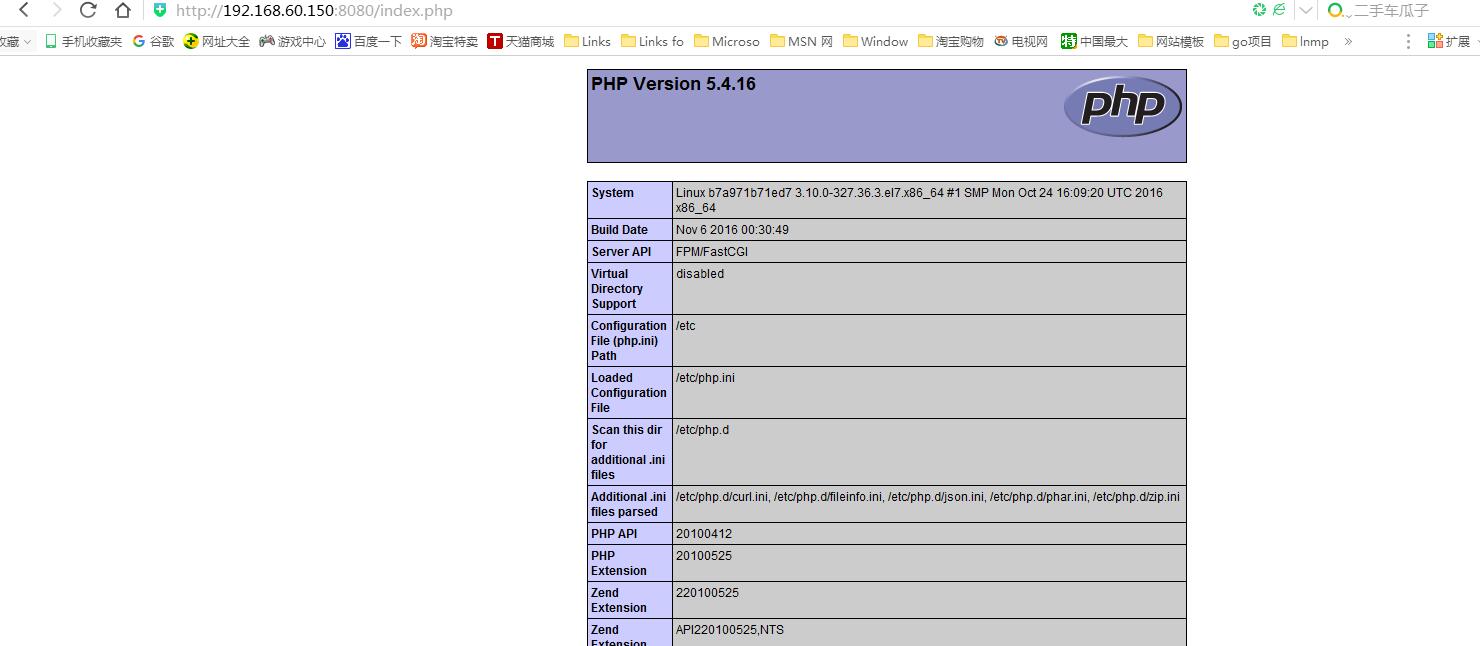
* 浏览器访问 ip:8080/index.php
6. 总结
以需求驱动技术,技术本身没有优略之分,只有业务之分。
本文转自asd1123509133 51CTO博客,原文链接:http://blog.51cto.com/lisea/1940480,如需转载请自行联系原作者