在TextView或者编辑框EditText中添加图片的方法,代码如下:
|
1
2
3
4
5
6
7
8
9
10
11
12
13
14
15
16
17
18
19
20
21
22
23
24
25
26
27
28
29
30
31
32
33
34
35
36
37
38
39
40
|
import java.util.regex.Matcher;
import java.util.regex.Pattern;
import android.os.Bundle;
import android.app.Activity;
import android.text.Spannable;
import android.text.SpannableStringBuilder;
import android.text.style.ImageSpan;
import android.widget.EditText;
import android.widget.TextView;
public class MainActivity extends Activity
{ @Override
protected void onCreate(Bundle savedInstanceState)
{
super.onCreate(savedInstanceState);
setContentView(R.layout.activity_main);
TextView tv = (TextView) findViewById(R.id.tv);
String str = "sdfasdfasljeojgfad falsdkjfasjdkf alsdjfoawpjf sajfadsjf ladjfa ls";
SpannableStringBuilder builder = new SpannableStringBuilder(str);
String flag = "";
Pattern pattern = Pattern.compile(flag);
Matcher matcher = pattern.matcher(str);
while (matcher.find())
{
builder.setSpan(new ImageSpan(this, R.drawable.ic_launcher), matcher.start(), matcher.end(), Spannable.SPAN_EXCLUSIVE_EXCLUSIVE);
}
tv.setText(builder);
EditText ed = (EditText) findViewById(R.id.editText1);
ed.setText(builder);
}
} |
布局文件代码如下:
|
1
2
3
4
5
6
7
8
9
10
11
12
13
14
15
16
17
18
19
20
21
22
23
24
25
26
27
28
29
|
<RelativeLayout xmlns:android="http://schemas.android.com/apk/res/android"
xmlns:tools="http://schemas.android.com/tools"
android:layout_width="match_parent"
android:layout_height="match_parent"
android:paddingBottom="@dimen/activity_vertical_margin"
android:paddingLeft="@dimen/activity_horizontal_margin"
android:paddingRight="@dimen/activity_horizontal_margin"
android:paddingTop="@dimen/activity_vertical_margin"
tools:context=".MainActivity" >
<TextView
android:id="@+id/tv"
android:layout_width="wrap_content"
android:layout_height="wrap_content"
android:text="@string/hello_world" />
<EditText
android:id="@+id/editText1"
android:layout_width="wrap_content"
android:layout_height="wrap_content"
android:layout_alignParentLeft="true"
android:layout_below="@+id/tv"
android:layout_marginTop="63dp"
android:ems="10" >
<requestFocus />
</EditText>
</RelativeLayout> |
效果图:
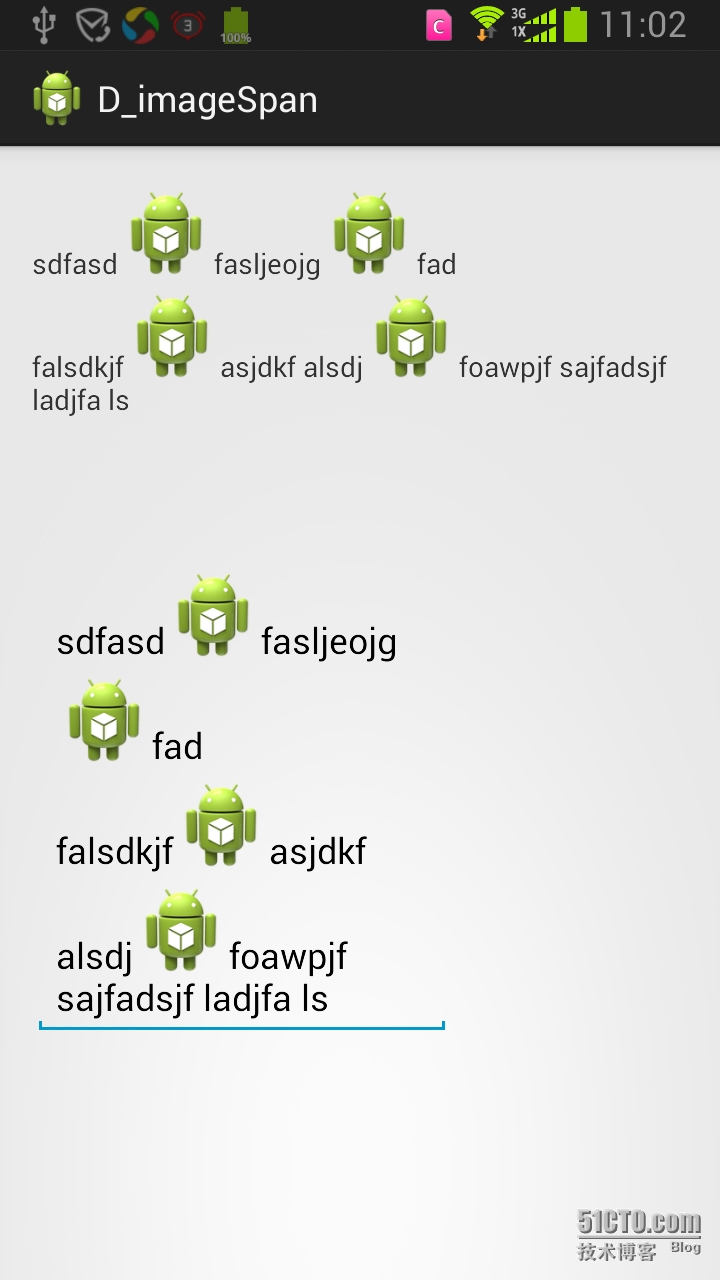
本文转自 glblong 51CTO博客,原文链接:http://blog.51cto.com/glblong/1548221,如需转载请自行联系原作者