Jumpserver 是一款由python编写开源的跳板机(堡垒机)系统,实现了跳板机应有的功能。基于ssh协议来管理,客户端无需安装agent。
特点:
完全开源,GPL授权
Python编写,容易再次开发
实现了跳板机基本功能,认证、授权、审计
集成了Ansible,批量命令等
支持WebTerminal
Bootstrap编写,界面美观
自动收集硬件信息
录像回放
命令搜索
实时监控
批量上传下载
实验环境
centos6.5_x64
实验软件
epel-release-6-8.noarch
pycrypto-2.4.1.tar.gz
gmp-5.1.0.tar.bz2
jumpserver-0.3.2.zip
软件安装
sed -i 's/^mirrorlist=https/mirrorlist=http/' /etc/yum.repos.d/epel.repo
yum install -y git* python-pip* gcc automake autoconf python-devel vim* sshpass readline-devel pip*
python-crypto* openssl* unzip* lrzsz unzip* tar* iftop* mysql mysql-devel mysql-server
tar jxvf gmp-5.1.0.tar.bz2
cd gmp-5.1.0
make && make install
vim /etc/my.cnf
[mysqld]
default-character-set=utf8 添加配置
service mysqld restart
mysqladmin -uroot password 数据库访问密码
mysql -uroot password 数据库访问密码
mysql> create database jumpserver;
mysql> grant all privileges on jumpserver.* to [email protected] identified by '123456'; jumpserver为授权用户 123456授权密码
mysql> flush privileges;
mysql> select host,user from mysql.user;
+-----------+------------+
| host | user |
+-----------+------------+
| 127.0.0.1 | root |
| centos6 | |
| centos6 | root |
| localhost | |
| localhost | jumpserver |
| localhost | root |
+-----------+------------+
6 rows in set (0.00 sec)
mysql> show databases;
+--------------------+
| Database |
+--------------------+
| information_schema |
| jumpserver |
| mysql |
| test |
+--------------------+
mysql -u jumpserver password 授权数据库访问密码
mv jumpserver-0.3.2.zip /opt/
unzip jumpserver-0.3.2.zip
pip /opt/jumpserver-0.3.2/install -r requirements.txt
python /opt/jumpserver-0.3.2/install/install.py
pip freeze
You are using pip version 7.1.0, however version 8.1.2 is available.
You should consider upgrading via the 'pip install --upgrade pip' command.
ansible==1.9.4
argparse==1.4.0
async==0.6.1
backports-abc==0.4
backports.ssl-match-hostname==3.4.0.2
Beaker==1.3.1
beautifulsoup4==4.1.3
bunch==1.0.1
cas==0.15
certifi==2016.8.8
chardet==2.2.1
ClusterShell==1.5.90
cups==1.0
cupshelpers==1.0
decorator==3.0.1
Django==1.6
开始写入配置文件
Traceback (most recent call last):
File "/opt/jumpserver-0.3.1/install/next.py", line 21, in <module>
from juser.user_api import db_add_user, get_object, User
File "/opt/jumpserver-0.3.1/juser/user_api.py", line 3, in <module>
from Crypto.PublicKey import RSA
File "/usr/lib64/python2.6/site-packages/Crypto/PublicKey/RSA.py", line 37, in <module>
from Crypto.Util.number import getRandomRange
File "/usr/lib64/python2.6/site-packages/Crypto/Util/number.py", line 56, in <module>
if _fastmath is not None and not _fastmath.HAVE_DECL_MPZ_POWM_SEC:
AttributeError: 'module' object has no attribute 'HAVE_DECL_MPZ_POWM_SEC'
pip uninstall pycrypto
easy_install pycrypto-2.4.1.tar.gz
python /opt/jumpserver-0.3.2/install/install.py
请输入您服务器的IP地址,用户浏览器可以访问 [192.168.31.135]:
是否安装新的MySQL服务器? (y/n) [y]: n 如果有运行数据库服务器选 n 第一次安装选 y
开始安装设置mysql (请手动设置mysql安全)
默认用户名: jumpserver 默认密码: [email protected]
连接数据库成功
请输入SMTP地址:
请输入SMTP端口 [25]:
请输入账户:
请输入密码: 邮箱认证建议使用新浪邮箱
请输入管理员用户名 [admin]: admin
请输入管理员密码: [[email protected]]:
请再次输入管理员密码: [[email protected]]:
Starting jumpserver service:[ OK ]
安装成功,Web登录请访问 http://ip:8000
netstat -tuplna | grep 8000
tcp 0 0 0.0.0.0:8000 0.0.0.0:* LISTEN 11780/python
ps -ef | grep 8000
root 10160 2430 0 10:54 pts/0 00:00:00 grep 8000
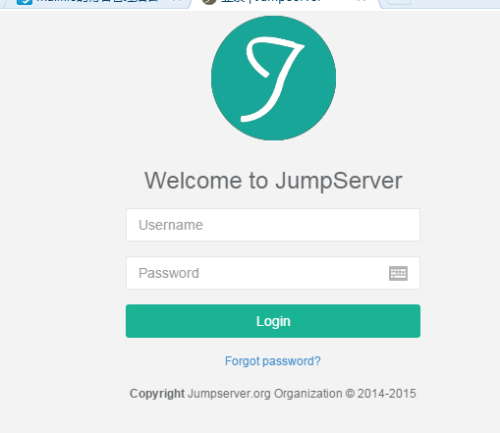
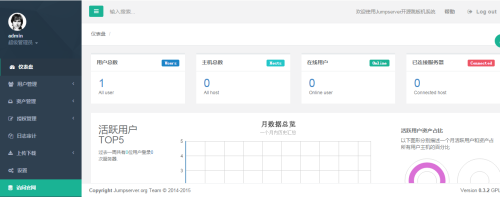
用户名 admin 密码为初始化自行设置 (根据个人喜好修改)
本文转自 mailfile 51CTO博客,原文链接:http://blog.51cto.com/mailfile/1839023,如需转载请自行联系原作者