本章是Spring Data系列的第三篇。系列文章,重点不是讲解JPA语法,所以跑开了JPA的很多语法等,重点放在环境搭建,通过对比方式,快速体会Spring 对JPA的强大功能。
准备代码过程中,保持了每个例子的独立性,和简单性,准备的源码包,下载即可使用。如果,对JPA语法想深入研究的话,直接下载在此基础上进行测试。
前言
Spring Data 系列(一) 入门:简单介绍了原生态的SQL使用,以及JdbcTemplate的使用,在这里写SQL的活还需要自己准备。
Spring Data 系列(二) Spring+JPA入门(集成Hibernate) : 使用JPA API,SQL实现了透明化,可以在不同数据库之间进行切换,以及JPA解决方案间切换。这时候的业务DAO层,是自定义的方法。
Spring Data 系列(三) Spring+JPA(spring-data-commons): 在Spring Data 系列(二)
的基础上,业务DAO层,也可以省掉。
1.XML配置实现spring-data-commons集成
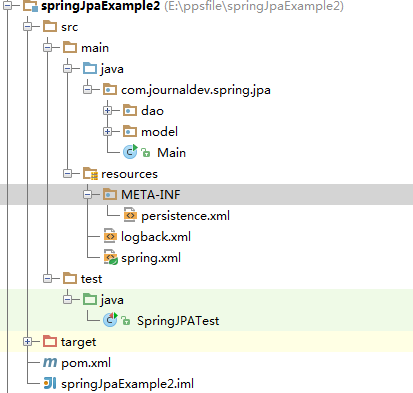
环境代码和项目结构和Spring Data 系列(二) 基本一致
1.1 项目结构
1.2.pom.xml
|
1
2
3
4
5
6
7
8
9
10
11
12
13
14
15
16
17
18
19
20
21
22
23
24
25
26
27
28
29
30
31
32
33
34
35
36
37
38
39
40
41
42
43
44
45
46
47
48
49
50
51
52
53
54
55
56
57
58
59
60
61
62
63
|
<project xmlns="http://maven.apache.org/POM/4.0.0" xmlns:xsi="http://www.w3.org/2001/XMLSchema-instance"
xsi:schemaLocation="http://maven.apache.org/POM/4.0.0 http://maven.apache.org/xsd/maven-4.0.0.xsd">
<modelVersion>4.0.0</modelVersion>
<groupId>com.springframework</groupId>
<artifactId>springJpaExample2</artifactId>
<version>1.0-SNAPSHOT</version>
<packaging>jar</packaging>
<name>springJpaExample2</name>
<url>http://maven.apache.org</url>
<properties>
<project.build.sourceEncoding>UTF-8</project.build.sourceEncoding>
</properties>
<dependencies>
<dependency>
<groupId>org.springframework.boot</groupId>
<artifactId>spring-boot-starter-data-jpa</artifactId>
</dependency>
<dependency>
<groupId>mysql</groupId>
<artifactId>mysql-connector-java</artifactId>
</dependency>
<dependency>
<groupId>org.springframework</groupId>
<artifactId>spring-test</artifactId>
</dependency>
<dependency>
<groupId>junit</groupId>
<artifactId>junit</artifactId>
<version>4.12</version>
</dependency>
</dependencies>
<repositories>
<repository>
<id>spring-releases</id>
<name>Spring Releases</name>
<url>https://repo.spring.io/libs-release</url>
</repository>
<repository>
<id>org.jboss.repository.releases</id>
<name>JBoss Maven Release Repository</name>
<url>https://repository.jboss.org/nexus/content/repositories/releases</url>
</repository>
</repositories>
<pluginRepositories>
<pluginRepository>
<id>spring-releases</id>
<name>Spring Releases</name>
<url>https://repo.spring.io/libs-release</url>
</pluginRepository>
</pluginRepositories>
<dependencyManagement>
<dependencies>
<dependency>
<groupId>io.spring.platform</groupId>
<artifactId>platform-bom</artifactId>
<version>1.1.2.RELEASE</version>
<type>pom</type>
<scope>import</scope>
</dependency>
</dependencies>
</dependencyManagement>
</project>
|
1.3 persistence.xml
|
1
2
3
4
5
6
7
|
<persistence version="2.1"
xmlns="http://xmlns.jcp.org/xml/ns/persistence" xmlns:xsi="http://www.w3.org/2001/XMLSchema-instance"
xsi:schemaLocation="http://xmlns.jcp.org/xml/ns/persistence http://xmlns.jcp.org/xml/ns/persistence/persistence_2_1.xsd">
<persistence-unit name="JPAExamples">
<provider>org.hibernate.jpa.HibernatePersistenceProvider</provider>
</persistence-unit>
</persistence>
|
1.4 日志文件(这对研究框架操作过程,是个很好的入口)
|
1
2
3
4
5
6
7
8
9
10
11
12
13
14
15
16
17
18
|
<?xml version="1.0" encoding="UTF-8"?>
<configuration>
<appender name="STDOUT" class="ch.qos.logback.core.ConsoleAppender">
<layout class="ch.qos.logback.classic.PatternLayout">
<Pattern>
%d{yyyy-MM-dd HH:mm:ss} [%thread] %-5level %logger{36} - %msg%n
</Pattern>
</layout>
</appender>
<logger name="org.hibernate" level="debug" additivity="false">
<appender-ref ref="STDOUT" />
</logger>
<root level="error">
<appender-ref ref="STDOUT" />
</root>
</configuration>
|
1.5 核心配置文件spring.xml
|
1
2
3
4
5
6
7
8
9
10
11
12
13
14
15
16
17
18
19
20
21
22
23
24
25
26
27
28
29
30
31
32
33
34
35
36
37
38
39
40
41
42
43
44
45
46
47
48
49
50
51
52
53
54
55
|
<?xml version="1.0" encoding="UTF-8"?>
<beans xmlns="http://www.springframework.org/schema/beans"
xmlns:xsi="http://www.w3.org/2001/XMLSchema-instance"
xmlns:p="http://www.springframework.org/schema/p"
xmlns:jpa="http://www.springframework.org/schema/data/jpa"
xmlns:context="http://www.springframework.org/schema/context"
xmlns:aop="http://www.springframework.org/schema/aop"
xmlns:tx="http://www.springframework.org/schema/tx"
xsi:schemaLocation="http://www.springframework.org/schema/beans http://www.springframework.org/schema/beans/spring-beans.xsd
http://www.springframework.org/schema/aop http://www.springframework.org/schema/aop/spring-aop-3.1.xsd
http://www.springframework.org/schema/tx http://www.springframework.org/schema/tx/spring-tx-3.1.xsd
http://www.springframework.org/schema/context http://www.springframework.org/schema/context/spring-context-3.1.xsd
http://www.springframework.org/schema/data/jpa http://www.springframework.org/schema/data/jpa/spring-jpa.xsd
">
<bean id="dataSource" class="org.springframework.jdbc.datasource.DriverManagerDataSource">
<property name="url" value="jdbc:mysql://localhost:3306/exampledb"/>
<property name="username" value="root"/>
<property name="password" value="root"/>
<property name="driverClassName" value="com.mysql.jdbc.Driver"/>
</bean>
<bean id="entityManagerFactory" class="org.springframework.orm.jpa.LocalContainerEntityManagerFactoryBean">
<property name="dataSource" ref="dataSource"/>
<property name="persistenceXmlLocation" value="META-INF/persistence.xml"/>
<property name="persistenceUnitName" value="JPAExamples"/>
<property name="jpaVendorAdapter" ref="jpaVendorAdapter"/>
<property name="jpaDialect" ref="jpaDialect"/>
<property name="jpaProperties">
<props>
<prop key="hibernate.show_sql">true</prop>
</props>
</property>
</bean>
<bean id="jpaVendorAdapter" class="org.springframework.orm.jpa.vendor.HibernateJpaVendorAdapter">
<property name="generateDdl" value="false" />
<property name="database" value="MYSQL"/>
</bean>
<bean id="jpaDialect" class="org.springframework.orm.jpa.vendor.HibernateJpaDialect"/>
<bean id="entityManager" factory-bean="entityManagerFactory" factory-method="createEntityManager"></bean>
<!-- Jpa 事务管理器 -->
<bean id="transactionManager" class="org.springframework.orm.jpa.JpaTransactionManager"
p:entityManagerFactory-ref="entityManagerFactory" />
<!-- 开启注解事务 -->
<tx:annotation-driven transaction-manager="transactionManager" proxy-target-class="true" />
<!-- 启动对@AspectJ(面向切面)注解的支持 -->
<aop:aspectj-autoproxy />
<context:component-scan base-package="com.journaldev.spring.jpa"></context:component-scan>
<jpa:repositories base-package="com.journaldev.spring.jpa"/>
</beans>
|
1.6 业务Entity
|
1
2
3
4
5
6
7
8
9
10
11
12
13
14
15
16
17
18
19
20
21
22
23
24
25
26
27
28
29
30
31
32
33
34
35
36
37
38
39
40
41
|
package com.journaldev.spring.jpa.model;
import javax.persistence.Entity;
import javax.persistence.Id;
import javax.persistence.IdClass;
@Entity
public class Employee {
@Id
private Integer id;
private String name;
private String role;
public int getId() {
return id;
}
public void setId(int id) {
this.id = id;
}
public String getName() {
return name;
}
public void setName(String name) {
this.name = name;
}
public String getRole() {
return role;
}
public void setRole(String role) {
this.role = role;
}
@Override
public String toString() {
return "{ID=" + id + ",Name=" + name + ",Role=" + role + "}";
}
}
|
1.7 DAO
|
1
2
|
public interface EmployeeDAO extends CrudRepository<Employee,Integer> {
}
|
DAO接口定义,这儿有几点2点注意
-
不需要在这儿重复通过@Reposity,@Component等注解声明Bean,因为通过<jpa:repositories base-package="com.journaldev.spring.jpa"/>语法已经声明了
-
CrudRepository是泛型,不能省略。
1.8 最后测试
|
1
2
3
4
5
6
7
8
9
10
11
12
13
14
15
16
17
18
19
20
21
22
23
24
25
26
27
28
29
30
31
32
33
34
35
36
37
|
import com.journaldev.spring.jpa.dao.EmployeeDAO;
import com.journaldev.spring.jpa.model.Employee;
import org.junit.Test;
import org.junit.runner.RunWith;
import org.springframework.beans.factory.annotation.Autowired;
import org.springframework.test.context.ContextConfiguration;
import org.springframework.test.context.junit4.AbstractTransactionalJUnit4SpringContextTests;
import org.springframework.test.context.junit4.SpringJUnit4ClassRunner;
import javax.annotation.Resource;
import java.util.Iterator;
import java.util.Random;
@RunWith(SpringJUnit4ClassRunner.class)
@ContextConfiguration(locations = "classpath:spring.xml")
public class SpringJPATest /*extends AbstractTransactionalJUnit4SpringContextTests */{
@Autowired
private EmployeeDAO employeeDAO;
@Test
public void testSave(){
Employee emp = new Employee();
int rand = new Random().nextInt(1000);
emp.setId(rand);
emp.setName("Pankaj");
emp.setRole("Java Developer");
employeeDAO.save(emp);
emp.setName(emp.getName() + "_update");
employeeDAO.save(emp);
Iterable<Employee> employees = employeeDAO.findAll();
Iterator<Employee> iterator = employees.iterator();
while(iterator.hasNext()){
System.out.println(iterator.next());
}
}
}
|
测试代码,不多测试。还是那句话,该系列文章,重点是演示搭建过程,以及对比方式,理解Spring Data带来的威力。
最后:
通过对比,相信大家不难发现,本文的DAO层连实现都不需要了,定义一个接口就齐活了,逻辑由Spring自动实时自动生成。最后我要说的时,虽然Spring给我们带来的便利,但麻烦也随之而来。把底层实现进行了屏蔽,凡是遇到错误,也很难定位问题了,弄清楚Spring的工作机制,这也是我们以后的课题了。
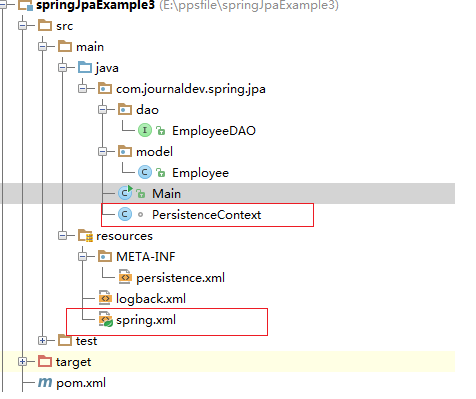
2.Annotation配置实现spring-data-commons集成
和<1.XML配置实现spring-data-commons集成>节基本一样。
稍微有点差别的是
2.1 spring.xml
|
1
2
3
4
5
6
7
8
9
10
11
12
13
14
15
16
17
|
<?xml version="1.0" encoding="UTF-8"?>
<beans xmlns="http://www.springframework.org/schema/beans"
xmlns:xsi="http://www.w3.org/2001/XMLSchema-instance"
xmlns:p="http://www.springframework.org/schema/p"
xmlns:jpa="http://www.springframework.org/schema/data/jpa"
xmlns:context="http://www.springframework.org/schema/context"
xmlns:aop="http://www.springframework.org/schema/aop"
xmlns:tx="http://www.springframework.org/schema/tx"
xsi:schemaLocation="http://www.springframework.org/schema/beans http://www.springframework.org/schema/beans/spring-beans.xsd
http://www.springframework.org/schema/aop http://www.springframework.org/schema/aop/spring-aop-3.1.xsd
http://www.springframework.org/schema/tx http://www.springframework.org/schema/tx/spring-tx-3.1.xsd
http://www.springframework.org/schema/context http://www.springframework.org/schema/context/spring-context-3.1.xsd
http://www.springframework.org/schema/data/jpa http://www.springframework.org/schema/data/jpa/spring-jpa.xsd
">
<context:component-scan base-package="com.journaldev.spring.jpa"></context:component-scan>
</beans>
|
去除数据库,事务管理器配置,改用java annotation。相信熟悉spring的同学都知道,他们仅仅是声明spring bean的方式有点差别,基本本质是一样,都是注册BeanDefinition元数据,进而根据元数据构建需要的Bean对象。
2.2 添加配置bean
|
1
2
3
4
5
6
7
8
9
10
11
12
13
14
15
16
17
18
19
20
21
22
23
24
25
26
27
28
29
30
31
32
33
34
35
36
37
38
39
40
41
42
43
44
45
46
47
48
49
50
51
52
53
54
55
56
57
58
59
60
61
62
63
64
65
66
67
|
package com.journaldev.spring.jpa;
import org.springframework.context.annotation.Bean;
import org.springframework.context.annotation.Configuration;
import org.springframework.data.jpa.repository.config.EnableJpaRepositories;
import org.springframework.jdbc.datasource.DriverManagerDataSource;
import org.springframework.orm.jpa.JpaTransactionManager;
import org.springframework.orm.jpa.LocalContainerEntityManagerFactoryBean;
import org.springframework.orm.jpa.vendor.HibernateJpaVendorAdapter;
import org.springframework.transaction.annotation.EnableTransactionManagement;
import javax.persistence.EntityManagerFactory;
import javax.sql.DataSource;
import java.util.Properties;
@Configuration
@EnableTransactionManagement
@EnableJpaRepositories(basePackages = {"com.journaldev.spring.jpa"
})
class PersistenceContext {
//Configure the required beans here
@Bean
public DataSource dataSource() {
DriverManagerDataSource dataSource = new DriverManagerDataSource();
dataSource.setUrl("jdbc:mysql://localhost:3306/exampledb");
dataSource.setDriverClassName("com.mysql.jdbc.Driver");
dataSource.setUsername("root");
dataSource.setPassword("root");
return dataSource;
}
@Bean
public LocalContainerEntityManagerFactoryBean entityManagerFactory(DataSource dataSource) {
LocalContainerEntityManagerFactoryBean entityManagerFactoryBean = new LocalContainerEntityManagerFactoryBean();
entityManagerFactoryBean.setDataSource(dataSource);
entityManagerFactoryBean.setJpaVendorAdapter(new HibernateJpaVendorAdapter());
// entityManagerFactoryBean.setPackagesToScan("com.journaldev.spring.jpa");
Properties jpaProperties = new Properties();
//Configures the used database dialect. This allows Hibernate to create SQL
//that is optimized for the used database.
jpaProperties.put("hibernate.dialect", "org.hibernate.dialect.MySQL5Dialect");
//Specifies the action that is invoked to the database when the Hibernate
//SessionFactory is created or closed.
jpaProperties.put("hibernate.hbm2ddl.auto",true);
//If the value of this property is true, Hibernate writes all SQL
//statements to the console.
jpaProperties.put("hibernate.show_sql",true);
//If the value of this property is true, Hibernate will format the SQL
//that is written to the console.
jpaProperties.put("hibernate.format_sql",true);
entityManagerFactoryBean.setJpaProperties(jpaProperties);
return entityManagerFactoryBean;
}
@Bean
public JpaTransactionManager transactionManager(EntityManagerFactory entityManagerFactory) {
JpaTransactionManager transactionManager = new JpaTransactionManager();
transactionManager.setEntityManagerFactory(entityManagerFactory);
return transactionManager;
}
}
|
使用编码式声明,我能想到唯一的优点:自动程度高一些,方便动态配置相关信息。
总之,变更了2处地方,其他完全一样。可以理解为就是声明底层支持对象(如数据源,事务管理器)两个地方发生了变化),看各自爱好,那种方式都可以。我比较倾向于XML声明方式。
源码包2个
本文出自 “简单” 博客,请务必保留此出处http://dba10g.blog.51cto.com/764602/1792855