Samba服务可以快速实现Unix和Windows环境之间文件共享,在Solaris 10下配置Samba非常简单,以下为具体的配置步骤。
1、配置samba的主配置文件smb.conf
默认smb.conf文件不存在,但在/etc/sfw下有个smb.conf.example文件,可以生成smb.conf
|
1
2
3
4
5
6
7
8
9
|
[[email protected]:/export/home/oracle]# cd /etc/sfw[[email protected]:/etc/sfw]# lsa2ps-site.cfg foomatic openssl ser zebraa2ps.cfg mysql private smb.conf-example
[[email protected]:/etc/sfw]# cp smb.conf-example smb.conf |
|
1
2
3
4
5
6
7
8
9
10
11
12
13
14
15
16
17
18
19
20
21
22
23
24
25
26
27
28
29
30
31
32
33
34
35
36
37
38
39
40
41
42
43
44
45
46
47
48
49
50
51
52
53
54
55
56
57
58
59
60
61
62
63
64
65
66
67
68
69
70
71
72
73
74
75
76
77
78
79
80
81
82
83
84
85
86
87
88
89
90
91
92
93
94
95
96
|
[[email protected]:/etc/sfw]# cat smb.conf"smb.conf" [Read only] 271 lines, 9662 characters
# This is the main Samba configuration file. You should read the# smb.conf(5) manual page in order to understand the options listed
# here. Samba has a huge number of configurable options (perhaps too# many!) most of which are not shown in this example
## For a step to step guide on installing, configuring and using samba,
# read the Samba-HOWTO-Collection. This may be obtained from:
# http://www.samba.org/samba/docs/Samba-HOWTO-Collection.pdf
## Many working examples of smb.conf files can be found in the
# Samba-Guide which is generated daily and can be downloaded from:
# http://www.samba.org/samba/docs/Samba-Guide.pdf
## Any line which starts with a ; (semi-colon) or a # (hash)
# is a comment and is ignored. In this example we will use a #
# for commentry and a ; for parts of the config file that you
# may wish to enable## NOTE: Whenever you modify this file you should run the command "testparm"
# to check that you have not made any basic syntactic errors.
##======================= Global Settings =====================================[global]# workgroup = NT-Domain-Name or Workgroup-Name, eg: MIDEARTH
workgroup = MYGROUP
# server string is the equivalent of the NT Description field server string = Samba Server
# Security mode. Defines in which mode Samba will operate. Possible
# values are share, user, server, domain and ads. Most people will want
# user level security. See the Samba-HOWTO-Collection for details.
security = user
# This option is important for security. It allows you to restrict
# connections to machines which are on your local network. The
# following example restricts access to two C class networks and
# the "loopback" interface. For more examples of the syntax see
# the smb.conf man page; hosts allow = 192.168.1. 192.168.2. 127.
# If you want to automatically load your printer list rather# than setting them up individually then you'll need this
load printers = yes
# you may wish to override the location of the printcap file
; printcap name = /etc/printcap# on SystemV system setting printcap name to lpstat should allow
# you to automatically obtain a printer list from the SystemV spool
# system; printcap name = lpstat# It should not be necessary to specify the print system type unless
# it is non-standard. Currently supported print systems include:# bsd, cups, sysv, plp, lprng, aix, hpux, qnx; printing = cups# Uncomment this if you want a guest account, you must add this to /etc/passwd
# otherwise the user "nobody" is used
; guest account = pcguest/share# if you enable domain logons then you may want a per-machine or
# per user logon script# run a specific logon batch file per workstation (machine); logon script = %m.bat# run a specific logon batch file per username; logon script = %U.bat# Where to store roving profiles (only for Win95 and WinNT)
# %L substitutes for this servers netbios name, %U is username
# You must uncomment the [Profiles] share below; logon path = \\%L\Profiles\%U# Windows Internet Name Serving Support Section:# WINS Support - Tells the NMBD component of Samba to enable it's WINS Server; wins support = yes# WINS Server - Tells the NMBD components of Samba to be a WINS Client# Note: Samba can be either a WINS Server, or a WINS Client, but NOT both
; wins server = w.x.y.z# WINS Proxy - Tells Samba to answer name resolution queries on
/# machine to add or delete corresponding unix accounts
; add user script = /usr/sbin/useradd %u; add group script = /usr/sbin/groupadd %g; add machine script = /usr/sbin/adduser -n -g machines -c Machine -d /dev/null -s /bin/false %u
; delete user script = /usr/sbin/userdel %u
; delete user from group script = /usr/sbin/deluser %u %g
; delete group script = /usr/sbin/groupdel %g
#============================ Share Definitions ==============================[homes] comment = Home Directories
browseable = no
writable = yes
# Un-comment the following and create the netlogon directory for Domain Logons
; [netlogon]; comment = Network Logon Service; path = /usr/sfw/lib/netlogon; guest ok = yes; writable = no; share modes = no......---以上为默认的smb.conf的配置信息,默认samba共享系统用户的home目录,如果只是共享系统用户home目录,可以使用默认配 |
2、启动samba相关process
Samba的启动进程为smbd和nmbd
|
1
2
3
4
5
6
7
8
9
10
11
12
13
14
15
16
17
18
19
20
21
22
23
24
25
26
27
28
29
30
31
32
33
34
35
36
37
38
39
40
41
42
43
|
[[email protected]:/etc/sfw]# find / -name samba/var/spool/samba
/var/samba
/usr/sfw/lib/webmin/blue-theme/samba/usr/sfw/lib/webmin/caldera/samba/usr/sfw/lib/webmin/mscstyle3/samba/usr/sfw/lib/webmin/samba/etc/webmin/samba[[email protected]:/etc/sfw]# find / -name smbd/usr/sfw/sbin/smbd[[email protected]:/etc/sfw]# find / -name nmbd/usr/sfw/sbin/nmbd[[email protected]:/etc/sfw]# /usr/sfw/sbin/smbd start[[email protected]:/etc/sfw]# ps -ef |grep smb root 774 1 0 10:15:21 ? 0:00 /usr/sfw/sbin/smbd start
root 775 774 0 10:15:22 ?
[[email protected]:/etc/sfw]# /usr/sfw/sbin/nmbd start [[email protected]:/etc/sfw]# ps -ef |grep nmb root 777 1 0 10:15:29 ? 0:00 /usr/sfw/sbin/nmbd start
[[email protected]:/etc/sfw]# netstat -an|grep 45
*.445 *.* 0 0 49152 0 LISTEN
|
3、配置访问samba共享的用户(首先必须是系统用户)
|
1
2
3
4
5
6
7
8
9
10
11
12
13
14
15
16
17
18
19
20
21
22
23
24
25
26
27
28
29
30
31
|
[[email protected]:/etc/sfw]# ls /usr/sfw/bin|grep smbfindsmbsmbcaclssmbclientsmbcontrolsmbcquotassmbgetsmbpasswdsmbspoolsmbstatussmbtarsmbtree[[email protected]:/etc/sfw]# /usr/sfw/bin/smbpasswd -a oracleNew SMB password:Retype new SMB password:
Added user oracle. |
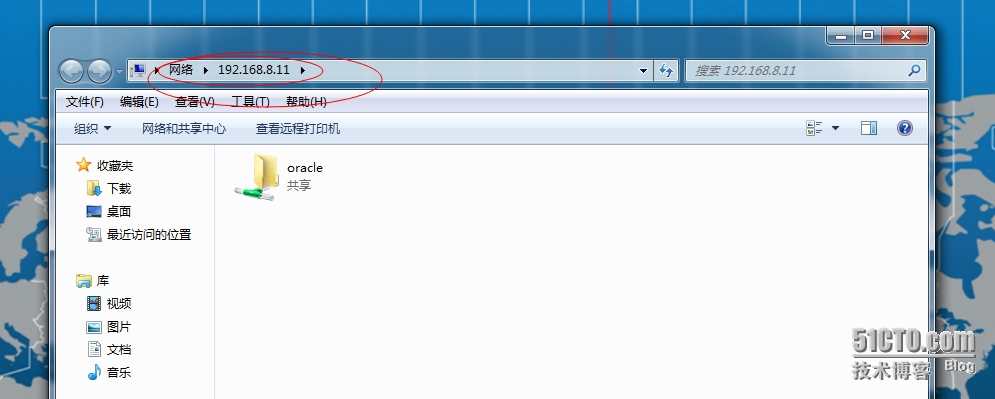
4、客户端共享 访问
本文转自 客居天涯 51CTO博客,原文链接:http://blog.51cto.com/tiany/1608246,如需转载请自行联系原作者