https://www.cnblogs.com/NeilZhang/p/10815698.html
EventBus是针对Android优化的发布-订阅事件总线,简化了Android组件间的通信。EventBus以其简单易懂、优雅、开销小等优点而备受欢迎。
github 地址:https://github.com/greenrobot/EventBus
1. 使用
1.1 gradle中引入
api 'org.greenrobot:eventbus:3.0.0'
1.2 定义事件
定义一个类作为事件,可以在类中定义不同的参数,发布者赋值,订阅者取值。
public class TestEvent {

    private String mName;


    public TestEvent(String name) {
        mName = name;
    }

    public String getEventName() {
        return mName;
    }
}
1.3 注册事件
首先需要将当前对象(Activity/Fragment等)与EventBus绑定(一般在onCreate函数中进行注册)
EventBus.getDefault().register(this);
接收事件的函数:
@Subscribe (threadMode = ThreadMode.MAIN, sticky = true)
public void onTestKeyEvent(TestEvent event) {
        Log.d(TAG, "onTestKeyEvent | eventName=" + event.getEventName());
        Toast.makeText(this, "test event, name=" + event.getEventName(), Toast.LENGTH_SHORT).show();
    }
这里通过注解的方式,定义事件的类型,和回调的线程等信息。
查看EventBus jar包中Subscribe定义:
@Documented
@Retention(RetentionPolicy.RUNTIME)
@Target({ElementType.METHOD})
public @interface Subscribe {
ThreadMode
 threadMode() default ThreadMode.POSTING;

    /**
     * If true, delivers the most recent sticky event (posted with
     * {@link EventBus#postSticky(Object)}) to this subscriber (if event available).
     */
    boolean
sticky
() default false;

    /** Subscriber priority to influence the order of event delivery.
     * Within the same delivery thread ({@link ThreadMode}), higher priority subscribers will receive events before
     * others with a lower priority. The default priority is 0. Note: the priority does *NOT* affect the order of
     * delivery among subscribers with different {@link ThreadMode}s! */
    int
priority
() default 0;
}
查看EventBus jar包中ThreadMode定义:
a) POSTING : 回调在发布者线程
b) MAIN : 回调在主线程
c) BACKGROUND : 回调在子线程(如果发布在子线程者回调直接运行在该线程)
d) ASYNC : 异步回调(不回回调在发布线程也不会回调在主线程)
1.4 发送事件
发布者不需要进行注册,只需要将事件post出去。
a) 普通事件:EventBus.getDefault().post(new TestEvent("normalEvent"));
b) 粘性事件:EventBus.getDefault().postSticky(new TestEvent("stickEvent"));
普通事件和粘性事件区别:
如果发布的是普通事件,当前如果没有Subscriber,则后续注册的Subscriber也不会收到该事件。
如果发布的是粘性事件,当前如果没有Subscriber,内部会暂存该事件,当注册Subscriber时,该Subscriber会立刻收到该事件。
2. 结构
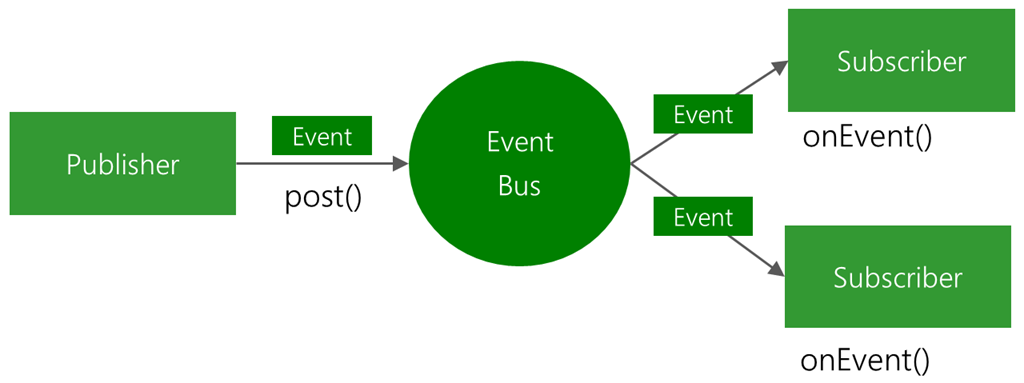
采用了典型的订阅发布设计模式。
3. 源码分析
// 这里只分析其原理和结构不会细细推敲每一行代码
订阅者信息封装(Subscription):
定义了两个成员变量,
final Object subscriber;  // 订阅一个事件的对象
final SubscriberMethod subscriberMethod; // 订阅的具体信息(方法名/ThreadMode/isStrick/priority)
EventBus主要成员变量:
private final Map<Class<?>, CopyOnWriteArrayList<Subscription>> subscriptionsByEventType;
private final Map<Object, List<Class<?>>> typesBySubscriber;
private final Map<Class<?>, Object> stickyEvents;
subscriptionsByEventType:以event(即事件类)为key,以订阅列表(Subscription)为value,事件发送之后,在这里寻找订阅者,而Subscription又是一个CopyOnWriteArrayList,这是一个线程安全的容器。你们看会好奇,Subscription到底是什么,其实看下去就会了解的,现在先提前说下:Subscription是一个封装类,封装了订阅者、订阅方法这两个类。
typesBySubscriber:以订阅者类为key,以event事件类为value,在进行register或unregister操作的时候,会操作这个map。
stickyEvents:保存的是粘性事件
3.1 注册Subscriber
注册过程,也就是调用regester函数的执行过程(主要是通过反射将注册者信息添加到上述讲的两个map中:typesBySubscriber、subscriptionsByEventType)

a) SubscriberMethodFinder 是专门用来查找目标对象中所有订阅函数(带缓存,避免同一个类多次反射查找)。反射可以获取函数的注解内容及每个函数的返回值/修饰符,具体查看findUsingReflectionInSingleClass函数。
private void findUsingReflectionInSingleClass(FindState findState) {
        Method[] methods;
        try {
            // This is faster than getMethods, especially when subscribers are fat classes like Activities
            methods = findState.clazz.getDeclaredMethods();
        } catch (Throwable th) {
            // Workaround for java.lang.NoClassDefFoundError, see https://github.com/greenrobot/EventBus/issues/149
            methods = findState.clazz.getMethods();
            findState.skipSuperClasses = true;
        }
        for (Method method : methods) {
            int modifiers = method.getModifiers();
            if ((modifiers & Modifier.PUBLIC) != 0 && (modifiers & MODIFIERS_IGNORE) == 0) {
                Class<?>[] parameterTypes = method.getParameterTypes();
                if (parameterTypes.length == 1) {
                    Subscribe subscribeAnnotation = method.getAnnotation(Subscribe.class);
                    if (subscribeAnnotation != null) {
                        Class<?> eventType = parameterTypes[0];
                        if (findState.checkAdd(method, eventType)) {
                            ThreadMode threadMode = subscribeAnnotation.threadMode();
                            findState.subscriberMethods.add(new SubscriberMethod(method, eventType, threadMode,
                                    subscribeAnnotation.priority(), subscribeAnnotation.sticky()));
                        }
                    }
                } else if (strictMethodVerification && method.isAnnotationPresent(Subscribe.class)) {
                    String methodName = method.getDeclaringClass().getName() + "." + method.getName();
                    throw new EventBusException("@Subscribe method " + methodName +
                            "must have exactly 1 parameter but has " + parameterTypes.length);
                }
            } else if (strictMethodVerification && method.isAnnotationPresent(Subscribe.class)) {
                String methodName = method.getDeclaringClass().getName() + "." + method.getName();
                throw new EventBusException(methodName +
                        " is a illegal @Subscribe method: must be public, non-static, and non-abstract");
            }
        }
    }
b) 将订阅函数添加到两个缓存map中
c) 如果订阅函数接收的是粘性事件,则将缓存中的粘性事件回调给该订阅函数。
上述b) c) 两个步骤的具体代码如下:
private void subscribe(Object subscriber, SubscriberMethod subscriberMethod) {
        Class<?> eventType = subscriberMethod.eventType;
        Subscription newSubscription = new Subscription(subscriber, subscriberMethod);
        CopyOnWriteArrayList<Subscription> subscriptions = subscriptionsByEventType.get(eventType);
        if (subscriptions == null) {
            subscriptions = new CopyOnWriteArrayList<>();
            subscriptionsByEventType.put(eventType, subscriptions);
        } else {
            if (subscriptions.contains(newSubscription)) {
                throw new EventBusException("Subscriber " + subscriber.getClass() + " already registered to event "
                        + eventType);
            }
        }

        int size = subscriptions.size();
        for (int i = 0; i <= size; i++) {
            if (i == size || subscriberMethod.priority > subscriptions.get(i).subscriberMethod.priority) {
                subscriptions.add(i, newSubscription);
                break;
            }
        }

        List<Class<?>> subscribedEvents = typesBySubscriber.get(subscriber);
        if (subscribedEvents == null) {
            subscribedEvents = new ArrayList<>();
            typesBySubscriber.put(subscriber, subscribedEvents);
        }
        subscribedEvents.add(eventType);

        if (subscriberMethod.sticky) {
            if (eventInheritance) {
                // Existing sticky events of all subclasses of eventType have to be considered.
                // Note: Iterating over all events may be inefficient with lots of sticky events,
                // thus data structure should be changed to allow a more efficient lookup
                // (e.g. an additional map storing sub classes of super classes: Class -> List<Class>).
                Set<Map.Entry<Class<?>, Object>> entries = stickyEvents.entrySet();
                for (Map.Entry<Class<?>, Object> entry : entries) {
                    Class<?> candidateEventType = entry.getKey();
                    if (eventType.isAssignableFrom(candidateEventType)) {
                        Object stickyEvent = entry.getValue();
                        checkPostStickyEventToSubscription(newSubscription, stickyEvent);
                    }
                }
            } else {
                Object stickyEvent = stickyEvents.get(eventType);
                checkPostStickyEventToSubscription(newSubscription, stickyEvent);
            }
        }
    }
3.2 分发消息到每个Subscriber
分发过程是从subscriptionsByEventType中取Subscriber并在指定的线程中回调接收函数的过程。
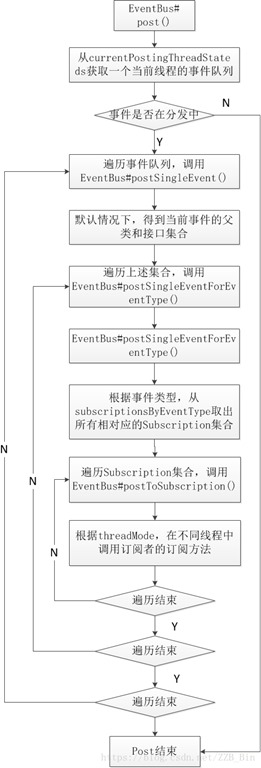
如何实现在不同线程中执行回调函数?
a)从订阅信息中获取订阅函数回调线程。
b) 在指定线程中回调订阅函数。
分发消息过程
不同的的消息分发器在EventBus构造的时候初始化,下面看一下AsyncPoster的源码如下:
class AsyncPoster implements Runnable {

    private final PendingPostQueue queue;
    private final EventBus eventBus;

    AsyncPoster(EventBus eventBus) {
        this.eventBus = eventBus;
        queue = new PendingPostQueue();
    }

    public void enqueue(Subscription subscription, Object event) {
        PendingPost pendingPost = PendingPost.obtainPendingPost(subscription, event);
        queue.enqueue(pendingPost);
        eventBus.getExecutorService().execute(this);
    }

    @Override
    public void run() {
        PendingPost pendingPost = queue.poll();
        if(pendingPost == null) {
            throw new IllegalStateException("No pending post available");
        }
        eventBus.invokeSubscriber(pendingPost);
    }

}
AsyncPoster分发器继承自Runable,核心是通过自定义的阻塞队列维护消息,然后在EventBus定义的线程池中执行runable接口中的代码。
EventBus中还定义了BackgroundPoster/HandlerPoster这里不赘述。
3.3 物理类图
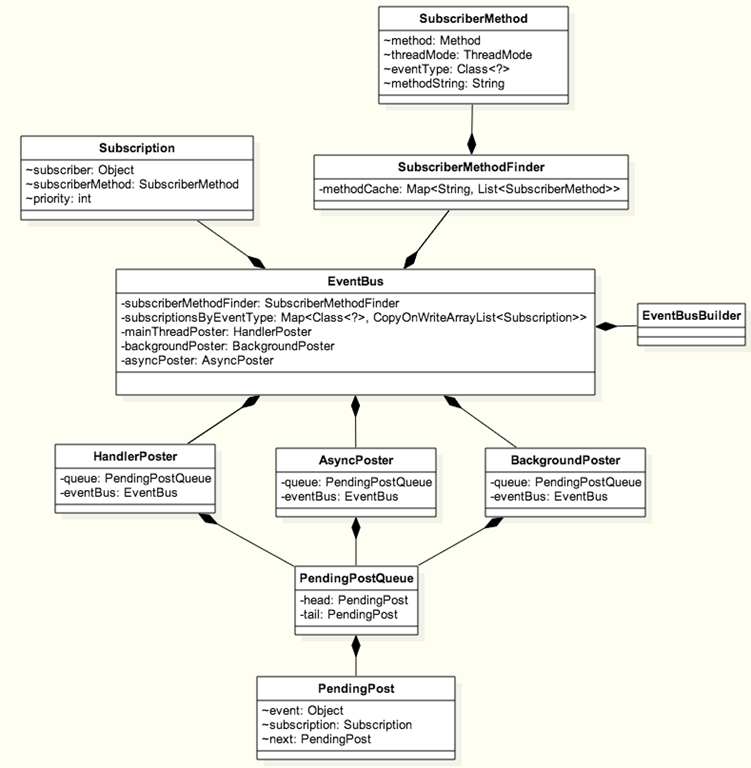
其它细节:
上述分析只是讲解了EventBus大概原理,并没有细细分析。如,代码中很多考虑了并发,事件优先级等
梦想不是浮躁,而是沉淀和积累