步骤1:配置客户端
步骤2:先运行,看到效果,再学习
步骤3:模仿和排错
步骤4:pom.xml
步骤5:bootstrap.yml
步骤6:application.yml
步骤7:ProductController.java
步骤8:products.html
步骤9:启动
步骤10:刷新
步骤 1 : 配置客户端
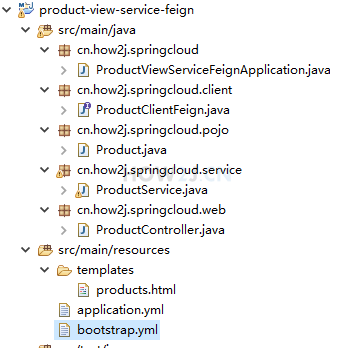
接下来我们把现成的 视图微服务-Feign 改造成配置客户端,使得其可以从配置服务器上获取版本信息。
步骤 2 : 先运行,看到效果,再学习
老规矩,先下载下载区(点击进入)的可运行项目,配置运行起来,确认可用之后,再学习做了哪些步骤以达到这样的效果。
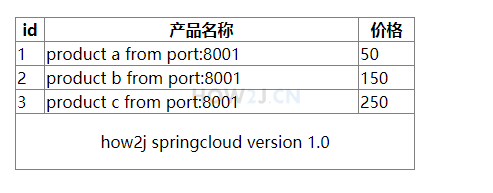
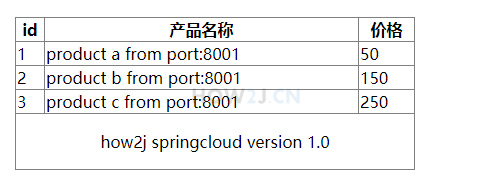
挨个启动 EurekaServerApplication, ConfigServerApplication, ProductDataServiceApplication, ProductViewServiceFeignApplication, 然后访问如下地址:
http://localhost:8012/products
可以看到版本信息: how2j springcloud version 1.0
注: 当然了,当你做的时候,这个版本号已经不是 1.0了,因为后续的功能,会持续增加这个版本号~

步骤 3 : 模仿和排错
在确保可运行项目能够正确无误地运行之后,再严格照着教程的步骤,对代码模仿一遍。
模仿过程难免代码有出入,导致无法得到期望的运行结果,此时此刻通过比较正确答案 ( 可运行项目 ) 和自己的代码,来定位问题所在。
采用这种方式,学习有效果,排错有效率,可以较为明显地提升学习速度,跨过学习路上的各个槛。
推荐使用diffmerge软件,进行文件夹比较。把你自己做的项目文件夹,和我的可运行项目文件夹进行比较。
这个软件很牛逼的,可以知道文件夹里哪两个文件不对,并且很明显地标记出来
这里提供了绿色安装和使用教程:diffmerge 下载和使用教程
步骤 4 : pom.xml
增加一个 spring-cloud-starter-config 用于访问配置服务器
|
<project xmlns="http://maven.apache.org/POM/4.0.0"xmlns:xsi="http://www.w3.org/2001/XMLSchema-instance"xsi:schemaLocation="http://maven.apache.org/POM/4.0.0 http://maven.apache.org/xsd/maven-4.0.0.xsd">
<modelVersion>4.0.0</modelVersion>
<parent>
<groupId>cn.how2j.springcloud</groupId>
<artifactId>springcloud</artifactId>
<version>0.0.1-SNAPSHOT</version>
</parent>
<artifactId>product-view-service-feign</artifactId>
<dependencies>
<dependency>
<groupId>org.springframework.cloud</groupId>
<artifactId>spring-cloud-starter-netflix-eureka-client</artifactId>
</dependency>
<dependency>
<groupId>org.springframework.cloud</groupId>
<artifactId>spring-cloud-starter-openfeign</artifactId>
</dependency>
<dependency>
<groupId>org.springframework.boot</groupId>
<artifactId>spring-boot-starter-web</artifactId>
</dependency>
<dependency>
<groupId>org.springframework.boot</groupId>
<artifactId>spring-boot-starter-thymeleaf</artifactId>
</dependency>
<dependency>
<groupId>org.springframework.cloud</groupId>
<artifactId>spring-cloud-starter-zipkin</artifactId>
</dependency>
<dependency>
<groupId>org.springframework.cloud</groupId>
<artifactId>spring-cloud-starter-config</artifactId>
</dependency>
</dependencies>
</project>
|
步骤 5 : bootstrap.yml
作为配置客户端,比较。。。特别~ 它需要在 bootstrap.yml 里配置 config-server 的信息,而不是像以前那样在 application.yml 里进行配置。
bootstrap.yml 和 application.yml 的区别,简单说就是前者先启动,并且一些系统方面的配置需要在 bootstrap.yml 里进行配置。 更多关于他们的区别,请自行百度。
在 bootstrap.yml 里配置提供了 serviceId: config-server, 这个是配置服务器在 eureka server 里的服务名称,这样就可以定位 config-server了。

|
spring:
cloud:
config:
label: master
profile: dev
discovery:
enabled: true
serviceId: config-server
client:
serviceUrl:
defaultZone: http://localhost:8761/eureka/
|
步骤 6 : application.yml
这个没什么变化,就是把 eureka 地址信息移动到了 bootstrap.yml 里。
|
spring:
application:
name: product-view-service-feign
thymeleaf:
cache: false
prefix: classpath:/templates/
suffix: .html
encoding: UTF-8
content-type: text/html
mode: HTML5
zipkin:
base-url: http://localhost:9411
|
步骤 7 : ProductController.java
增加这个属性,就可以从 config-server 去获取 version 信息了。
|
@Value("${version}")
String version;
|
然后把这个放在 Model里
|
m.addAttribute("version", version);
|
|
package cn.how2j.springcloud.web;
import java.util.List;
import org.springframework.beans.factory.annotation.Autowired;
import org.springframework.beans.factory.annotation.Value;
import org.springframework.cloud.context.config.annotation.RefreshScope;
import org.springframework.stereotype.Controller;
import org.springframework.ui.Model;
import org.springframework.web.bind.annotation.RequestMapping;
import cn.how2j.springcloud.pojo.Product;
import cn.how2j.springcloud.service.ProductService;
@Controller
@RefreshScope
public class ProductController {
@Autowired ProductService productService;
@Value("${version}")
String version;
@RequestMapping("/products")
public Object products(Model m) {
List<Product> ps = productService.listProducts();
m.addAttribute("version", version);
m.addAttribute("ps", ps);
return "products";
}
}
|
步骤 8 : products.html
显示出版本信息来
|
<!DOCTYPE HTML>
<html xmlns:th="http://www.thymeleaf.org">
<head>
<title>products</title>
<meta http-equiv="Content-Type" content="text/html; charset=UTF-8" />
<style>
table {
border-collapse:collapse;
width:400px;
margin:20px auto;
}
td,th{
border:1px solid gray;
}
</style>
</head>
<body>
<div class="workingArea">
<table>
<thead>
<tr>
<th>id</th>
<th>产品名称</th>
<th>价格</th>
</tr>
</thead>
<tbody>
<tr th:each="p: ${ps}">
<td th:text="${p.id}"></td>
<td th:text="${p.name}"></td>
<td th:text="${p.price}"></td>
</tr>
</tbody>
<tr>
<td align="center" colspan="3">
<p th:text="${version}" >how2j springcloud version unknown</p>
</td>
</tr>
</table>
</div>
</body>
</html>
|
步骤 9 : 启动
挨个启动 EurekaServerApplication, ConfigServerApplication, ProductDataServiceApplication, ProductViewServiceFeignApplication, 然后访问如下地址:
http://localhost:8012/products
可以看到版本信息: how2j springcloud version 1.0

步骤 10 : 刷新
现在修改 版本信息:
https://github.com/how2j/springcloudConfig/blob/master/respo/product-view-service-feign-dev.properties
改成 version = how2j springcloud version 1.1,
然后刷新 http://localhost:8012/products 会发现。。。。它还是 1.0.。。。 那么要如何生效呢? 就必须重启 ConfigServerApplication 和 ProductViewServiceFeignApplication 才行了~
这就。。。未免有点 2 了吧~
所以接下来就要讲解如何通过 rabbitMQ 动态刷新啦
更多内容,点击了解: https://how2j.cn/k/springcloud/springcloud-config-client/2048.html