Django本身提供了一个分页的类,直接导入就可以使用,不过这个方法只能在Django里面使用。武sir在大家从头写了一个自定义分页的类。这个类的实现的方法和内容基本上可以作为模板在任何语言里面使用,只需要修改对应的语法即可。
pagenation.py
|
1
2
3
4
5
6
7
8
9
10
11
12
13
14
15
16
17
18
19
20
21
22
23
24
25
26
27
28
29
30
31
32
33
34
35
36
37
38
39
40
41
42
43
44
45
46
47
48
49
50
51
52
53
54
55
56
57
58
59
60
61
62
63
64
65
66
67
68
69
70
71
72
73
74
75
76
77
78
79
80
81
82
83
84
85
86
87
88
89
90
91
92
|
__author__ = 'Administrator'
from django.utils.safestring import mark_safe
#上一篇说了,这是为了XSS的自动保护机制,为了让前端模板识别我们传递的html或者js格式字符串,我们需要标记为安全class Page:
#构造函数,传入当前页,总共的行数,每一页的行数和显示多少页的数字 def __init__(self, current_page, data_count, per_page_count=10, pager_num=7):
self.current_page = current_page
self.data_count = data_count
self.per_page_count = per_page_count
self.pager_num = pager_num
#@property这个装饰器的作用是把方法当做属性来调用,比如调用obj.start()就变成了obj.start #返回每一页的起始行数 @property
def start(self):
return (self.current_page - 1) * self.per_page_count
#返回每一页的终止行数 @property
def end(self):
return self.current_page * self.per_page_count
#返回根据总的行数总共应该显示多少页 @property
def total_count(self):
v, y = divmod(self.data_count, self.per_page_count)
if y:
v += 1
return v
#返回最终的界面,参数接收url应该是啥样的,比如 user_list就是我们传入的基本的base,然后每一页后面加参数,比如http://127.0.0.1:8000/user_list/?p=4 def page_str(self, base_url):
page_list = []
#根据不同的条件,判断start_index和end_index的值,这两个值代表当前页面显示的初始页码和终止页码 if self.total_count < self.pager_num:
start_index = 1
end_index = self.total_count + 1
else:
if self.current_page <= (self.pager_num + 1) / 2:
start_index = 1
end_index = self.pager_num + 1
else:
start_index = self.current_page - (self.pager_num - 1) / 2
end_index = self.current_page + (self.pager_num + 1) / 2
if (self.current_page + (self.pager_num - 1) / 2) > self.total_count:
end_index = self.total_count + 1
start_index = self.total_count - self.pager_num + 1
#下面是显示的页码界面,上一页放在页码前面,下一页放在页码后面,每一个页码都是以a标签,指向对应的url if self.current_page == 1:
prev = '<a class="page" href="javascript:void(0);">上一页</a>'
else:
prev = '<a class="page" href="%s?p=%s">上一页</a>' % (base_url, self.current_page - 1,)
page_list.append(prev)
for i in range(int(start_index), int(end_index)):
if i == self.current_page:
temp = '<a class="page active" href="%s?p=%s">%s</a>' % (base_url, i, i)
else:
temp = '<a class="page" href="%s?p=%s">%s</a>' % (base_url, i, i)
page_list.append(temp)
if self.current_page == self.total_count:
nex = '<a class="page" href="javascript:void(0);">下一页</a>'
else:
nex = '<a class="page" href="%s?p=%s">下一页</a>' % (base_url, self.current_page + 1,)
page_list.append(nex)
#这个是一个输入框,可以直接跳转到对应的页码,这里直接写Javascript了,当然这个东西放在前端写也是可以的 jump = """
<input type='text' class='go' /><a class='page' οnclick='jumpTo(this, "%s?p=");'>GO</a>
<script>
function jumpTo(ths,base){
var val = ths.previousSibling.value;
if (val){
location.href = base + val;
}
else{
loction.href='#'
}
}
</script>
""" % (base_url,)
page_list.append(jump)
page_str = mark_safe("".join(page_list))
return page_str
|
上面的类写好了,那么就实例化和调用了
views.py里面导入自定义的类
|
1
2
3
4
5
6
7
8
9
10
11
12
13
14
15
|
from utils import pagination
LIST = []
#初始化500个值测试for i in range(500):
LIST.append(i)
def user_list(request):
#Get方法获取p的值,如果没有就设置为1,然后转换为整数 current_page = request.GET.get('p', 1)
current_page = int(current_page)
#显示当前页的行数 page_obj=pagination.Page(current_page,len(LIST))
data = LIST[page_obj.start:page_obj.end]
#显示页码 page_str = page_obj.page_str("/user_list/")
return render(request, 'user_list.html', {'li': data,'page_str': page_str})
|
user_list.html, 直接获取结果,注意这设定了个style,根据active属性显示不同颜色,这个.page这个类其实是在后端调用的
|
1
2
3
4
5
6
7
8
9
10
11
12
13
14
15
16
17
18
19
20
21
22
23
24
25
26
27
28
29
30
31
32
33
34
35
36
37
38
39
40
41
42
43
44
45
46
47
48
|
<!DOCTYPE html><html lang="en">
<head>
<meta charset="UTF-8">
<title></title>
<style>
.go{
width:20px;
border: solid 1px;
color: #66512c;
display: inline-block;
padding: 5px;
}
.pagination .page{
border: solid 1px;
color: #66512c;
display: inline-block;
padding: 5px;
background-color: papayawhip;
margin: 5px;
}
.pagination .page.active{
background-color: brown;
color: white;
}
</style>
</head>
<body>
<ul>
{% for item in li %}
{% include 'li.html' %}
{% endfor %}
</ul>
<div class="pagination">
{{ page_str }}
</div>
<script src="/static/jquery-1.12.4.js"></script>
<script src="/static/jquery.cookie.js"></script>
</body>
</html>
|
最后的效果
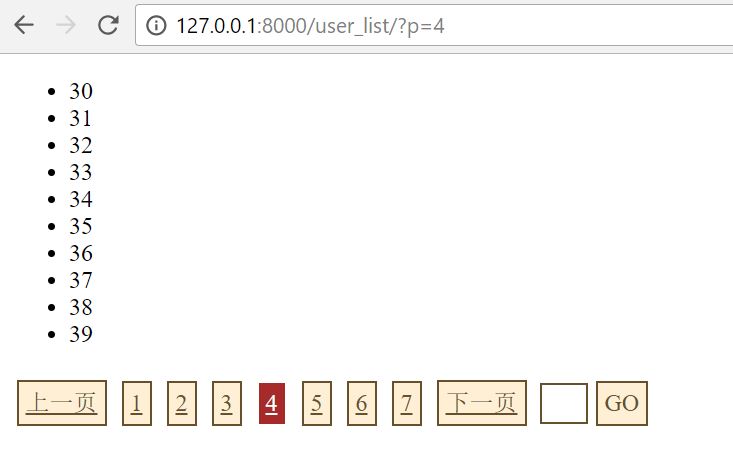
本文转自 beanxyz 51CTO博客,原文链接:http://blog.51cto.com/beanxyz/1956006,如需转载请自行联系原作者