环境介绍
System: CentOS7.2 x86_64
hostname: elk-server.huangming.org
IP Address: 10.0.6.42、10.17.83.42
本篇的ELK环境为单机部署方式,即将ELK所有的软件包都安装在一台服务器上,配置如下:
CPU: 4c
Mem: 8G
Disk: 50
一、Elasticsearch安装
1、安装jdk 1.8及以上的版本(安装过程略)
[[email protected] elk]# java -version
java version "1.8.0_65"
Java(TM) SE Runtime Environment (build 1.8.0_65-b17)
Java HotSpot(TM) 64-Bit Server VM (build 25.65-b01, mixed mode)
2、下载Elasticsearch最新版本(目前5.5版本)
使用curl命令下载tar包
# curl -L -O https://artifacts.elastic.co/downloads/elasticsearch/elasticsearch-5.5.2.tar.gz
也可以使用wget命令下载
# wget https://artifacts.elastic.co/downloads/elasticsearch/elasticsearch-5.5.2.tar.gz
3、解压至指定目录(安装目录)/usr/local/下,并将其重命名为elasticsearch (完整的目录应该为/usr/local/elasticsearch)
# tar -zxf elasticsearch-5.5.2.tar.gz -C /usr/local/
# cd /usr/local/
# mv elasticsearch-5.5.2 elasticsearch
2、创建一个用于运行elasticsearch的普通用户,随后修改elasticsearch家目录的所属权限为该用户;创建elasticsearch数据存储目录/data/elasticsearch
# groupadd elasticsearch
# useradd -g elasticsearch elasticsearch -m
# chown -R elasticsearch. /usr/local/elasticsearch
# mkdir /data/elasticsearch
# chown -R elasticsearch. /data/elasticsearch
2、修改elasticsearch.yml配置文件
# vim config/elasticsearch.yml
cluster.name: my-application        #ELK集群名称
path.data: /data/elasticsearch      #elasticsearch 数据存储目录
path.logs: /usr/local/elasticsearch/logs   #elasticsearch 日志存储路径
network.host: 10.17.83.42           #elasticsearch 监听地址,默认为localhost
http.port: 9200                     #elasticsearch 监听端口,默认问9200
6、修改相关的内核参数
# 打开/etc/security/limits.conf文件,添加以下参数
*        soft    nproc           2048
*        hard    nproc           16384
*        soft    nofile          65536
*        hard    nofile          65536
# 修改vm.max_map_count=262144
# echo "vm.max_map_count=262144" >> /etc/sysctl.conf
7、运行elasticsearch (注意:要切换到普通用户运行)
# su - elasticsearch
$ ./bin/elasticsearch
运行elasticsearch
[[email protected] ~]$ cd /usr/local/elasticsearch/
[[email protected] elasticsearch]$ ./bin/elasticsearch
[2017-08-28T14:51:31,069][INFO ][o.e.n.Node               ] [] initializing ...
[2017-08-28T14:51:31,186][INFO ][o.e.e.NodeEnvironment    ] [6eN59Pf] using [1] data paths, mounts [[/ (rootfs)]], net usable_space [89.4gb], net total_space [91.4gb], spins? [unknown], types [rootfs]
[2017-08-28T14:51:31,187][INFO ][o.e.e.NodeEnvironment    ] [6eN59Pf] heap size [1.9gb], compressed ordinary object pointers [true]
[2017-08-28T14:51:31,188][INFO ][o.e.n.Node               ] node name [6eN59Pf] derived from node ID [6eN59PfuS7iVRfoEppsngg]; set [node.name] to override
[2017-08-28T14:51:31,189][INFO ][o.e.n.Node               ] version[5.5.2], pid[2759], build[b2f0c09/2017-08-14T12:33:14.154Z], OS[Linux/3.10.0-327.el7.x86_64/amd64], JVM[Oracle Corporation/Java HotSpot(TM) 64-Bit Server VM/1.8.0_65/25.65-b01]
[2017-08-28T14:51:31,189][INFO ][o.e.n.Node               ] JVM arguments [-Xms2g, -Xmx2g, -XX:+UseConcMarkSweepGC, -XX:CMSInitiatingOccupancyFraction=75, -XX:+UseCMSInitiatingOccupancyOnly, -XX:+AlwaysPreTouch, -Xss1m, -Djava.awt.headless=true, -Dfile.encoding=UTF-8, -Djna.nosys=true, -Djdk.io.permissionsUseCanonicalPath=true, -Dio.netty.noUnsafe=true, -Dio.netty.noKeySetOptimization=true, -Dio.netty.recycler.maxCapacityPerThread=0, -Dlog4j.shutdownHookEnabled=false, -Dlog4j2.disable.jmx=true, -Dlog4j.skipJansi=true, -XX:+HeapDumpOnOutOfMemoryError, -Des.path.home=/usr/local/elasticsearch]
[2017-08-28T14:51:32,174][INFO ][o.e.p.PluginsService     ] [6eN59Pf] loaded module [aggs-matrix-stats]
[2017-08-28T14:51:32,174][INFO ][o.e.p.PluginsService     ] [6eN59Pf] loaded module [ingest-common]
[2017-08-28T14:51:32,175][INFO ][o.e.p.PluginsService     ] [6eN59Pf] loaded module [lang-expression]
[2017-08-28T14:51:32,175][INFO ][o.e.p.PluginsService     ] [6eN59Pf] loaded module [lang-groovy]
[2017-08-28T14:51:32,175][INFO ][o.e.p.PluginsService     ] [6eN59Pf] loaded module [lang-mustache]
[2017-08-28T14:51:32,175][INFO ][o.e.p.PluginsService     ] [6eN59Pf] loaded module [lang-painless]
[2017-08-28T14:51:32,175][INFO ][o.e.p.PluginsService     ] [6eN59Pf] loaded module [parent-join]
[2017-08-28T14:51:32,175][INFO ][o.e.p.PluginsService     ] [6eN59Pf] loaded module [percolator]
[2017-08-28T14:51:32,175][INFO ][o.e.p.PluginsService     ] [6eN59Pf] loaded module [reindex]
[2017-08-28T14:51:32,176][INFO ][o.e.p.PluginsService     ] [6eN59Pf] loaded module [transport-netty3]
[2017-08-28T14:51:32,176][INFO ][o.e.p.PluginsService     ] [6eN59Pf] loaded module [transport-netty4]
[2017-08-28T14:51:32,176][INFO ][o.e.p.PluginsService     ] [6eN59Pf] no plugins loaded
[2017-08-28T14:51:33,991][INFO ][o.e.d.DiscoveryModule    ] [6eN59Pf] using discovery type [zen]
[2017-08-28T14:51:34,576][INFO ][o.e.n.Node               ] initialized
[2017-08-28T14:51:34,577][INFO ][o.e.n.Node               ] [6eN59Pf] starting ...
[2017-08-28T14:51:34,814][INFO ][o.e.t.TransportService   ] [6eN59Pf] publish_address {10.17.83.42:9300}, bound_addresses {10.17.83.42:9300}
[2017-08-28T14:51:34,826][INFO ][o.e.b.BootstrapChecks    ] [6eN59Pf] bound or publishing to a non-loopback or non-link-local address, enforcing bootstrap checks
[2017-08-28T14:51:37,883][INFO ][o.e.c.s.ClusterService   ] [6eN59Pf] new_master {6eN59Pf}{6eN59PfuS7iVRfoEppsngg}{hs82h4vkTwKCEvKybCodbw}{10.17.83.42}{10.17.83.42:9300}, reason: zen-disco-elected-as-master ([0] nodes joined)
[2017-08-28T14:51:37,900][INFO ][o.e.h.n.Netty4HttpServerTransport] [6eN59Pf] publish_address {10.17.83.42:9200}, bound_addresses {10.17.83.42:9200}
[2017-08-28T14:51:37,900][INFO ][o.e.n.Node               ] [6eN59Pf] started
[2017-08-28T14:51:37,925][INFO ][o.e.g.GatewayService     ] [6eN59Pf] recovered [0] indices into cluster_state
[2017-08-28T14:51:43,485][INFO ][o.e.c.m.MetaDataCreateIndexService] [6eN59Pf] [.kibana] creating index, cause [api], templates [], shards [1]/[1], mappings [_default_, index-pattern, server, visualization, search, timelion-sheet, config, dashboard, url]
一般情况我们要求elasticsearch在后台运行,使用命令如下:
$ ./bin/elasticsearch -d
8、检查elasticsearch状态,如下则表示正常运行
[[email protected] elasticsearch]# curl http://10.17.83.42:9200
{
  "name" : "6eN59Pf",
  "cluster_name" : "my-application",
  "cluster_uuid" : "cKopwE1iTciIQAiFI6d8Gw",
  "version" : {
    "number" : "5.5.2",
    "build_hash" : "b2f0c09",
    "build_date" : "2017-08-14T12:33:14.154Z",
    "build_snapshot" : false,
    "lucene_version" : "6.6.0"
  },
  "tagline" : "You Know, for Search"
}
二、Logstash安装
1、下载logstash软件包
# wget https://artifacts.elastic.co/downloads/logstash/logstash-5.5.2.tar.gz
2、解压至指定安装目录
# tar -zxf logstash-5.5.2.tar.gz -C /usr/local/
# cd /usr/local/

# mv logstash-5.5.2 logstash
3、运行logstash
# cd logstash/
# ./bin/logstash -e 'input { stdin { } } output { stdout {} }'
输入”hello world! ”,验证是否正常输出
[[email protected] logstash]# ./bin/logstash -e 'input { stdin { } } output { stdout {} }'
ERROR StatusLogger No log4j2 configuration file found. Using default configuration: logging only errors to the console.
Sending Logstash's logs to /usr/local/logstash/logs which is now configured via log4j2.properties
[2017-08-28T15:11:33,267][INFO ][logstash.setting.writabledirectory] Creating directory {:setting=>"path.queue", :path=>"/usr/local/logstash/data/queue"}
[2017-08-28T15:11:33,273][INFO ][logstash.setting.writabledirectory] Creating directory {:setting=>"path.dead_letter_queue", :path=>"/usr/local/logstash/data/dead_letter_queue"}
[2017-08-28T15:11:33,300][INFO ][logstash.agent           ] No persistent UUID file found. Generating new UUID {:uuid=>"2fb479ab-0ca5-4979-89b1-4246df9a7472", :path=>"/usr/local/logstash/data/uuid"}
[2017-08-28T15:11:33,438][INFO ][logstash.pipeline        ] Starting pipeline {"id"=>"main", "pipeline.workers"=>8, "pipeline.batch.size"=>125, "pipeline.batch.delay"=>5, "pipeline.max_inflight"=>1000}
[2017-08-28T15:11:33,455][INFO ][logstash.pipeline        ] Pipeline main started
The stdin plugin is now waiting for input:
[2017-08-28T15:11:33,497][INFO ][logstash.agent           ] Successfully started Logstash API endpoint {:port=>9600}
hello world!
2017-08-28T07:11:42.724Z elk-server.huangming.org hello world!
三、Kibana安装
1、下载kibana
# wget https://artifacts.elastic.co/downloads/kibana/kibana-5.5.2-linux-x86_64.tar.gz
2、解压至安装目录
# tar -zxf kibana-5.5.2-linux-x86_64.tar.gz -C /usr/local/
# cd /usr/local/
# mv kibana-5.5.2-linux-x86_64 kibana
3、修改配置
# cd kibana/

# vim config/kibana.yml

server.port: 5601            # 监听端口
server.host: "10.17.83.42"   # 指定后端服务器
elasticsearch.url: "http://10.17.83.42:9200"  # 指定elasticsearch实例地址
4、运行kibana
# ./bin/kibana &
[[email protected] kibana]# ./bin/kibana &
[1] 3219
[[email protected] kibana]#   log   [07:26:02.496] [info][status][plugin:[email protected]] Status changed from uninitialized to green - Ready
  log   [07:26:02.604] [info][status][plugin:[email protected]] Status changed from uninitialized to yellow - Waiting for Elasticsearch
  log   [07:26:02.637] [info][status][plugin:[email protected]] Status changed from uninitialized to green - Ready
  log   [07:26:02.682] [info][status][plugin:[email protected]] Status changed from uninitialized to green - Ready
  log   [07:26:02.930] [info][status][plugin:[email protected]] Status changed from yellow to green - Kibana index ready
  log   [07:26:02.932] [info][status][plugin:[email protected]] Status changed from uninitialized to green - Ready
  log   [07:26:02.937] [info][listening] Server running at http://10.17.83.42:5601
  log   [07:26:02.939] [info][status][ui settings] Status changed from uninitialized to green - Ready
5、验证kibana
在客户端浏览器打开http://10.17.83.42:5601
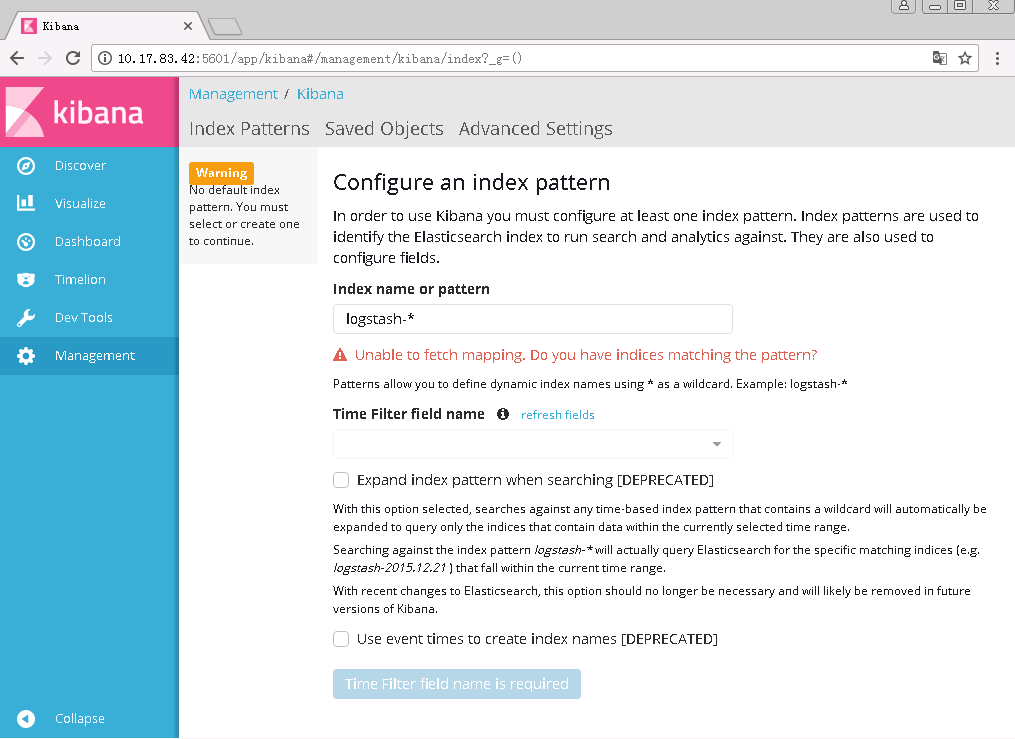
在该页面提示我们需要创建一个index
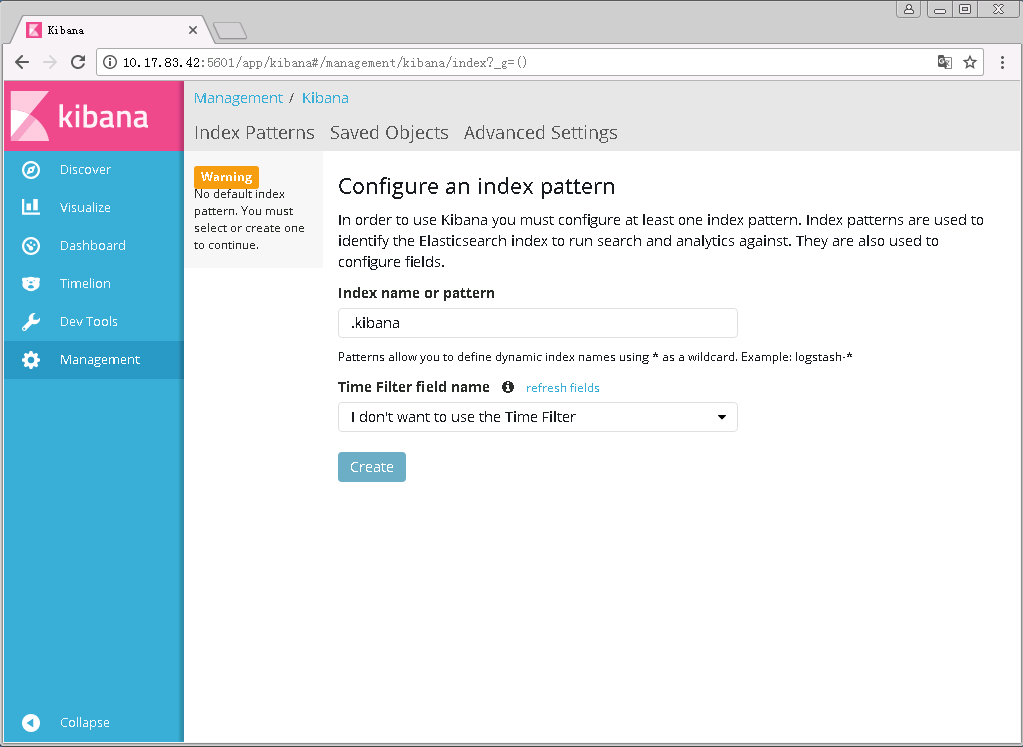
首先创建一个kinana默认的index(名称为.kibana),如果输入的index名不存在,则无法创建
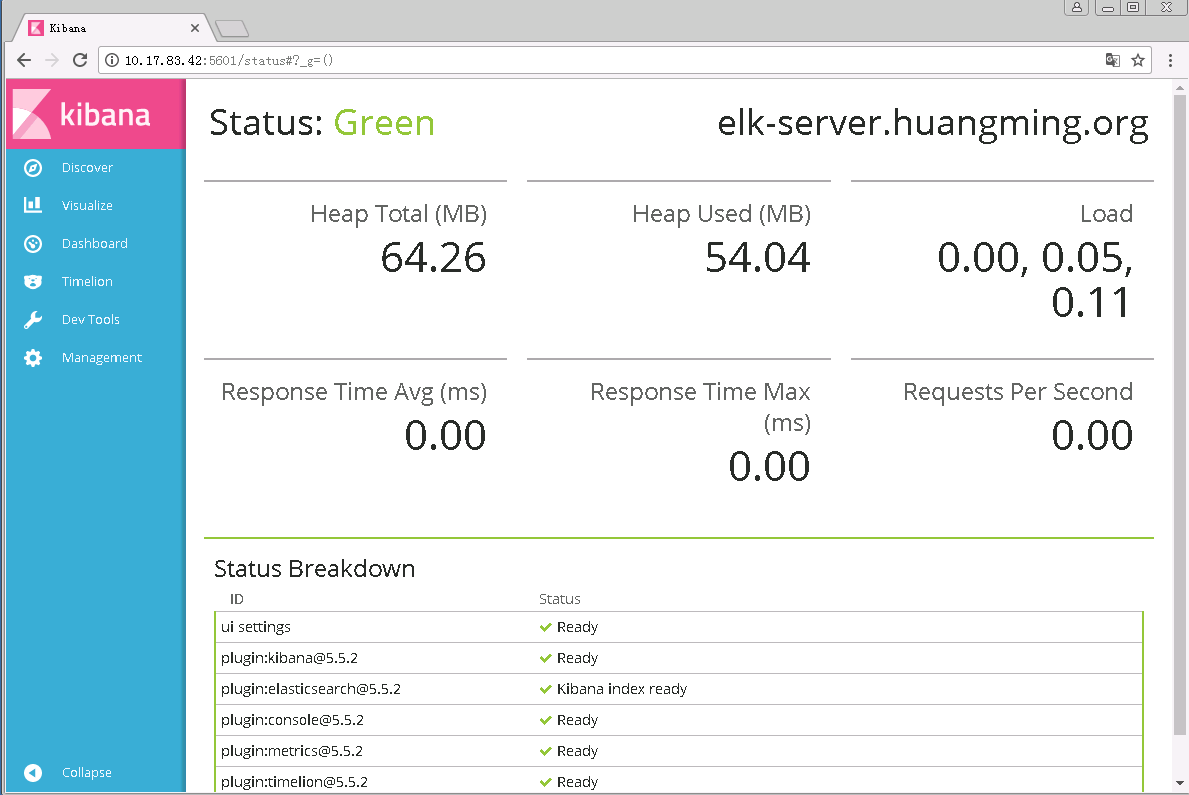
查看运行状态及已安装的插件
至此ELK已经搭建完成了,下面来创建一个收集message系统日志的实例
四、收集syslog日志
1、创建配置文件
# cd logstash/
# vim config/logstash.conf
input {
    file {
        path => ["/var/log/messages"]
        type => "syslog"
    }
}

filter {
    grok {
        match => [ "message", "%{SYSLOGBASE} %{GREEDYDATA:content}" ]
    }
}

output {
    elasticsearch {
        hosts => ["10.17.83.42:9200"]
        index => "syslog-%{+YYY.MM.dd}"
    }
    stdout { codec => rubydebug }
}
其中match => [ "message", "%{SYSLOGBASE} %{GREEDYDATA:content}" ]这一行也可以具体写成如下:
match => [ "message", "%{SYSLOGTIMESTAMP:timestamp} (?:%{SYSLOGFACILITY} )?%{SYSLOGHOST:logsource} %{SYSLOGPROG}: %{GREEDYDATA:content}" ]
参考官方文档logstash配置:
https://www.elastic.co/guide/en/logstash/current/plugins-filters-grok.html
2、指定配置文件运行logstash
# ./bin/logstash -f ./config/logstash.conf &
[[email protected] logstash]# ./bin/logstash -f ./config/logstash.conf &
[1] 4479
[[email protected] logstash]# ERROR StatusLogger No log4j2 configuration file found. Using default configuration: logging only errors to the console.
Sending Logstash's logs to /usr/local/logstash/logs which is now configured via log4j2.properties
[2017-08-28T16:29:05,950][INFO ][logstash.outputs.elasticsearch] Elasticsearch pool URLs updated {:changes=>{:removed=>[], :added=>[http://10.17.83.42:9200/]}}
[2017-08-28T16:29:05,955][INFO ][logstash.outputs.elasticsearch] Running health check to see if an Elasticsearch connection is working {:healthcheck_url=>http://10.17.83.42:9200/, :path=>"/"}
[2017-08-28T16:29:06,059][WARN ][logstash.outputs.elasticsearch] Restored connection to ES instance {:url=>"http://10.17.83.42:9200/"}
[2017-08-28T16:29:06,060][INFO ][logstash.outputs.elasticsearch] Using mapping template from {:path=>nil}
[2017-08-28T16:29:06,110][INFO ][logstash.outputs.elasticsearch] Attempting to install template {:manage_template=>{"template"=>"logstash-*", "version"=>50001, "settings"=>{"index.refresh_interval"=>"5s"}, "mappings"=>{"_default_"=>{"_all"=>{"enabled"=>true, "norms"=>false}, "dynamic_templates"=>[{"message_field"=>{"path_match"=>"message", "match_mapping_type"=>"string", "mapping"=>{"type"=>"text", "norms"=>false}}}, {"string_fields"=>{"match"=>"*", "match_mapping_type"=>"string", "mapping"=>{"type"=>"text", "norms"=>false, "fields"=>{"keyword"=>{"type"=>"keyword", "ignore_above"=>256}}}}}], "properties"=>{"@timestamp"=>{"type"=>"date", "include_in_all"=>false}, "@version"=>{"type"=>"keyword", "include_in_all"=>false}, "geoip"=>{"dynamic"=>true, "properties"=>{"ip"=>{"type"=>"ip"}, "location"=>{"type"=>"geo_point"}, "latitude"=>{"type"=>"half_float"}, "longitude"=>{"type"=>"half_float"}}}}}}}}
[2017-08-28T16:29:06,117][INFO ][logstash.outputs.elasticsearch] New Elasticsearch output {:class=>"LogStash::Outputs::ElasticSearch", :hosts=>["//10.17.83.42:9200"]}
[2017-08-28T16:29:06,187][INFO ][logstash.pipeline        ] Starting pipeline {"id"=>"main", "pipeline.workers"=>8, "pipeline.batch.size"=>125, "pipeline.batch.delay"=>5, "pipeline.max_inflight"=>1000}
[2017-08-28T16:29:06,343][INFO ][logstash.pipeline        ] Pipeline main started
[2017-08-28T16:29:06,380][INFO ][logstash.agent           ] Successfully started Logstash API endpoint {:port=>9600}
3、登录kibana页面
点击Management --> Index Patterns --> Create index
在Index name or pattern处输入在logstash中指定的index,后面的日期直接用*号代替即可
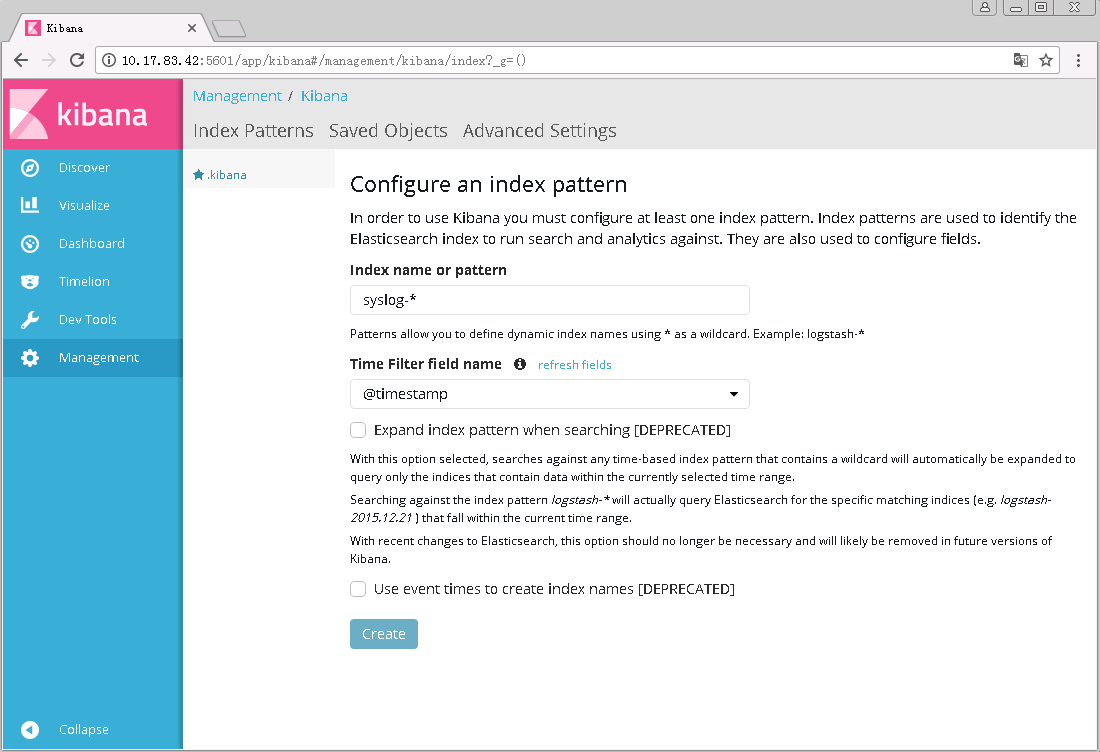
创建完成之后进入Discover页面

4、验证是否正常收集syslog日志,执行以下命令手动生成日志
[[email protected] kibana]# logger "helloooooooo22"
[[email protected] kibana]# yum install httpd
查看源日志文件,最近生成的的日志
[[email protected] ~]# tail -f -n 10 /var/log/messages
Aug 28 16:46:15 elk-server root: helloooooooo33
Aug 28 16:47:17 elk-server yum[5048]: Installed: apr-1.4.8-3.el7.x86_64
Aug 28 16:47:17 elk-server yum[5048]: Installed: apr-util-1.5.2-6.el7.x86_64
Aug 28 16:47:18 elk-server yum[5048]: Installed: httpd-tools-2.4.6-45.el7.centos.4.x86_64
Aug 28 16:47:18 elk-server yum[5048]: Installed: mailcap-2.1.41-2.el7.noarch
Aug 28 16:47:19 elk-server systemd: Reloading.
Aug 28 16:47:19 elk-server systemd: Configuration file /usr/lib/systemd/system/auditd.service is marked world-inaccessible. This has no effect as configuration data is accessible via APIs without restrictions. Proceeding anyway.
Aug 28 16:47:19 elk-server systemd: Configuration file /usr/lib/systemd/system/ebtables.service is marked executable. Please remove executable permission bits. Proceeding anyway.
Aug 28 16:47:19 elk-server systemd: Configuration file /usr/lib/systemd/system/wpa_supplicant.service is marked executable. Please remove executable permission bits. Proceeding anyway.
Aug 28 16:47:19 elk-server yum[5048]: Installed: httpd-2.4.6-45.el7.centos.4.x86_64
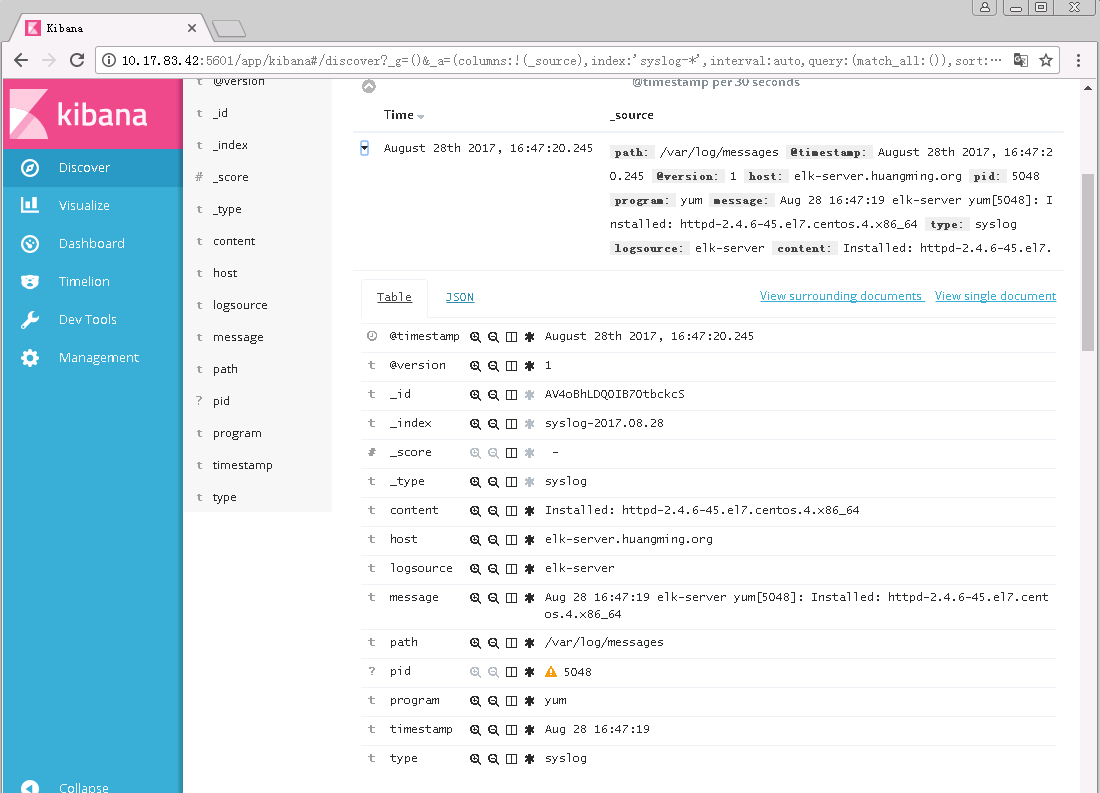
5、回到Kibana管理页面,重新刷新页面,可以看到新的日志已经展示出来了

展开最近的一条日志
转载于:https://blog.51cto.com/7424593/1960254