intellij idea查看scala sdk的源代码

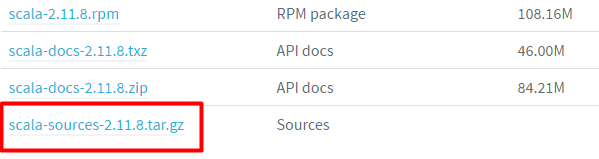
下载源代码

  1. 点击这个链接:http://www.scala-lang.org/download/all.html
  2. 选择需要的版本点击打开;
  3. 在新打开的网页下方找到源代码下载项:

Library sources not found for scala-library in Intellij

在intellij idea设置指向源代码

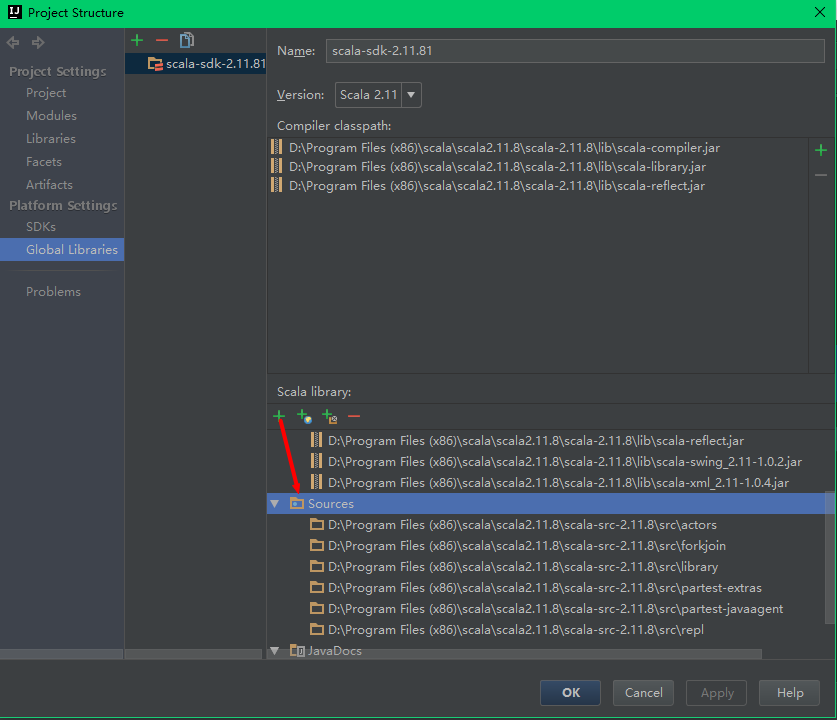
  1. 在intellij中打开File –> Project Structure,快捷键(Ctrl + Alt + Shift + s);
  2. 选择Global Libraries –> 目标SDK;
  3. 在右侧面板中的Scala Library下方点击“+”按钮;
  4. 选择解压后的源码包的src目录;
  5. apply即可。

看个截图好了:

Library sources not found for scala-library in Intellij

相关文章:

  • 2022-12-23
  • 2021-10-26
  • 2022-12-23
  • 2021-04-21
  • 2021-10-15
  • 2021-05-17
猜你喜欢
  • 2021-06-06
  • 2021-12-25
  • 2022-02-22
  • 2022-12-23
  • 2021-05-02
  • 2021-08-27
  • 2022-12-23
相关资源
相似解决方案